60
MULTI V S System Installation Manual
Due to our policy of continuous product innovation, some specifications may change without notification.
©LG Electronics U.S.A., Inc., Englewood Cliffs, NJ. All rights reserved. “LG” is a registered trademark of LG Corp.
ON
OFF
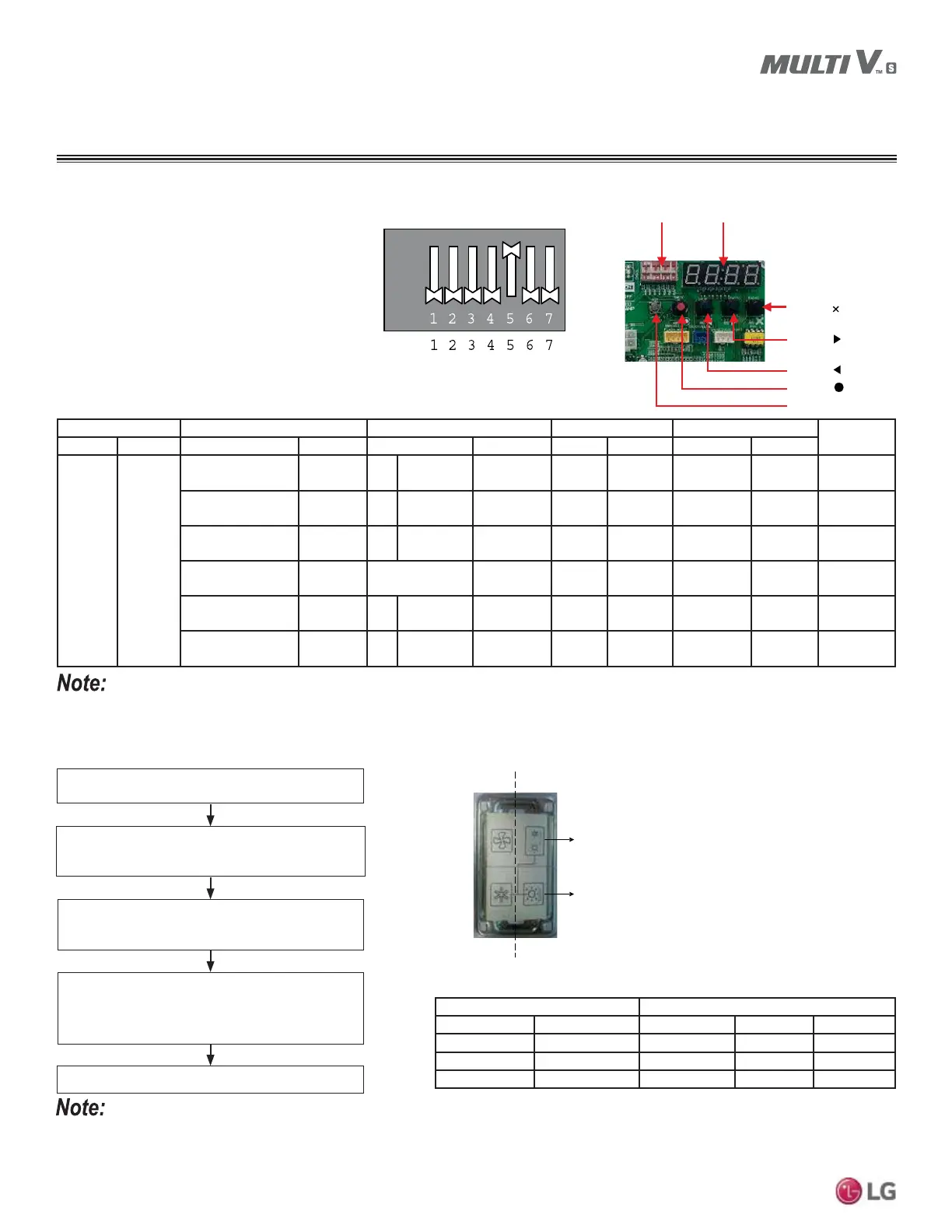
Figure 67: Outdoor Unit DIP Switch
SW01 Function Setting.
Setting the Functions
After No. 5 on DIP Switch SW01 is set to ON, select
the functions (mode, option, value, etc.) by using
WKHŹDQGŻEXWWRQV&KRRVHWKHSDUWLFXODUIXQFWLRQ
by pushing the
Ɣ button.
DIP-Switch SW01 LED
SW01C ( &RQ¿UP
SW02C (
%DFNZDUG
SW03C (
)RUZDUG
SW04C (
&DQFHO
6:'5HVHW
Figure 68: DIP Switch SW01 PCB Location.
Mode )XQFWLRQ Option 9DOXH Action
Notes
Content 'LVSOD\ Content 'LVSOD\ Content 'LVSOD\ Content 'LVSOD\ Implement 'LVSOD\
Installation
Func
Cool / Heat
Selector
Fn1 oFF op1 ~ op2
Selected the
Option
--
Change the
Set Value
Blank
Saved in
(3520
Static Pressure
Compensation
Fn2 oFF op1 ~ op3
Selected the
Option
--
Change the
Set Value
Blank
Saved in
(3520
Night Low Sound Fn3 oFF op1 ~ op12
Selected the
Option
--
Change the
Set Value
Blank
Saved in
(3520
Outdoor Unit
Address
Fn5 - - 0 ~ 255
Set the
Value
Change the
Set Value
Blank
Saved in
(3520
Snow Removal and
Rapid Defrost
Fn6 oFF op1 ~ op3
Selected the
Option
--
Change the
Set Value
Blank
Saved in
(3520
Adjusting Target
Pressure
Fn8 oFF op1 ~ op3
Selected the
Option
--
Change the
Set Value
Blank
Saved in
(3520
• Function sets are saved in the EPROM even if system power is reset.
• 1RRQ',36ZLWFK6:FDQEH2))H[FHSWZKHQLQVWDOOLQJDV\VWHPWKDWKDVDOO*HQHUDWLRQVHULHVLQGRRUXQLWV$518
Table 38: Setting the Functions.
6HWWLQJWKH&RRO+HDW6HOHFWLRQ)XQFWLRQ
Switches )XQFWLRQ
Switch (Phase) Switch (Bottom) oFF RS0RGH RS0RGH
Right Left Not Operating Cooling Cooling
Right Right Not Operating Heating Heating
Left - Not Operating )DQ0RGH Off
• A trained technician must set the functions.
• If a function is not used, set it to off.
• Install the Cool / Heat Selector first if the other functions are to be used.
Switch (Phase)
Switch (Bottom)
Left Side
Right Side
Set Outdoor Unit PCB DIP Switch No. 5 to ON.
6HOHFWWKHPRGHXVLQJWKHŹDQGŻEXWWRQV
Choose “Func” by pushing the Ɣ button.
Cool / Heat Selection mode is set.
6HOHFWWKHIXQFWLRQXVLQJWKHŹDQGŻEXWWRQV
Choose “Fn1” by pushing the Ɣ button.
6HOHFWWKHRSWLRQXVLQJWKHŹDQGŻEXWWRQV
Choose “oFF,” “op1,” and “op2” by pushing the
Ɣ button.
Table 39: 'H¿QLWLRQRI&RRO+HDW6HOHFWLRQ)XQFWLRQ6HWWLQJV
Figure 69: Cool / Heat Selector.
WIRING
Setting the Functions



 To Next Page
 Loading...