Operating 11
Operating
2
Basic Operations
iPod/iPhone/iPad Operation
You can enjoy the sound from your iPod/iPhone/
iPad through this unit. For details about iPod/
iPhone/iPad, refer to the iPod/iPhone/iPad User
Guide.
y
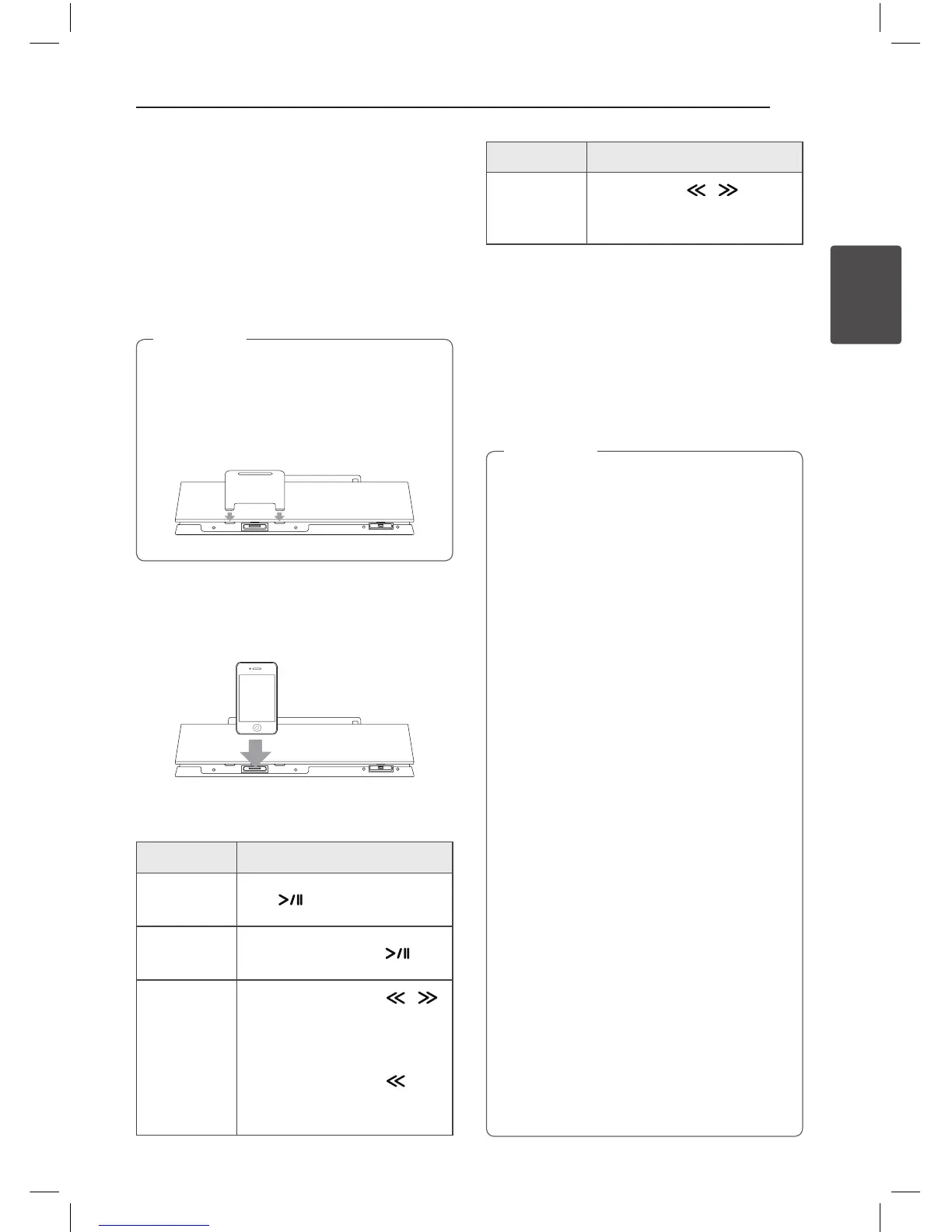
You are recommended to remove the case
for your iPod/iPhone/iPad before you place
your iPod/iPhone/iPad into the dock.
y
Install the supplied stand for iPad to keep
iPad stable before you place the iPad.
,
Note
1. Connect the iPod/iPhone/iPad firmly. When this
unit is connected to power, your iPod/iPhone/
iPad is automatically turned on and starts
recharging even in standby mode.
2. Press
P
FUNCTION or
P
to select IPOD
function.
To Do this
Play
Press
Pause
During playback, Press
Skip
During playback, press /
to go to the next le or to return
to the beginning of the current
le.
During playback, press twice
briey to step back to the
previous le.
To Do this
Search
Press and hold / during
playback and release it at the
point you want to listen to.
Compatible iPod/iPhone/iPad
The unit supports the models as follows ;
y
iPod touch 1G, 2G, 3G, 4G
y
iPod nano 2G, 3G, 4G, 5G, 6G
y
iPhone 3G / iPhone 3GS
y
iPhone 4 / iPhone 4S
y
iPad / iPad 2
y
When you disconnect your iPod/iPhone/
iPad during playback, the playback pauses.
y
When your iPod/iPhone/iPad is docked, you
cannot control the volume button of your
iPod/iPhone/iPad.
y
An error message “ERROR” appears when :
-
your iPod/iPhone/iPad is not connected
rmly.
-
this unit recognizes your iPod/iPhone/iPad
as an unknown device.
-
your iPod/iPhone/iPad is exceptionally low
in power.
/
The battery needs to be charged.
/
If you charge the battery while iPod/
iPhone/iPad is extremely low in power,
it may take longer to be charged.
y
You may not control your iPod/iPhone/iPad
from this unit due to malfunction of iPod/
iPhone/iPad.
y
Depending on your iPod/iPhone/iPad’s
software version, it may not be possible to
control your iPod/iPhone/iPad from this
unit. We recommend installing the latest
software version.
y
If you use an application, make a call, or send
and receive SMS text message, etc. on iPod
touch/iPhone/iPad, disconnect it from iPod/
iPhone/iPad dock of this unit and then use it.
y
If you have a problem with your iPod/
iPhone/iPad, please visit www.apple.com/
support.
y
iPod touch, iPhone and iPad have any
dierence in operation other than iPod.
You may need any additional control to use
them with this unit. (e.g. “slide to unlock”)
,
Note
ND5521-FC.BDEULLK_ENG.indd 11 12. 10. 10. �� 1:41



 To Next Page