Operating 13
Operating
2
y
You may not control your Android device
from this unit due to malfunction of Android
device.
y
Depending on your Android device’s
software version, it may not be possible
to control your Android device from this
unit. We recommend installing the latest
software version.
y
If you use an application, make a call, or
send and receive SMS text message, etc. on
Android device, disconnect it from Android
device dock of this unit and then use it.
,
Note
Listening to Music from Your
External Device
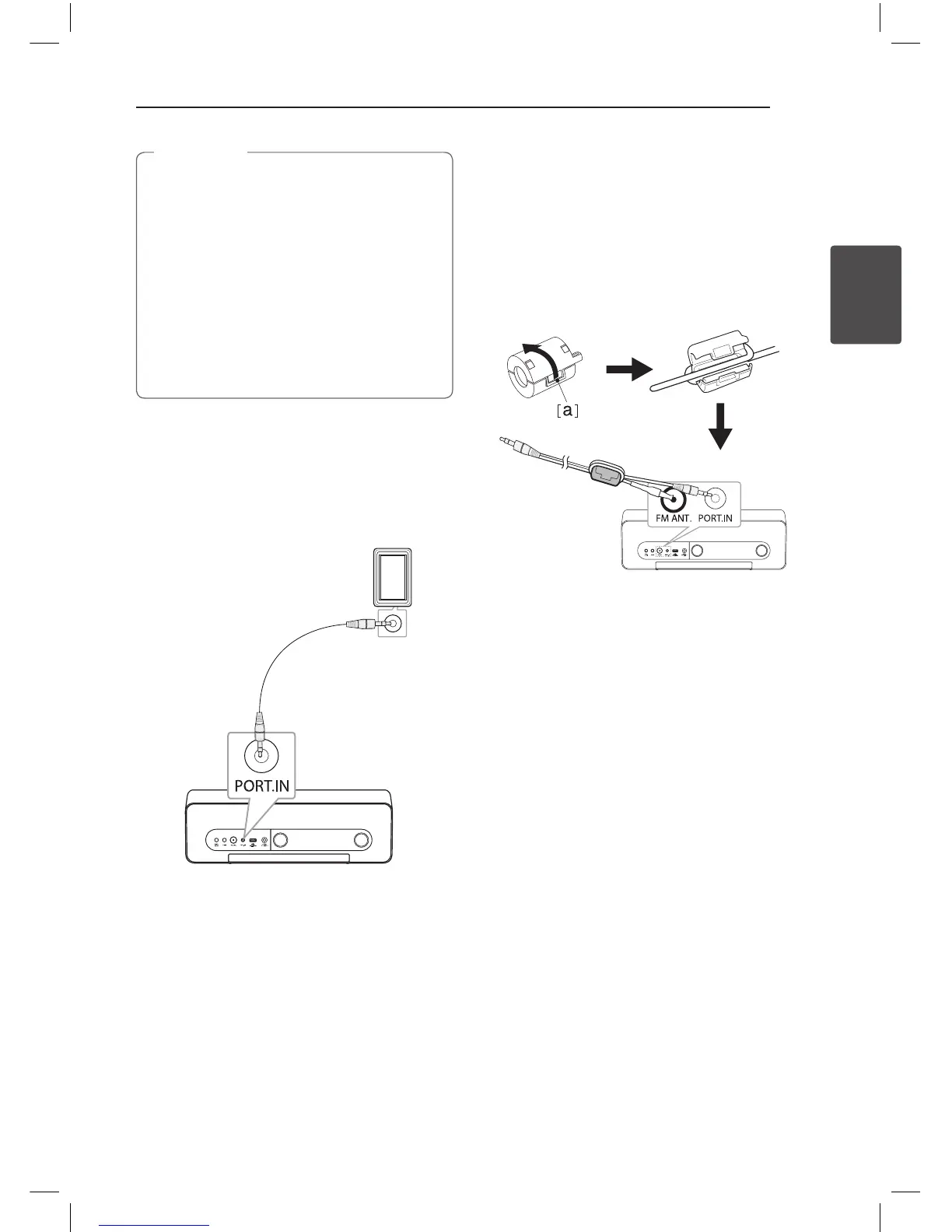
The unit can be used to play the music from many
types of external device. (Portable cable is not
supplied as an accessory with this unit.)
MP3 or PMP etc
1. Connect the external device to the PORT.IN
connector of the unit.
2. Turn the power on by pressing
1
.
3. Select the PORT (PORTABLE) function by
pressing
P
FUNCTION or
P
.
4. Turn the external device on and start playing it.
How to Affix the Ferrite Core
You must affix a core (supplied with the model you
purchased) in order to reduce or eliminate electrical
interference.
1. Pull the stopper [a] of the ferrite core to open.
2. Wind the portable cable and FM antenna
around the ferrite core once.
3. Close the ferrite core until it clicks.
ND5521-FC.BDEULLK_ENG.indd 13 12. 10. 10. �� 1:41



 To Next Page