15
CONNECTION
AND SETTING
Accessory
Accessory
Audio/V
Audio/V
ideo (A/V) Connections to
ideo (A/V) Connections to
Recorder
Recorder
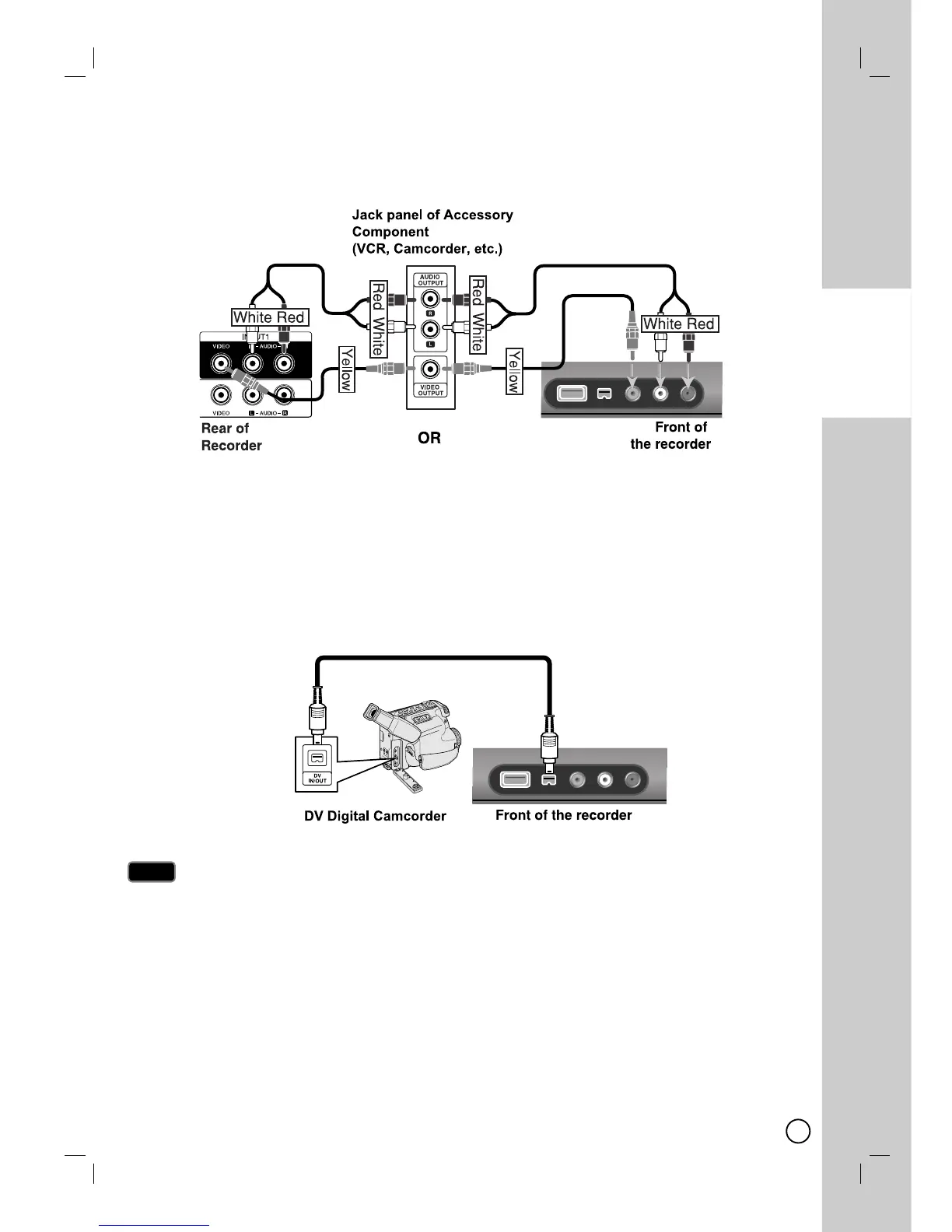
Connect the INPUT 1 or AV IN 2 jacks on the Recorder to the audio/video out jacks on your accessory component,
using the optional audio/video cables. (Refer to page 33 for [Recording from External Components].)
Connecting a Digital Camcorder
Connecting a Digital Camcorder
Use a DV cable (not supplied) to connect the DV in/out jack of your DV Digital Camcorder to the front panel DV IN
jack of this Recorder.
This jack is for connection to DV equipment only. It is not compatible with digital satellite tuners or D-VIDEO
video decks.
Disconnecting the DV cable while recording a contents of the connected digital camcorder may result in mal-
function.
Notes
Notes


 To Next Page
 Loading...