17
CONNECTION
AND SETTING
Initial Setup W
Initial Setup W
izard
izard
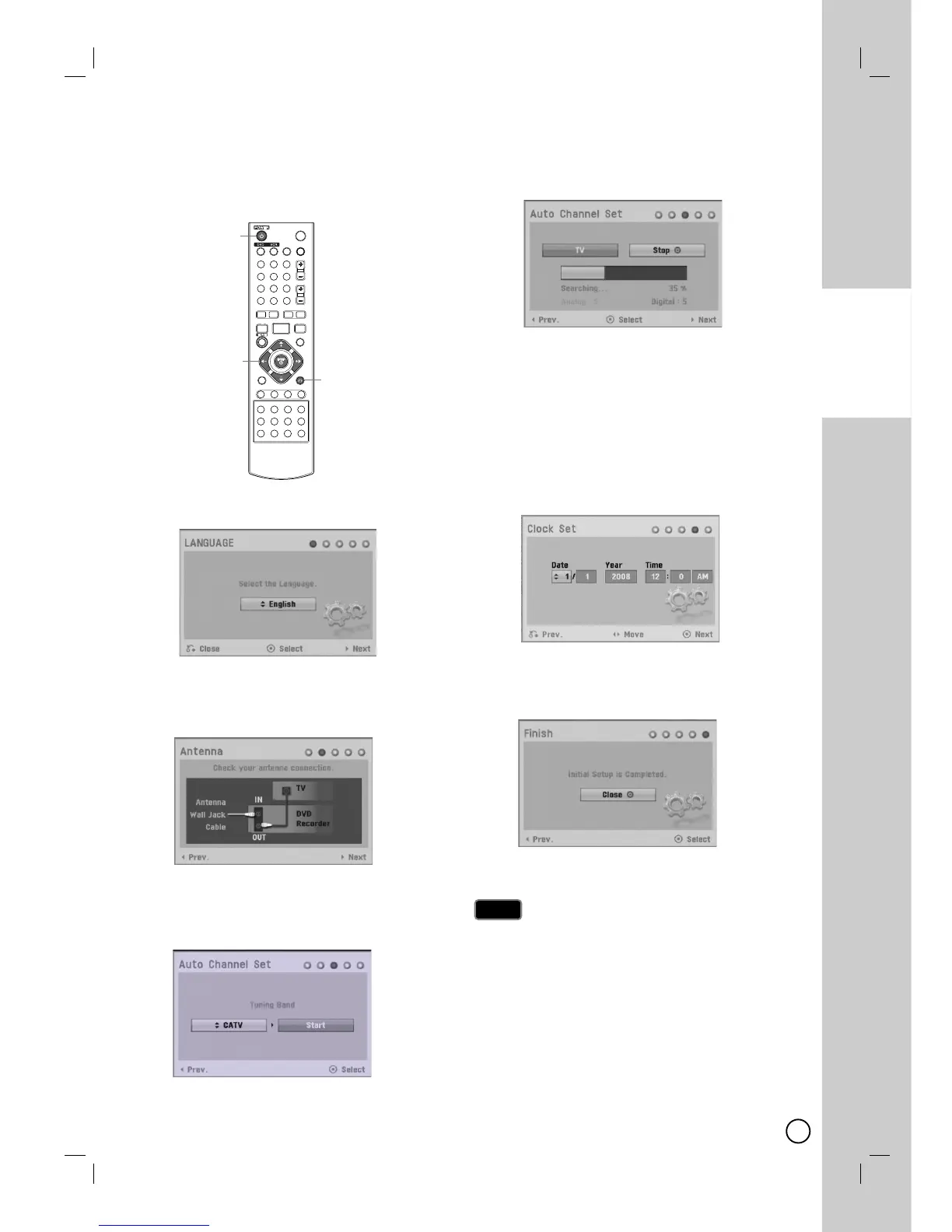
After the POWER (
11
) is pressed for the first time to
turn on the unit, the Initial Setup Wizard function sets
the Language, Channels and Clock step-by-step until
the setup is complete.
1. Use v / V to select a language for the Setup menu
and information display then press ENTER (
).
Press RETURN (
O
)to skip the Initial Setup.
2. Check your antenna connections.
Press B to move next step.
Press b to go back to the previous level.
3. Select the [Tuning Band] option then press B .
TV is for over-the-air antenna reception.
CATV is for cable subscribers.
Press b to go back to the previous level.
4. Press ENTER (
) to begin the channel search.
You can skip the analog channel scanning by
pressing B.
Press b to go back to the previous level.
5. Enter the necessary information for year, date and
time.
b / B (left/right): Moves the cursor to the
previous or next column.
v / V (up/down): Changes the setting at the cur-
rent cursor position.
You can use numbered buttons to change the
setting
Press ENTER (
) to confirm your setting.
Press RETURN
(
O
)
to go back to the previous
level.
6. Press ENTER (
) to exit the menu.
Press b to go back to the previous level.
You can reset the Initial Setup Wizard from the [Factory
Set] in the setup menu. (see page 51).
Note
Note


 To Next Page
 Loading...