105
TO USE A USB DEVICE
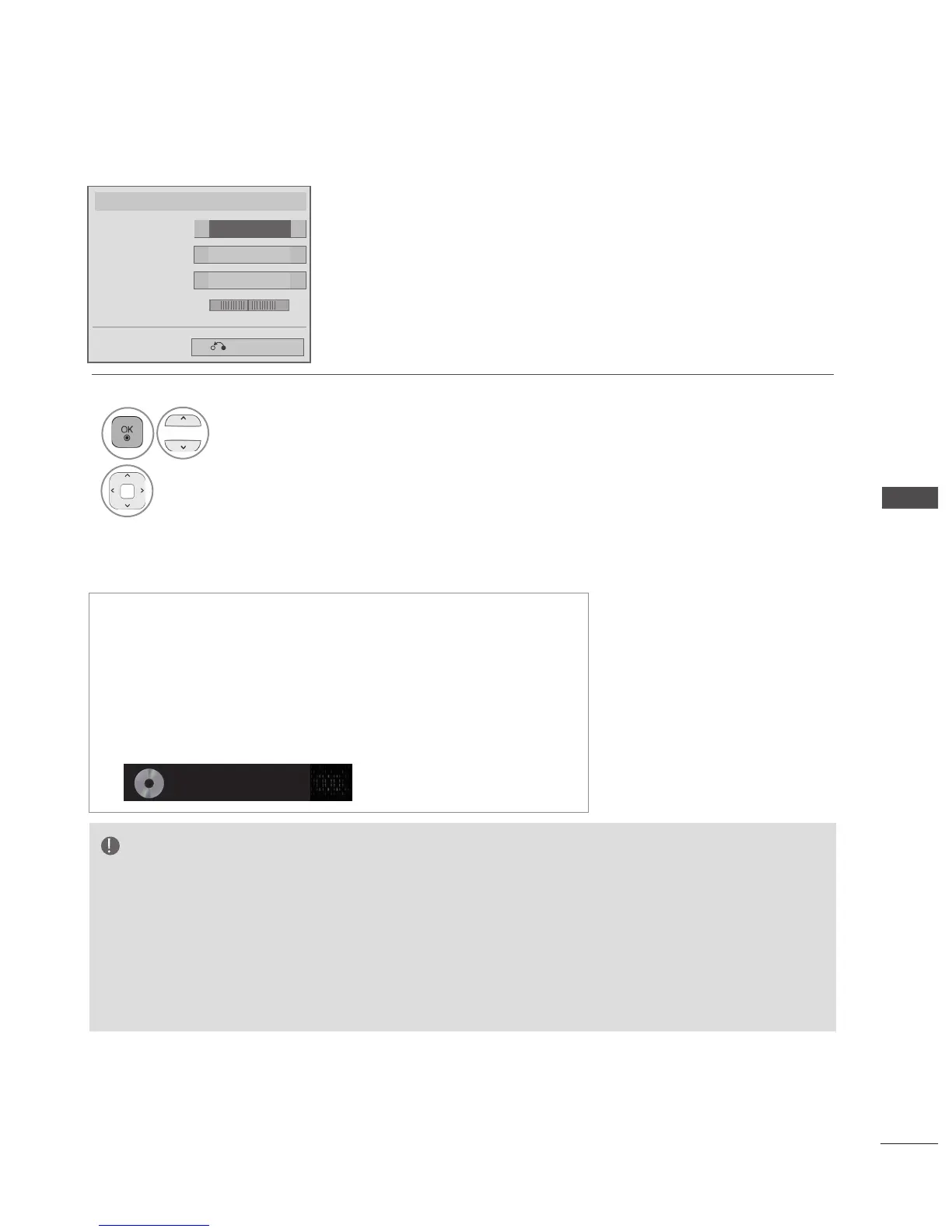
■ When you select the Set Audio,
1
Select Sound Mode, Auto
Volume, Clear Voice II or
Balance.
2
Make appropriate adjustments. (Refer
to p. 133 to 137)
Set Audio.
Standard
Sound Mode
◄
►
Off
Auto Volume
◄ ►
Off
Clear Voice II
Balance 0
◄ ►
Previous
L R
◄ ►
■ If you don't press any button for a while during the playing, the
play information box (as shown in the below) will float as a
screen saver.
■ The ‘Screen Saver’?
Screen saver is to prevent screen pixel damage due to an
fixed image remaining on the screen for a extended period of
time.
002. B02.mp3
► 00:31 / 04:04
NOTE
► A damaged or corrupted music file does not play but displays 00:00 in playtime.
► A music file downloaded from a paid service with copyright protection does not start but displays inappropri-
ate information in playtime.
► If you press OK, ■ buttons, screen saver is stopped.
► The PLAY(►), Pause(II), ■ , ►►, ◄◄ buttons on the remote control are also available in this mode.
► You can use the ►► button to select the next music file and the ◄◄ button to select the previous music
file.


 To Next Page