33
WATCHING TV / PROGRAMME CONTROL
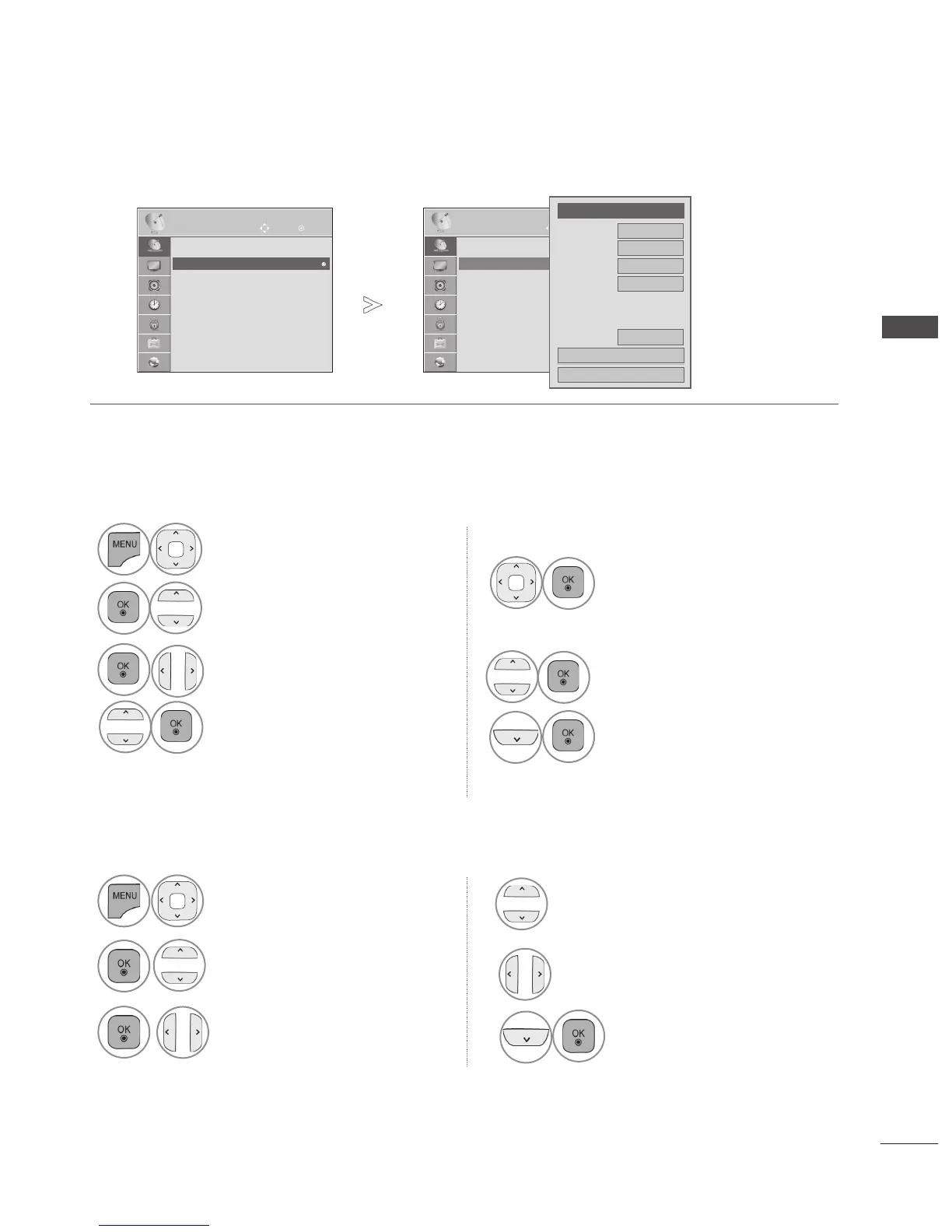
You can assign a station name with five characters to each programme number.
■ Assigning a station name
• Press the MENU/EXIT button to return to normal TV viewing.
• Press the BACK button to move to the previous menu screen.
1
Select SETUP.
2
Select Manual Tuning.
3
Select TV. (Only DTV)
4
Select Name.
5
Select the position and make
your choice of the second
character, and so on.
You can use an the alphabet
A to Z, the number 0 to 9, +/
-, and blank.
6
Select Close.
7
Select Store.
Normally fine tuning is only necessary if reception is poor.
■ Fine Tuning
Select TV. (Only DTV)
Select Fine.
Select SETUP.
Select Manual Tuning.
Select Store.
6
Fine tune for the best picture
and sound.
1
3
2
4
5
OK
Move
● Auto Tuning
● Manual Tuning
● Programme Edit
SETUP
● Manual Tuning
OK
Move
● Auto Tuning
● Manual Tuning
● Programme Edit
SETUP
● Manual Tuning
►
►
●
Storage
◄
TV
►
3
●
System
BG
●
Band
V/UHF
●
Channel
◄ ►
◄ ►
●
Fine
●
Search
0
●
Name
C 02
Close
Store
■ Image shown may differ from your TV.
(IN ANALOGUE MODE)



 To Next Page