31
WATCHING TV / PROGRAMME CONTROL
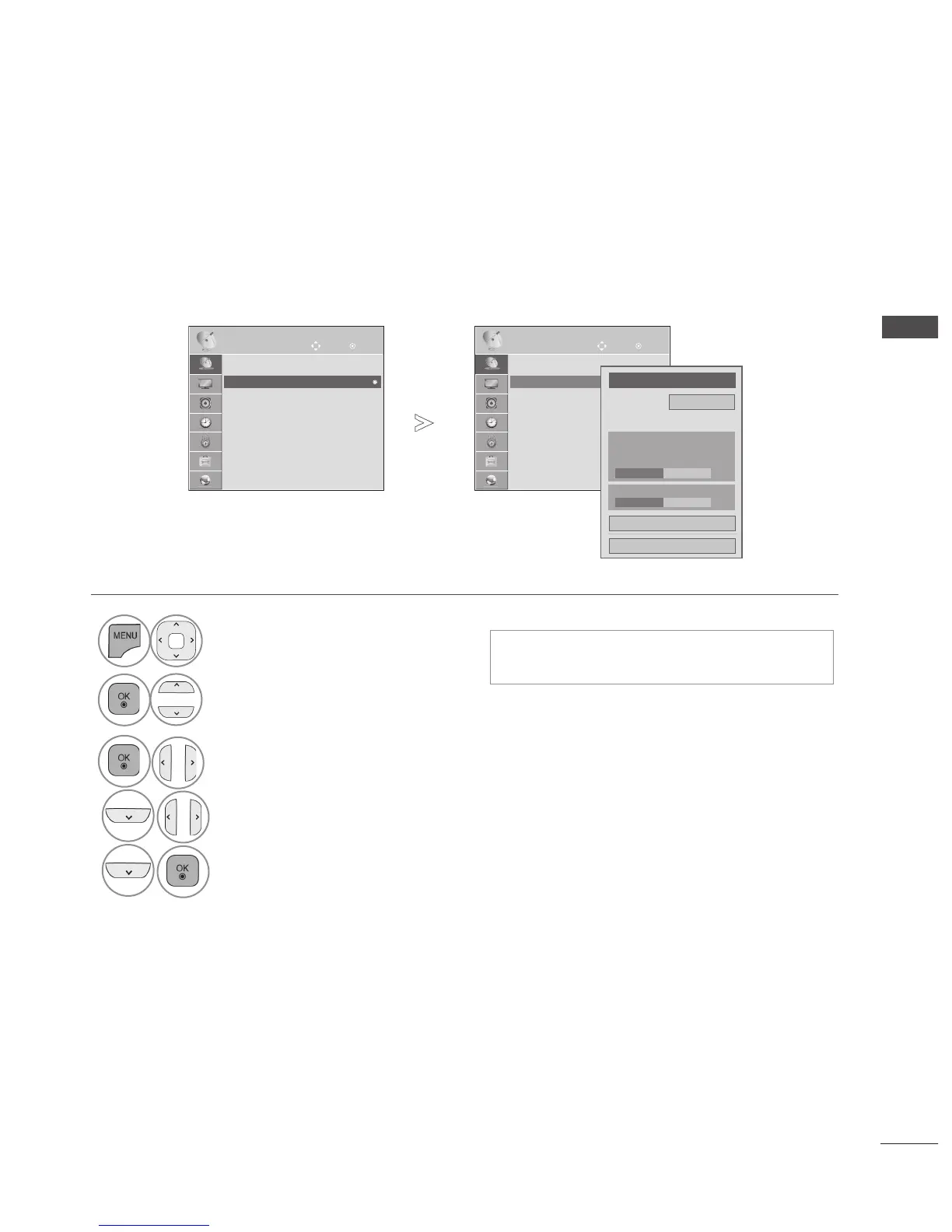
MANUAL PROGRAMME TUNING
Manual Tuning lets you manually add a programme to your programme list.
• Press the MENU/EXIT button to return to normal TV viewing.
• Press the BACK button to move to the previous menu screen.
(IN DIGITAL MODE)(ONLY DTV)
• Use NUMBER
buttons to input a 4-digit
password in Lock System ‘On’.
1
Select SETUP.
2
Select Manual Tuning.
3
Select DTV.
4
Select the desired channel number.
Update.
5
OK
Move
● Auto Tuning
● Manual Tuning
● Programme Edit
SETUP
● Manual Tuning
OK
Move
● Auto Tuning
● Manual Tuning
● Programme Edit
SETUP
● Manual Tuning
►
►
Frequency(kHz) 474000
◄
DTV
►
UHF CH.
30
Close
Update
● Signal Strength
50%
● Signal Quality
50%



 To Next Page