EasyManua.ls Logo

LG TV - PICTURE RESET

LG TV
242 pages
Print Icon
To Next Page IconTo Next Page
To Previous Page IconTo Previous Page
Loading...
127
PICTURE CONTROL
OK
Move
PICTURE
• Sharpness 70
• Colour 60
• Tint 0
• Colour Temp.
• Advanced Control
• Picture Reset
• TruMotion : Off
• Screen
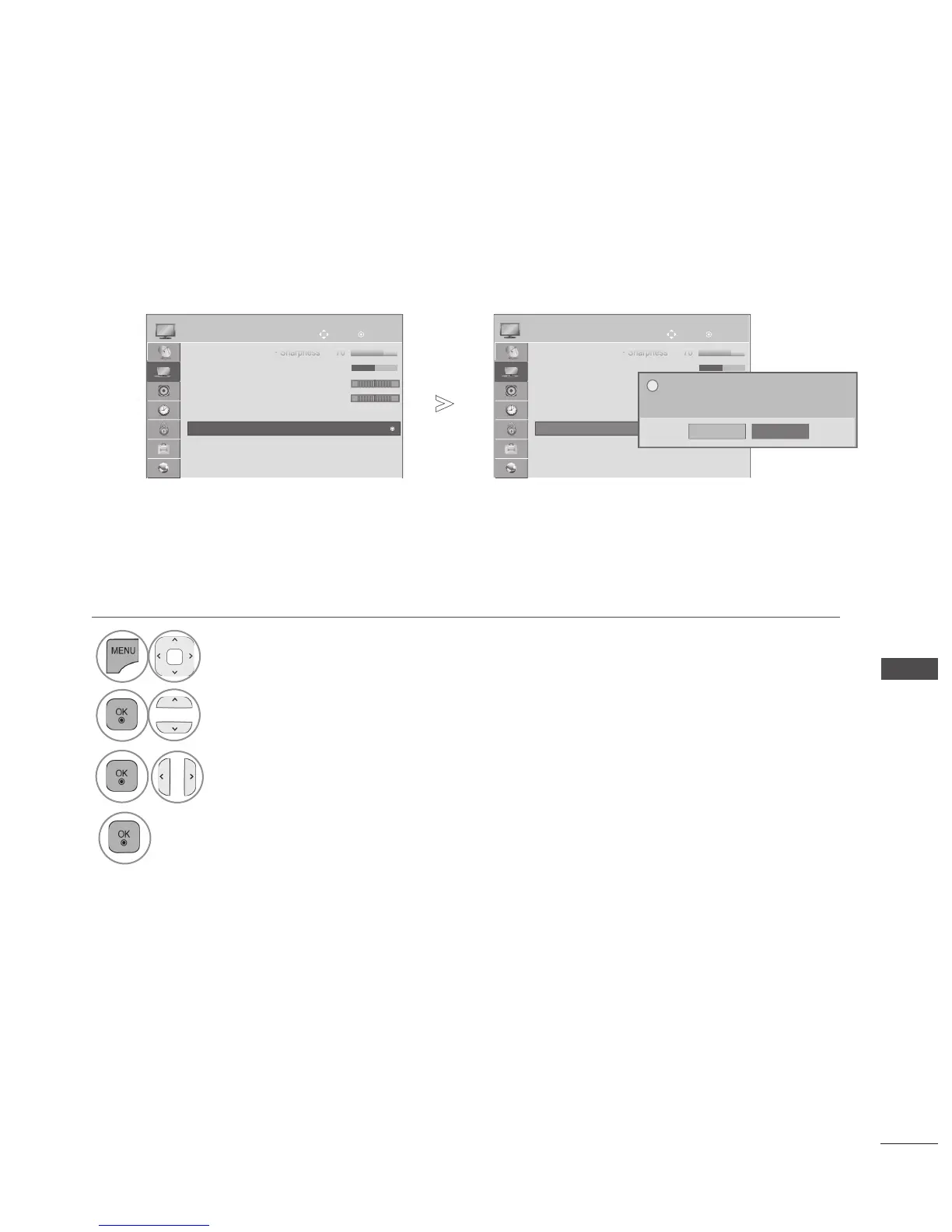
PICTURE RESET
Settings of the selected picture modes return to the default factory settings.
• Press the MENU/EXIT button to return to normal TV viewing.
• Press the BACK button to move to the previous menu screen.
1
Select PICTURE.
2
Select Picture Reset.
3
Select Yes.
4
Initialize the adjusted value.
R G
W
C
• Picture Reset
All picture setting will be reset.
Continue?
Yes No
?
OK
Move
PICTURE
• Sharpness 70
• Colour 60
• Tint 0
• Colour Temp. 0
• Advanced Control
• Picture Reset
• TruMotion : Off
• Screen
R G
W
C
• Picture Reset
►
►

Table of Contents