A-24
PREPARATION
PREPARATION
■ Image shown may differ from your TV.
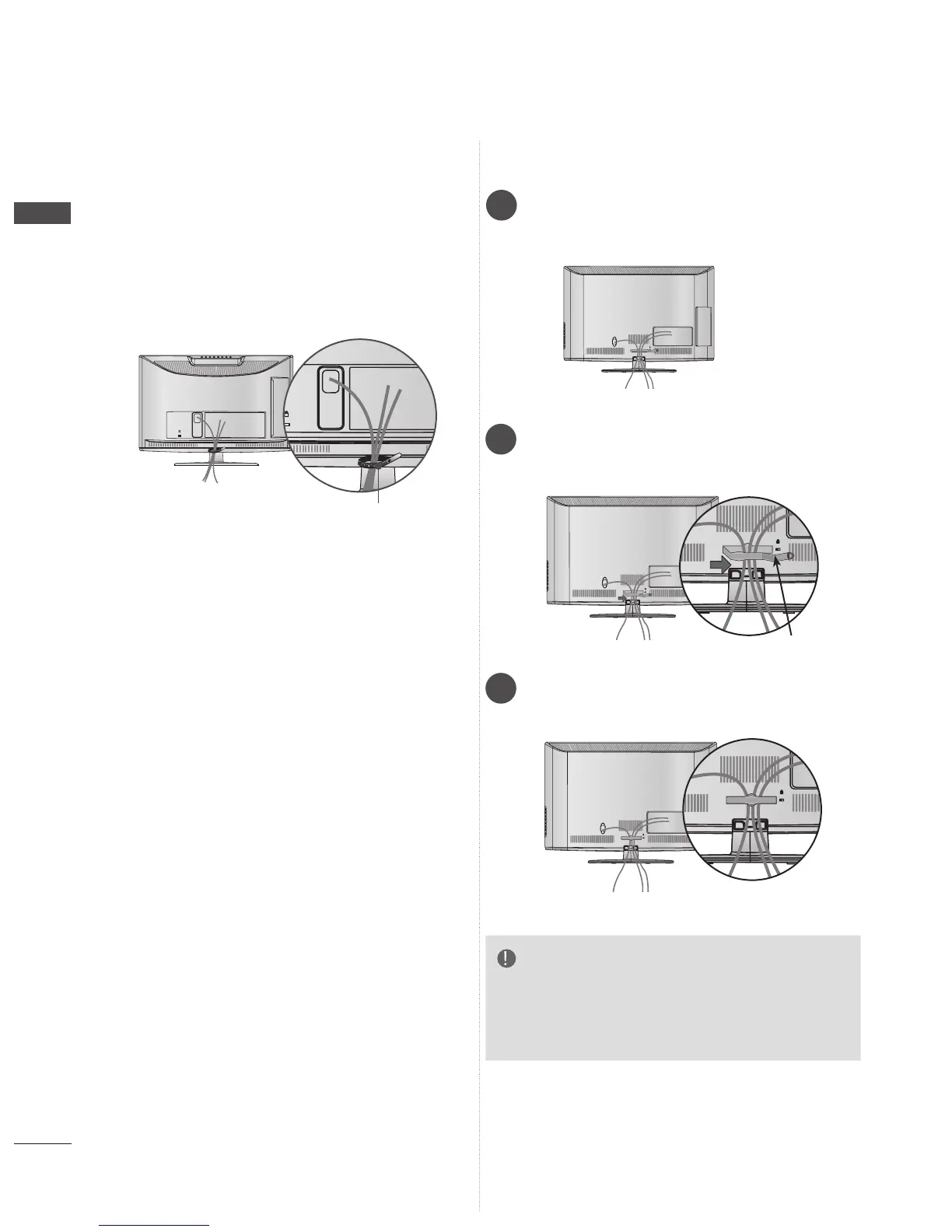
Only 22LD3**, 22/26LE6***
After connecting the cables as necessary, install
Cable Tie as shown and bundle the cables.
K
AC-IN
Cable Tie
BACK COVER FOR WIRE
ARRANGEMENT
Only 26/32LD3**, 32/37/42/47LD4**,
32/37/42/47/55LD6**, 32/42/46/52/60LD5**
AC IN
Connect the cables as necessary.
To connect additional equipment, see the
External equipment setup section.
1
Open the Cable Management Clip as
shown and manage the cables.
2
Fit the Cable management clip as shown.
3
NOTE
►Do not use the CABLE MANAGEMENT CLIP
to lift the TV.
- If the TV is dropped, you may be injured or the
TV may be damaged.



 To Next Page