135
SOUND & LANGUAGE CONTROL
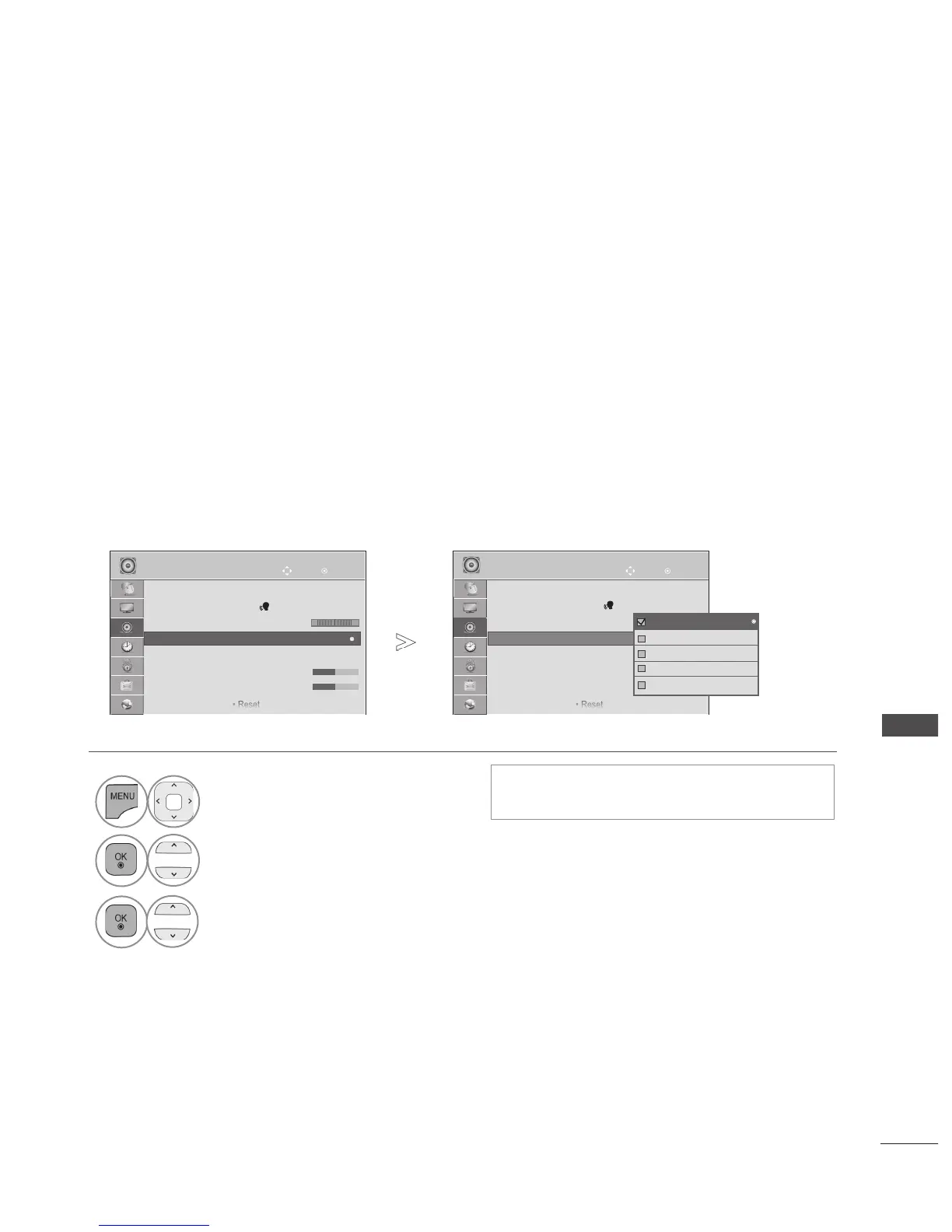
PRESET SOUND SETTINGS-SOUND MODE
You can select your preferred sound setting; Standard, Music, Cinema, Sport/Cricket or Game and
you can also adjust the Treble, Bass.
Sound Mode lets you enjoy the best sound without any Special adjustment as the TV sets the appro-
priate sound options based on the programme content.
Standard, Music, Cinema, Sport/Cricket and Game are preset for optimum sound quality at the factory.
Standard Offers standard-quality sound.
Music Optimizes sound for listening to music.
Cinema Optimizes sound for watching movies.
Sport/Cricket Optimizes sound for watching sports events.
Game Optimizes sound for playing games.
• Press the MENU/EXIT button to return to normal TV viewing.
• Press the BACK button to move to the previous menu screen.
• You can also adjust Sound Mode in the Q.
Menu.
1
Select AUDIO.
2
Select Sound Mode.
3
Select Standard, Music, Cinema, Sport/Cricket or Game.
OK
Move
● Auto Volume : Off
● Clear Voice II : Off 3
● Balance 0
● Sound Mode : Standard
• Infinite Sound : Off
• Treble 50
• Bass 50
• Reset
AUDIO
● Sound Mode : Standard
L R
OK
Move
● Auto Volume : Off
● Clear Voice II : Off 3
● Balance 0
● Sound Mode : Standard
• Infinite Sound : Off
• Treble 50
• Bass 50
• Reset
AUDIO
● Sound Mode : Standard
L R
►
►
Standard
Music
Cinema
Sport
Game
Standard
►
■ Image shown may differ from your TV.


 To Next Page