51
WATCHING TV / PROGRAMME CONTROL
DATA SERVICE
(This menu is enabled only in South Africa, Malaysia. )
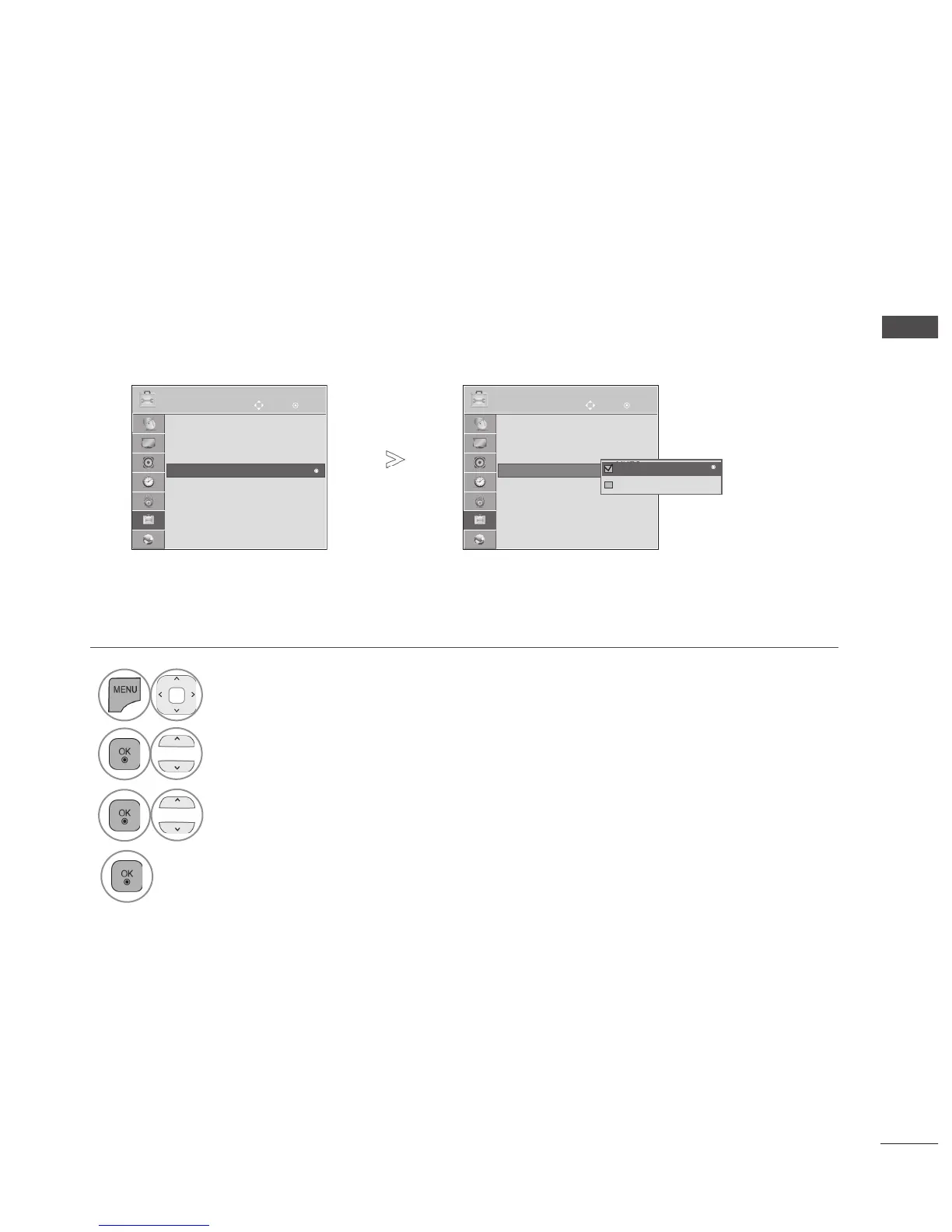
This function allow users to choose between MHEG(Digital Teletext) and Teletext if both exist at the same
time.
If only one of them exists, either MHEG or Teletext is enabled regardless of which option you select-
ed.
• Press the MENU/EXIT button to return to normal TV viewing.
• Press the BACK button to move to the previous menu screen.
1
Select OPTION.
2
Select Data Service.
3
Select MHEG or Teletext.
4
Save.
OK
Move
● Language(Language)
● Hard of Hearing (ꔞ) : Off
● Power Indicator
● Data Service : MHEG
● Factory Reset
● Set ID : 1
● Mode Setting : Home Use
OPTION
● Data Service : MHEG
►
OK
Move
● Language(Language)
● Hard of Hearing (ꔞ) : Off
● Power Indicator
● Data Service : MHEG
● Factory Reset
● Set ID : 1
● Mode Setting : Home Use
OPTION
● Data Service : MHEG
►
MHEG
Teletext
MHEG
►



 To Next Page