130
PICTURE CONTROL
PICTURE CONTROL
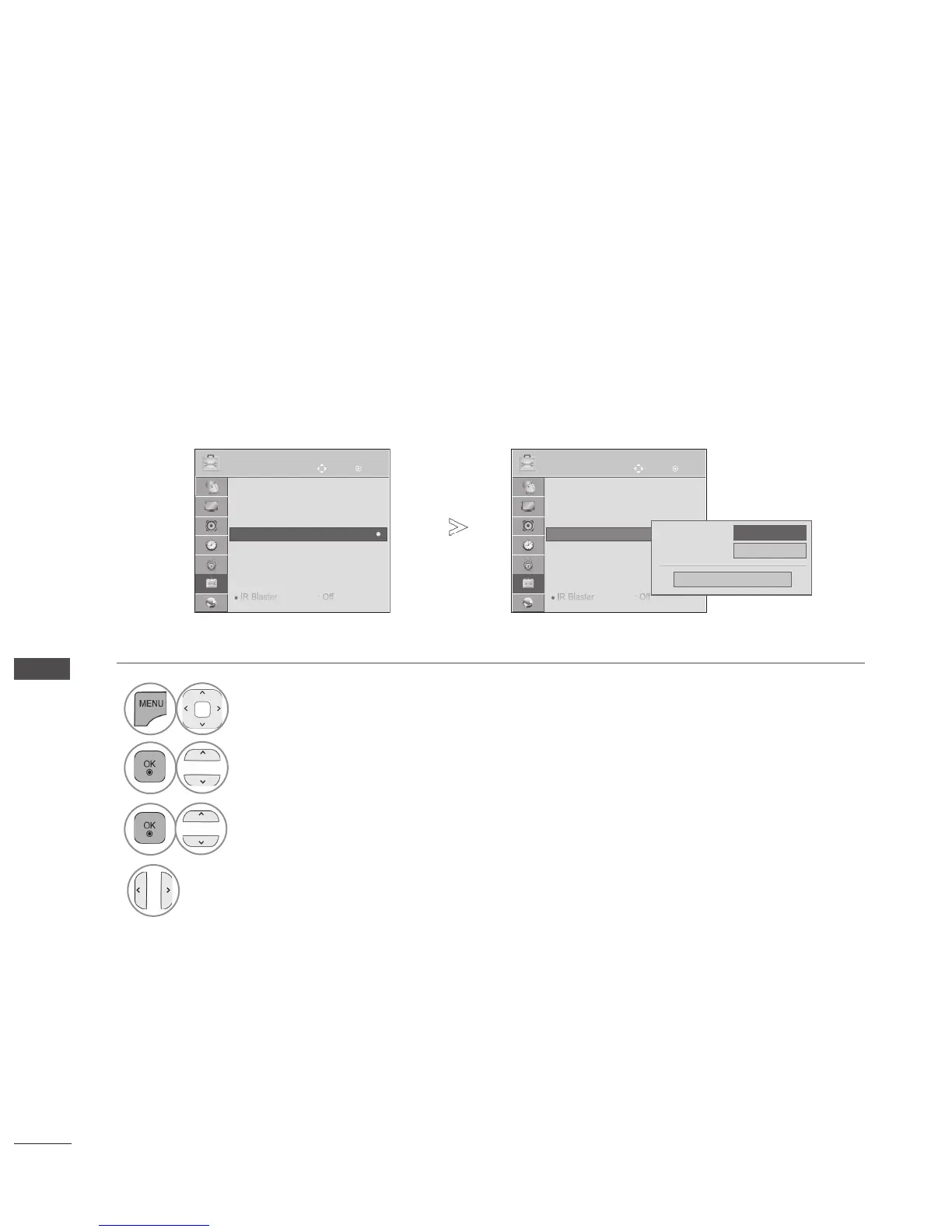
POWER INDICATOR
Adjust the power/standby indicator light on the front of the TV.
Standby Light
Determines whether to set the indicator light on the front of the TV to On or Off in standby mode.
Power Light
Determines whether to set the indicator light on the front of the TV to On or Off when the power turns
on.
If you select 3D mode, Power indicator is turned off automatically.
• Press the MENU/EXIT button to return to normal TV viewing.
• Press the BACK button to move to the previous menu screen.
1
Select OPTION.
2
Select Power Indicator.
3
Select Standby Light or Power Light.
4
Select your desired Source.
OK
Move
● Language(Language)
● Country : Australia
● Hard of Hearing (ꔞ) : Off
● Power Indicator
● Factory Reset
● Set ID : 1
● Mode Setting : Home Use
● IR Blaster : Off
OPTION
● Power Indicator
Standby Light
On
◄
On
►
Close
Power Light
OK
Move
● Language(Language)
● Country : Australia
● Hard of Hearing (ꔞ) : Off
● Power Indicator
● Factory Reset
● Set ID : 1
● Mode Setting : Home Use
● IR Blaster : Off
OPTION
● Power Indicator
►
►



 To Next Page