10
Getting to know your phone
NOTE Proximity sensor
Whenreceivingandmakingcalls,theproximitysensorautomaticallyturnsthebacklight
offandlocksthetouchscreenbysensingwhenthephoneisnearyourear.Thisextends
batterylifeandpreventsyoufromunintentionallyactivatingthetouchscreenduringcalls.
WARNING
PlacingaheavyobjectonthephoneorsittingonitcandamagetheLCDandtouch
screenfunctions.DonotcovertheLCDproximitysensorwithprotectivelm.Thiscould
causethesensortomalfunction.
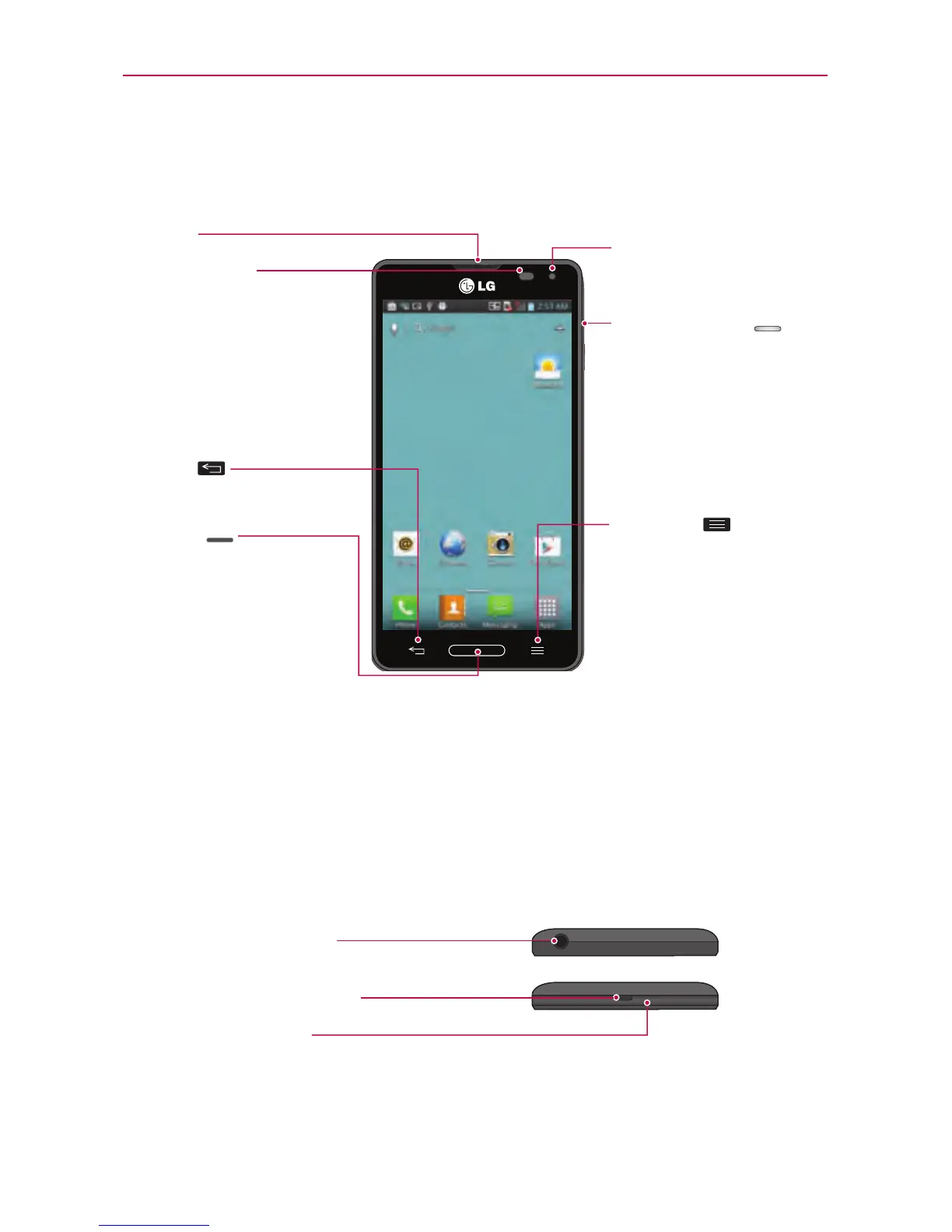
Microphone
Charger/USB Port
Earphone Jack
Device components
Earpiece
Proximity Sensor
Front Camera Lens
Home Key
•
ReturntotheHomescreen
fromanyscreen.
•
Pressandholdtoviewalistof
themostrecentlyusedapps.
Back Key
RETURN
tothepreviousscreen.
Power/Lock Key
•
Switchyourphoneon/off
bypressingandholdingthis
key.
•
Shortpresstolock/unlock
thescreen.
Menu Key
•
Displaysavailableoptions.
•
Touchandholdtosearch
withinthecurrentapplication
(notavailableforall
applications).



 To Next Page