43
Camera
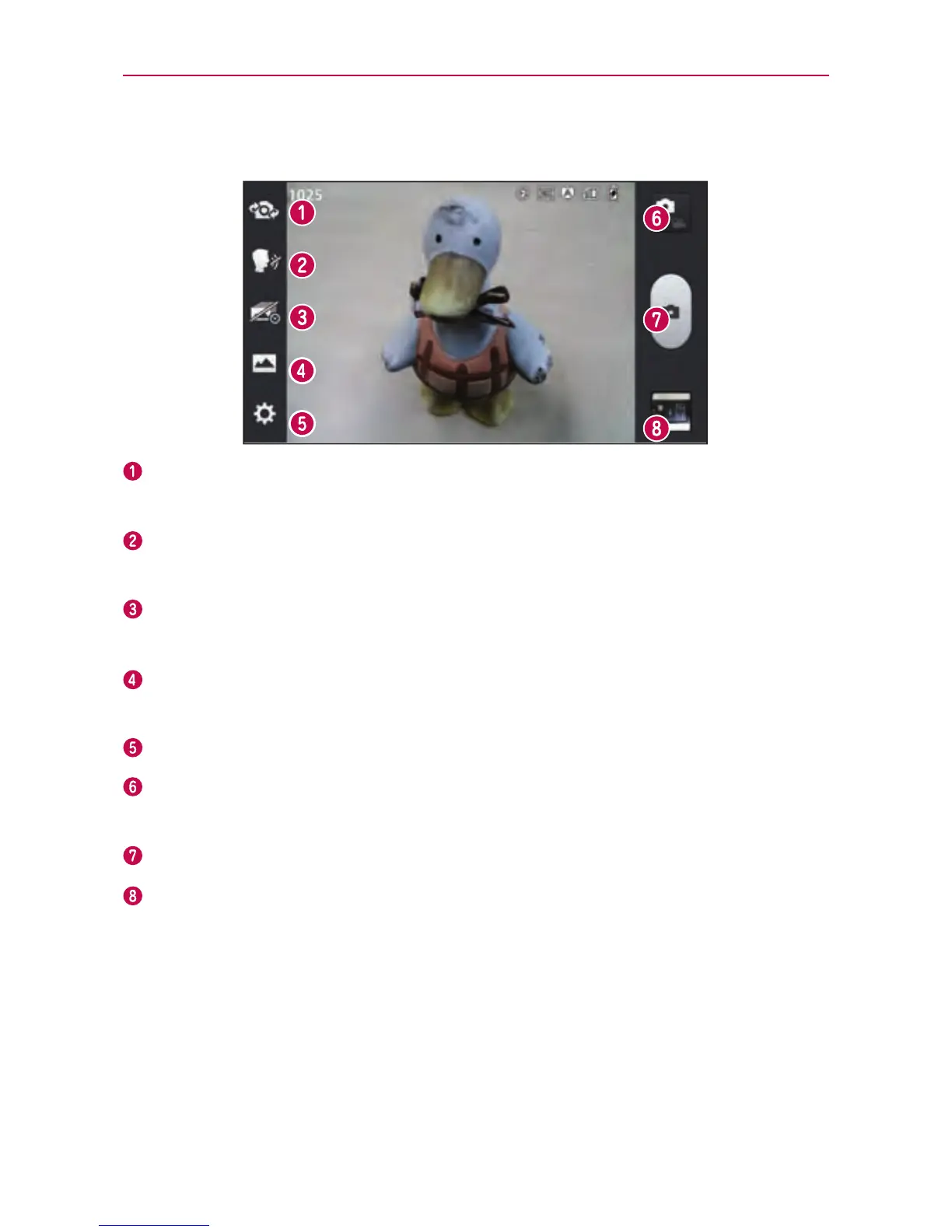
Getting to know the viewfinder
Switch lenses–Switchbetweentherear–facingcameralensandthe
front–facingcameralens.
Cheese shutter–Takephotowithvoicecommand(saying"Cheese",
"Smile","Whisky","Kimchi"or"LG").
Time catch shot–Allowsyoutocapturethemissingmomentbytaking
vesequentialpicturesatoncebeforetheshutterkeyistouched.
Shot mode–ChoosefromNormal,HDR,Panorama,Continuous
shot.
Settings–AccesstheSettingsmenu.
Mode switch–Allowsyoutoswitchbetweencameramodeandvideo
mode.
Capture–Takesaphoto.
Gallery–Allowsyoutoviewthelastphotoyoucaptured.Thisenables
youtoaccessyourGalleryandviewsavedphotoswithincameramode.
Taking a quick photo
1.OpentheCameraapplication.
2.Holdthephoneandpointthelenstowardsthesubjectyouwantto
photograph.



 To Next Page