20
Your Home screen
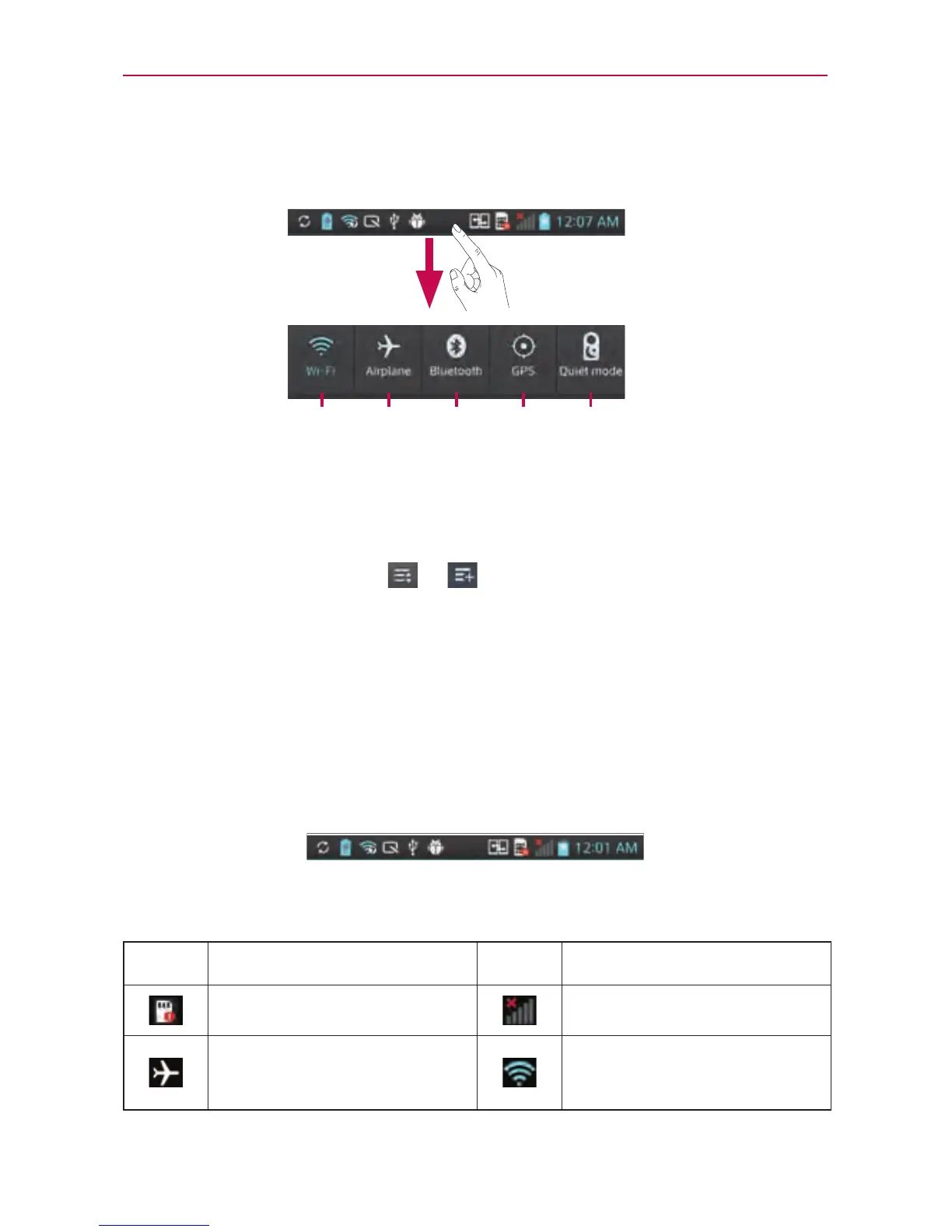
Status Bar
TheStatusBarrunsacrossthetopofyourscreen.
Quiet
mode
GPSBluetoothAirplaneWi-Fi
TouchandslidetheStatusBardownwithyourngertodisplaythe
NoticationsPanel.TheNoticationsPaneldisplaysallofyournotications
alongwiththeQuickSettingsatthetop.
Scrolltotherightandtouch
> tomanageyourQuickSettings.You
canaddandremoveWi-Fi,Airplanemode,Bluetooth,GPS,Quietmode,
Soundprole,Dataenabled,NFC,Auto-rotatescreen,Accounts&sync,
PortableWi-Fihotspot,Miracast,andPowersaver.
Viewing the Status Bar
TheStatusBarusesdifferenticonstodisplayphoneinformationsuchas
signalstrength,newmessages,batterylife,activeBluetoothanddata
connections.
Belowisatableexplainingthemeaningoficonsyou'relikelytoseeinthe
StatusBar.
Icon Description Icon Description
NoSIMcard Nosignal
Airplanemode
ConnectedtoaWi-Fi
network



 To Next Page