Data Logging
Prompts and Remarks
9-14 Using the LI-6400
9
the prompts. With OPEN 3.2 and above, this happens automatically, so there
is no problem.
Timing relative to logging
When you manually log, here is the sequence of events:
1. Latest measurements are captured
2. If ÒPrompt on LogÓ, prompts are presented, user responses recorded.
3. Computations done.
4. Record added to log file.
5. Beep (if enabled).
Thus, if you are prompting for values that are used in computations, the com-
putations done for the logged data will use the latest values that you have en-
tered.
-108:Comments - 18 char remark
-33:AREA_cm2% - Entered In-chmbr leaf
Plot#, Comments, Area
-104:Plot# - User defined (integer)
Change Insert Remove cancel OK
1
Revert Relabel Open... SaveAs.
2
Replace the selected item with
another, from the master list.
Insert a new item above the
selected item.
Remove the selected item
from the list.
Read another Prompt List
into the Editor.
Specify the file
name and save
this list.
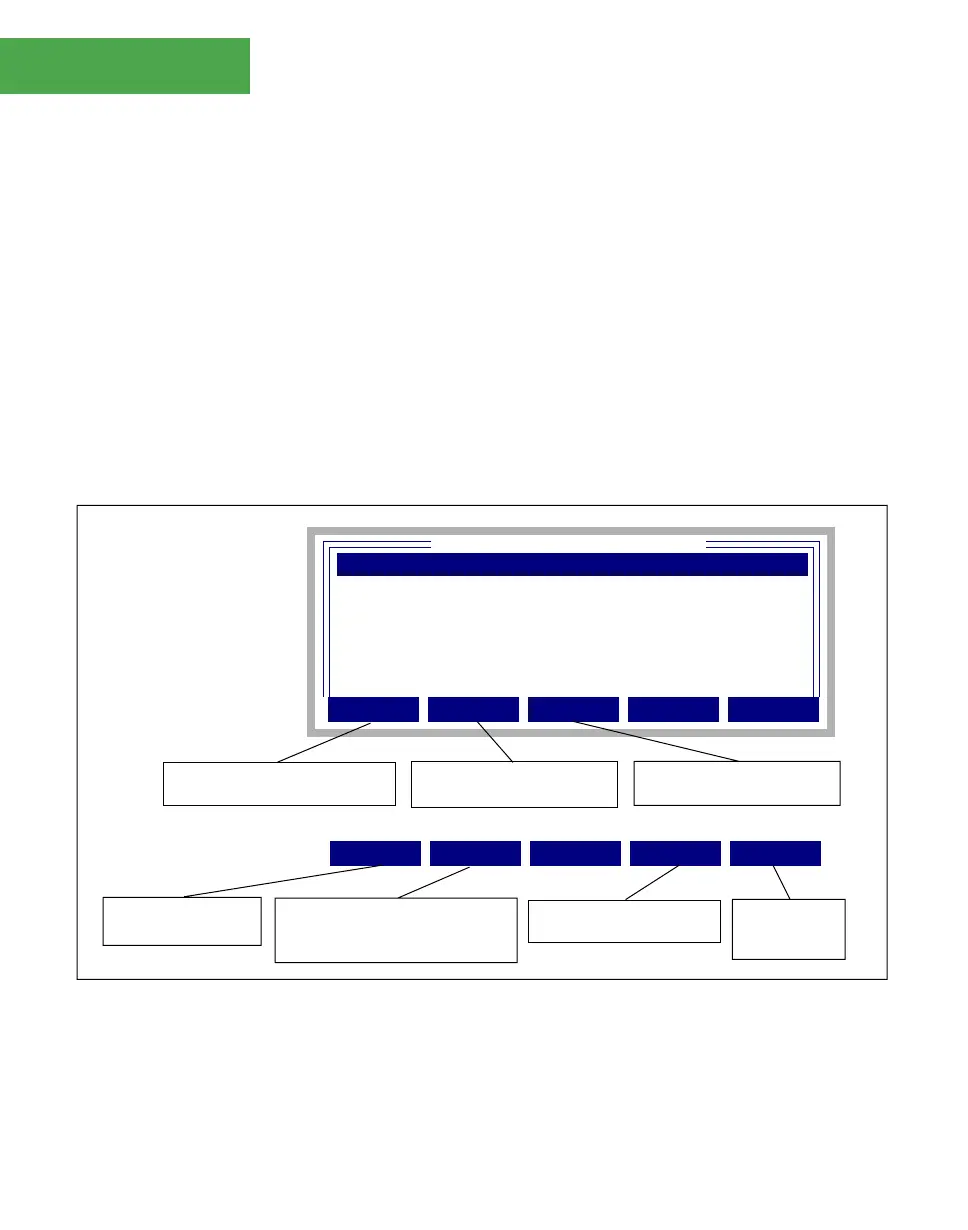
Figure 9-12. The Prompt List Editor, and associated function keys.
Return to the stored
version of the list
If the entry is a system user con-
stant (-101 to -109), you may re-
label it.


 To Next Page