LPL Topics
Digital I/O
Using the LI-6400 23-75
Digital I/O
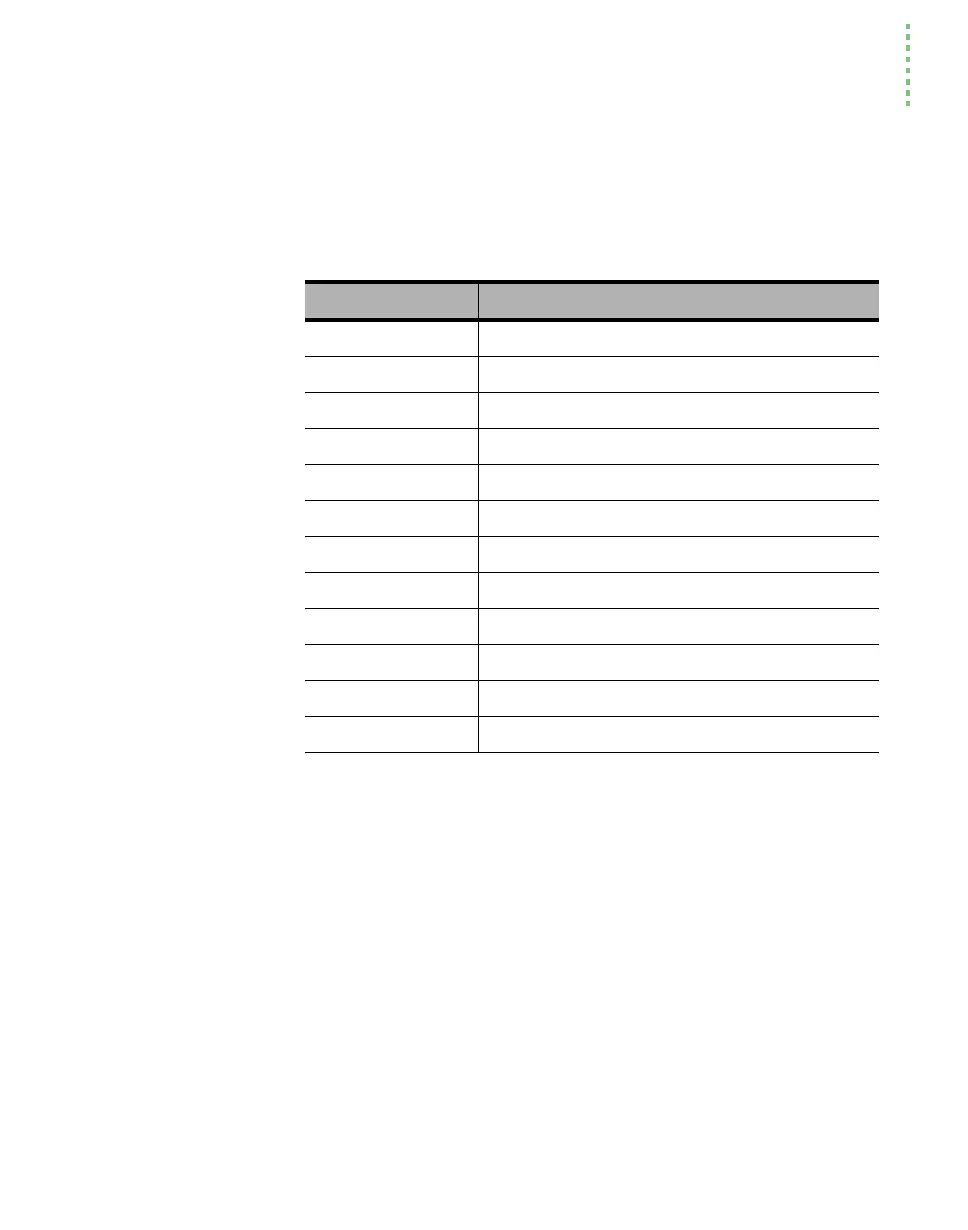
Digital I/O is done with the keywords shown in Table 23-31.
Ports and Pins
LPL assumes that digital I/O lines are grouped together into some combina-
tion of ports. DIONPORTS tells how many ports there are, and DIONPINS
tells how many pins a particular port has. All pins on a port have the same di-
rection: that is, they are controlled by the LPL program (output), or they are
set by some external device (input). Some ports can be programmed to do ei-
ther input or output, and some are strictly one or the other. The keyword DI-
OSTATUS provides the capabilities and current setting of any port.
A port/pin is designated using a 16 bit integer. The high byte is the port, and
the low byte is the pin. Thus, port 2 pin 3 can be most conveniently referenced
in hex as 0x0302. The sequence
0x0005 1 DIOSET
would turn the lamp on, since that is port 0, pin 5 (Table 23-32).
Table 23-31. Digital I/O keywords
Keyword Description
DIONPORTS Returns the number of DIO ports.
DIONPINS Returns the number of pins on a particular port.
DIOSTATUS Get the status and capabilities of a port.
DIODEFPORT Define a port for input or output.
DIOSETPORT Set/unset selected pins of a port.
DIOGETPORT Read selected pins of a port.
DIOSET Set/unset a pin on a port.
DIOGET Read a pin on a port.
DIOCOUNTMS Set sample period for digital counters.
DIODEFCOUNT Setup a port/pin for use as a counter.
DIOCOUNT Read and clear a counter.
DIOERR Returns the number of digital chip ÒhiccupÓ recoveries.


 To Next Page