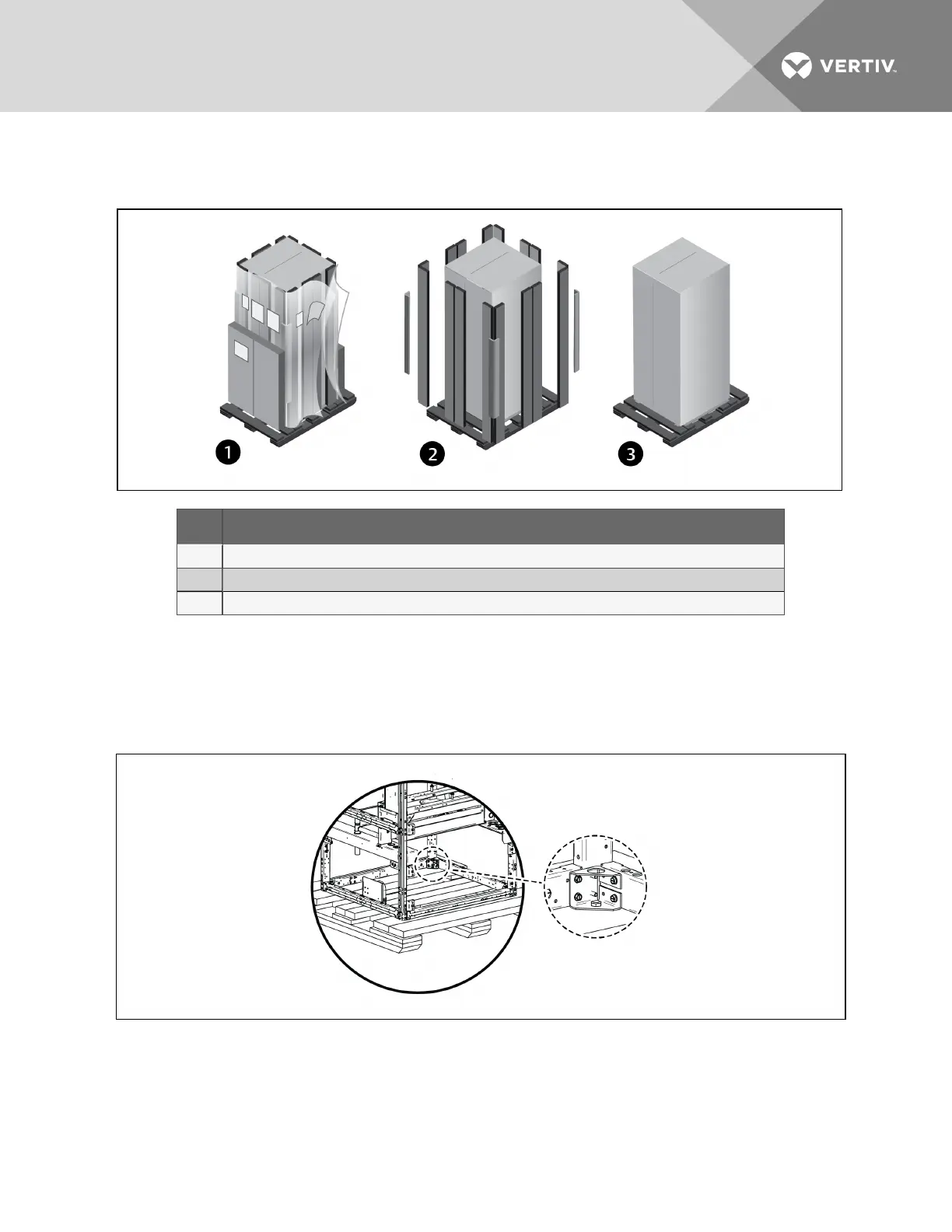
4. Remove the bag from the unit when ready to remove the skid and install the unit.
Figure 4.2 Unpacking the Unit
Item Description
1 Ship-loose items location, and removing exterior wrap from unit
2 Remove corner and side packaging planks
3 Leave the bag on the unit until ready to install.
4.3.1 Removing the Unit from the Skid with a Forklift
1. Remove the panels from the unit, and remove the 4 bolts attaching the unit to the skid. They
are inside unit base as shown in Figure 4.3 below.
Figure 4.3 Remove unit panels and bolts to skid
2. Align a forklift so the tines can be inserted under the unit.
3. Referring to Figure 4.4 on the next page:
• Insert the tines of the forklift completely under the base and beyond the opposite side of
the unit making sure they are level, not angled upward.
Vertiv | Liebert® PDX™ and PCW™ Installer/User Guide | 23



 To Next Page