30
Assembling Your Elliptical
5mm Allen
Wrench w/
Phillips
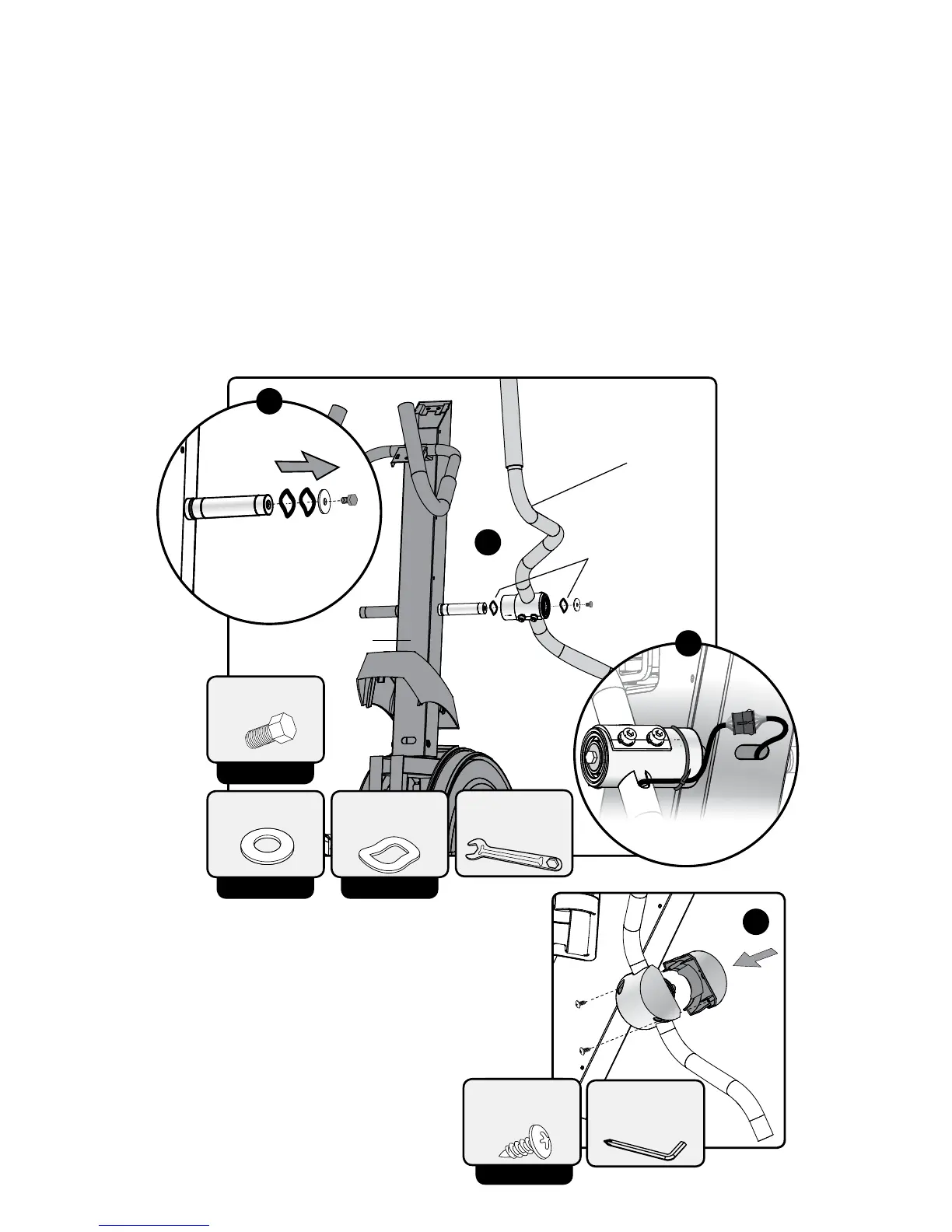
D. Remove M4x10L screws from pre-assem-
bled Mid Arm Joint Cover (9). Place both
halves around arm assembly connection
to post. Keep wires on underside of pivot
post to prevent pinching them when
attaching cover. Re-attach with Phillips
head screwdriver.
E. Repeat steps A – D for left
arm assembly.
Step 5: Arm Attachment
A. Remove pre-installed M8x15L bolt, at washer and 2 wave washers
from handlebar post on Console Mast (4).
B. Attach Right Arm Assembly (8) to Console Mast (4). Once installed
use 13mm wrench to tighten M8x15 bolt.
C. Connect wire harness from Right Arm Assembly (8) handlebar to
Console Mast (4). Do not remove zip tie holding wire harness to
Right Arm Assembly (8)
PRE-INSTALLED
M4 x 10L Screw
(x2)
D
PRE-INSTALLED
M8 x 15L
PRE-INSTALLED
Wave Washer
(4)
13/17mm
Wrench
View from behind
C
B
Remove
pre-installed
bolt and
washers
A
Console Mast
Right Arm Assembly
Wave Washers
PRE-INSTALLED
M8 Washer


 To Next Page