36
Console Basics
Readout Display
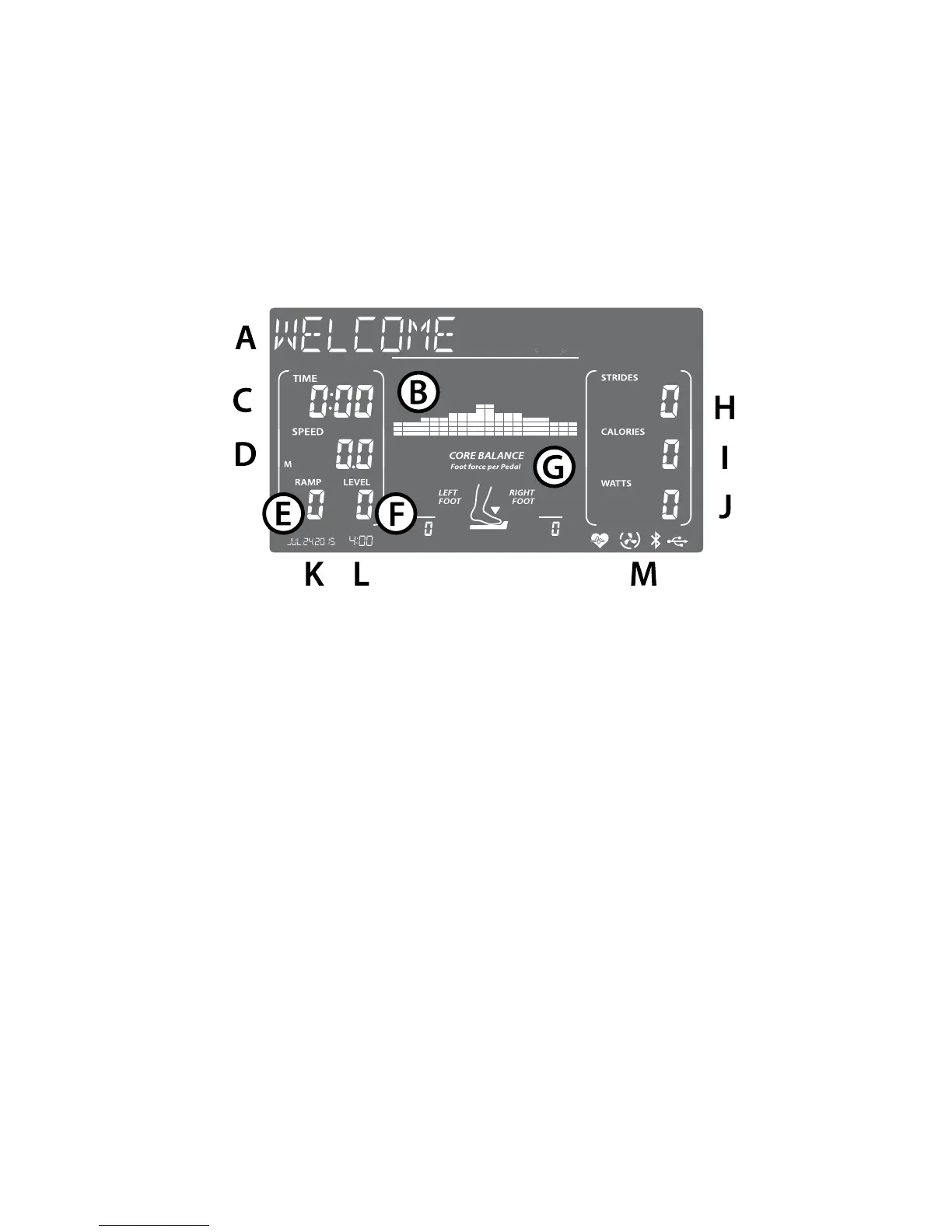
A blue backlit LCD display (E2i - 6", E3i - 7.5") provides all the information you
need to monitor your exercise results and get the most out of your exercise
program.
A. Message Window - This 16-character window helps step you through
program setup, then displays the program selected while you exercise.
B. Program Matrix - Divides the workout programs into 20 segments
with varying intensity levels. These programs can be viewed in levels of
incline or speed.
C. Time - The workout time elapsed or the workout time remaining.
D. Speed - Estimated ground speed based on your stride rate and a 20-inch
stride length.
D2. Distance - Estimated ground covered based on your stride count and a
20-inch stride (E3i only).
E. Ramp - Level of the pedal ramp, ranging from 0 to 20.
F. Level - Level of resistance on the pedals, ranging from 1 (180 watts at
60 rpm) to 20 (200 watts at 60 rpm).
G. Core Balance - A measurement of the total force you are placing on the
pedals, based on a total of 100%. The ideal is 50% for your left foot and
50% for your right foot.


 To Next Page