38
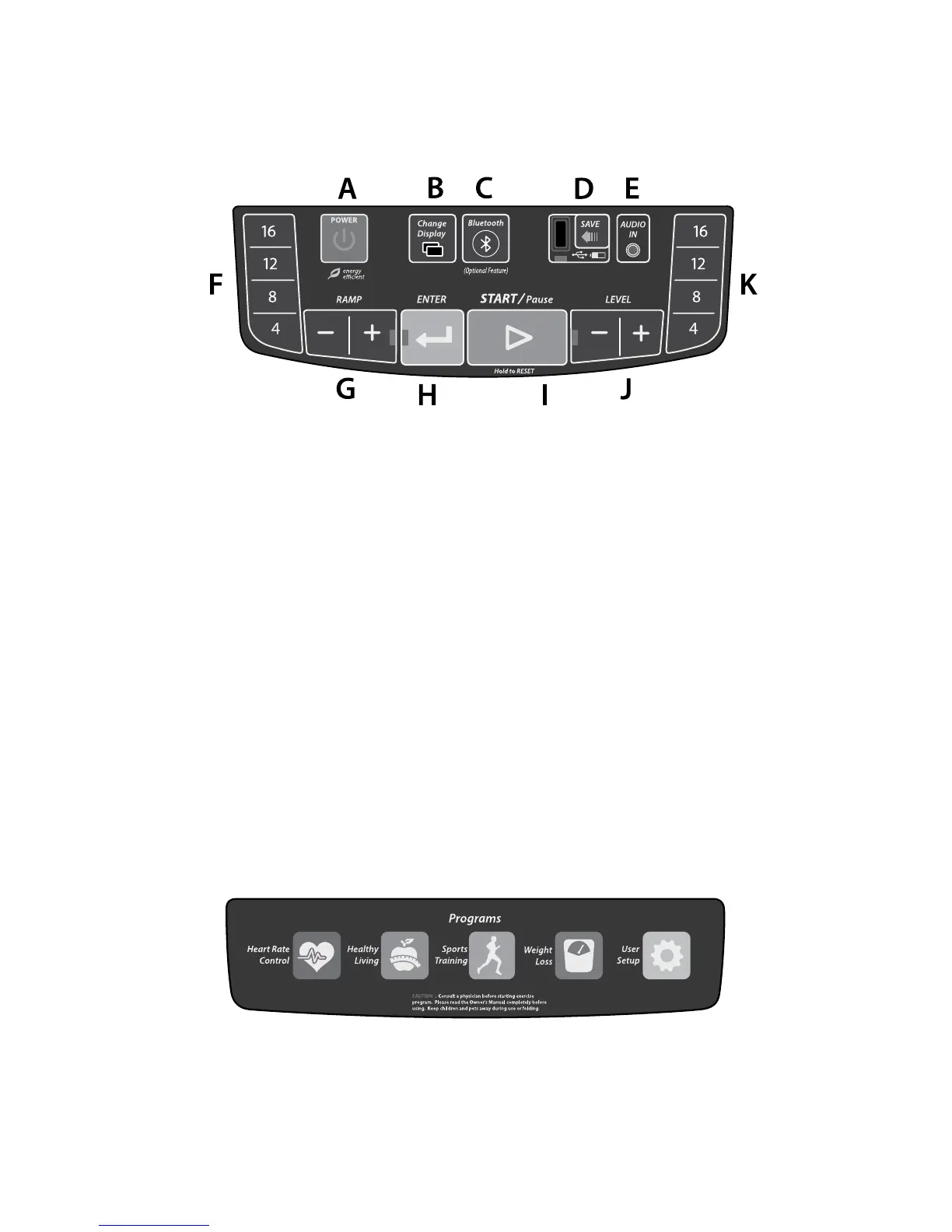
Main Keyboard
A. Power – This button can be used to turn the console “on” from Energy
Saving mode and to turn the console “o” when in Standby mode.
B. Change Display - Change the type of data displayed in some of the
readouts (E3i only).
C. Bluetooth - Pairs Bluetooth to your mobile device.
D. Exercise Data Save - This saves your workout results to a USB ash drive.
E. Audio In - Audio-in port and dual speakers.
F. Quickset
TM
Ramp - Select an ramp setting of 4, 8, 12 or 16.
G. Ramp - Raise and lower the ramp.
H. Enter - Conrm a selection.
I. Start/Pause - Start the elliptical/Pause the elliptical.
J. Resistance Level - Adjust the resistance on the pedals.
K. Quickset
TM
Resistance - Select a resistance setting of 4, 8, 12, or 16.
Top Keyboard
A. Program Group - Choose from HRC (Heart Rate Control), Healthy Living,
Sport Training, Weight Loss, and User Set Up (Not on E2i).
Console Basics



 To Next Page