-16-
LIFEWARMER
™
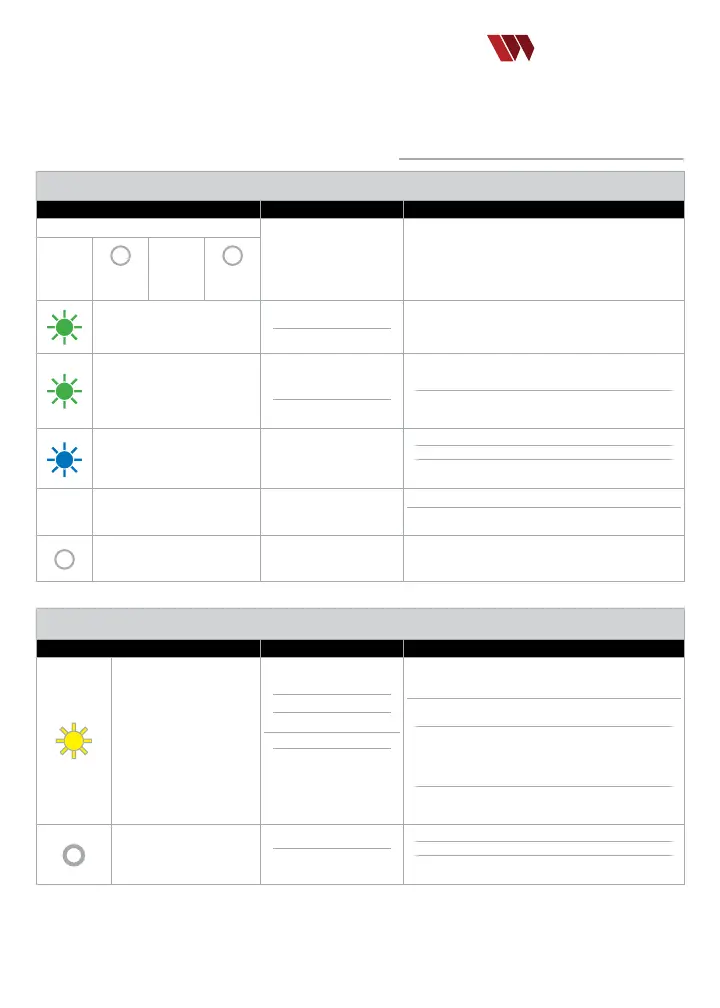
VISUAL/AUDIO INDICATORS
The Life Warmer Quantum Blood & Fluid Warming System is designed for simple, reliable operation.
Refer to the Visual/Audio Indicators Legend presented below.
Quantum Controller
NORMAL
Conditions
LED INDICATOR MEANING(S) ACTION REQUIRED
Start-Up Sequence
Controller initializing
sequence
No action required.
Blue
Flash
Yellow
Flash
Green
Flash
Clear
Flash
Green Flash - every 4 seconds
when NOT Connected to Tubing
Self-Check OK
Ready for Use
Connect Controller to primed tubing set
Green Flash - every second
when Connected to Tubing
Controller connected to
tubing and ready for ow.
(Standby Mode).
No ow or
ow too slow to warm
Increase ow rate if warming is desired.
If no further warming desired, disconnect system
Blue Flashing RAMP UP
(Flashing LED with increasing
i
ntensity/speed)
Fluid is warming and/or
temperature (<36ºC)
Flow rate may be exceeding heating capacity.
Consider reducing ow rate if clinically acceptable.
Check tubing for possible contact
with cold surface outdoors.
Green Solid
Fluid is warmed to
≥36ºC (in steady state).
No action required
Refer to Quantum System Response
by Temperature Table in Appendix.
Yellow Solid Low battery condition Charge or replace Battery Pack
Quantum Controller
ALERT
Conditions
LED INDICATOR MEANING(S) ACTION REQUIRED
Yellow – Flashing
(3 ashes – 1 every half
s
econd)
Dry line
Poor connection
Intentional disconnection
*
Tube mechanical failure.
*
Reminder to reattach to
tubing set if further
warming is desired.
Disconnect Controller from tubing set, ensure tubing
set is completely primed and no air in line.
If properly primed, reattach the Controller to the
tubing set and the yellow strobe should stop.
If yellow strobe persists, tubing set may have a
mechanical failure. Disconnect Controller and tubing
from patient. Obtain a new Quantum Tubing Set,
follow Quick Start to prime and attach to patient.
Disconnect Controller from Battery to conserve
battery power if no further warming is desired.
NO LEDS
Poor connection to Battery,
Battery Dead or
Controller failure
Check connection to Battery.
Check charge status of Battery.
If connection is proper and Battery is charged,
replace the Controller.
USER INTERFACE VISUAL/AUDIO LEGEND


 To Next Page