705iR User Manual
13 | 705iR User Manual
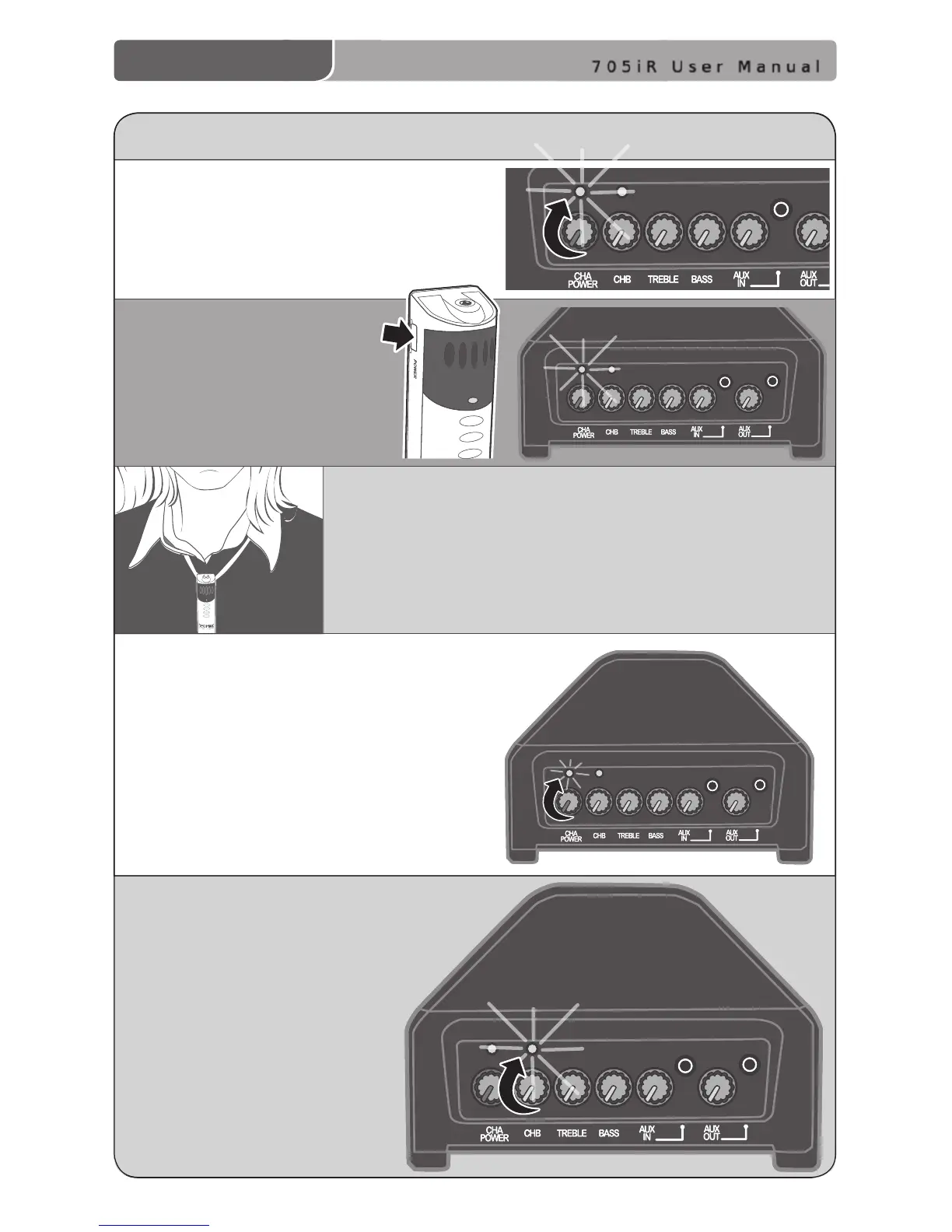
3. Slip the REDMIKE with lanyard around the neck
and position the top of the microphone just below
the collarbone. NOTE: Positioning of the REDMIKE is
critical for proper volume adjustment.
4. While speaking in a normal voice slowly increase
the volume of the corresponding channel
on the 705iR until your voice is barely
audible. REMEMBER: This equipment
supplements the user’s voice so they
are able to speak in a conversational
tone. Having the volume set too high will
result in feedback and listener fatigue.
INITIAL SET-UP: REDMIKE
5. If a second REDMIKE was
purchased, repeat steps 2-4.
NOTE: Each REDMIKE has its
Channel pre-set to either A or
B. No further adjustment is
necessary.
1. Turn the 705iR power knob clockwise.
The LED above the CH A POWER
switch will ash RED one time to
indicate the power is on.
2. Turn on the REDMIKE.
On the 705iR, the GREEN IR
LED above the CH A POWER
knob will light to indicate a
signal is being received.



 To Next Page