2.7.2. RS-232 connector
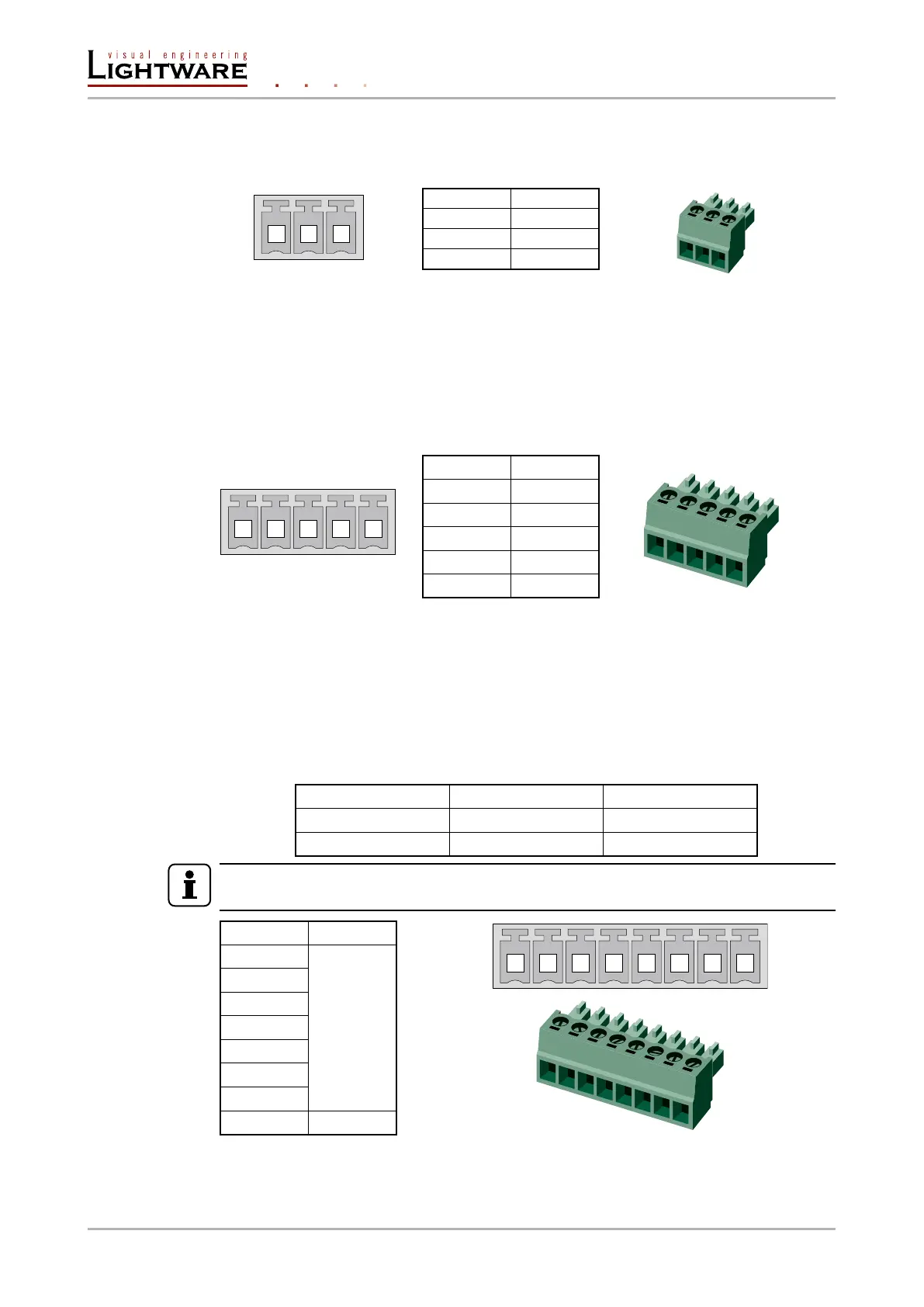
The transmitter contains a 3-pole Phoenix connector which is used for RS-232 serial
connection.
Pin nr. Signal
1 Ground
2 TX data
3 RX data
RS-232 connector pin assignments
Compatible plug type
Phoenix
®
Combicon series (3.5mm pitch, 3-pole), type: MC 1.5/3-ST-3.5.
2.7.3. Analog audio inputs and outputs
5-pole Phoenix connector is used for balanced analog audio input and output. Unbalanced
audio signals can be connected as well. For unbalanced input connect + and ground to the
source and connect – to the ground.
Pin nr. Signal
1 Left+
2 Left-
3 Ground
4 Right-
5 Right+
Analog audio connector and plug pin assignments
Compatible plug type
Phoenix
®
Combicon series (3.5mm pitch, 5-pole), type: MC 1.5/5-ST-3.5.
2.7.4. GPIO - General purpose input/output ports
SW4-OPT-TX240RAK contains a 8-pole Phoenix connector with seven GPIO pins, which
operates at TTL digital signal levels and can be set to high or low level (Push-Pull). The
direction of the pins can be input or output (adjustable). The signal levels are the following:
Voltage [V] Current, max. [mA]
Low level 0 - 0,8 30
High level 2 - 5 18
INFO
The total available current of the controller is 180mA.
Pin nr. Signal
1
Congurable
2
3
4
5
6
7
8 Ground
GPIO connector and plug pin assignments
Compatible plug type
Phoenix
®
Combicon series (3.5mm pitch 8-pole), type: MC 1.5/8-ST-3.5.
1 2 3
1 2 3 4 5
1 2 3 4 5 6 7 8
Page 16 / 106 Installation and controls









 To Next Page