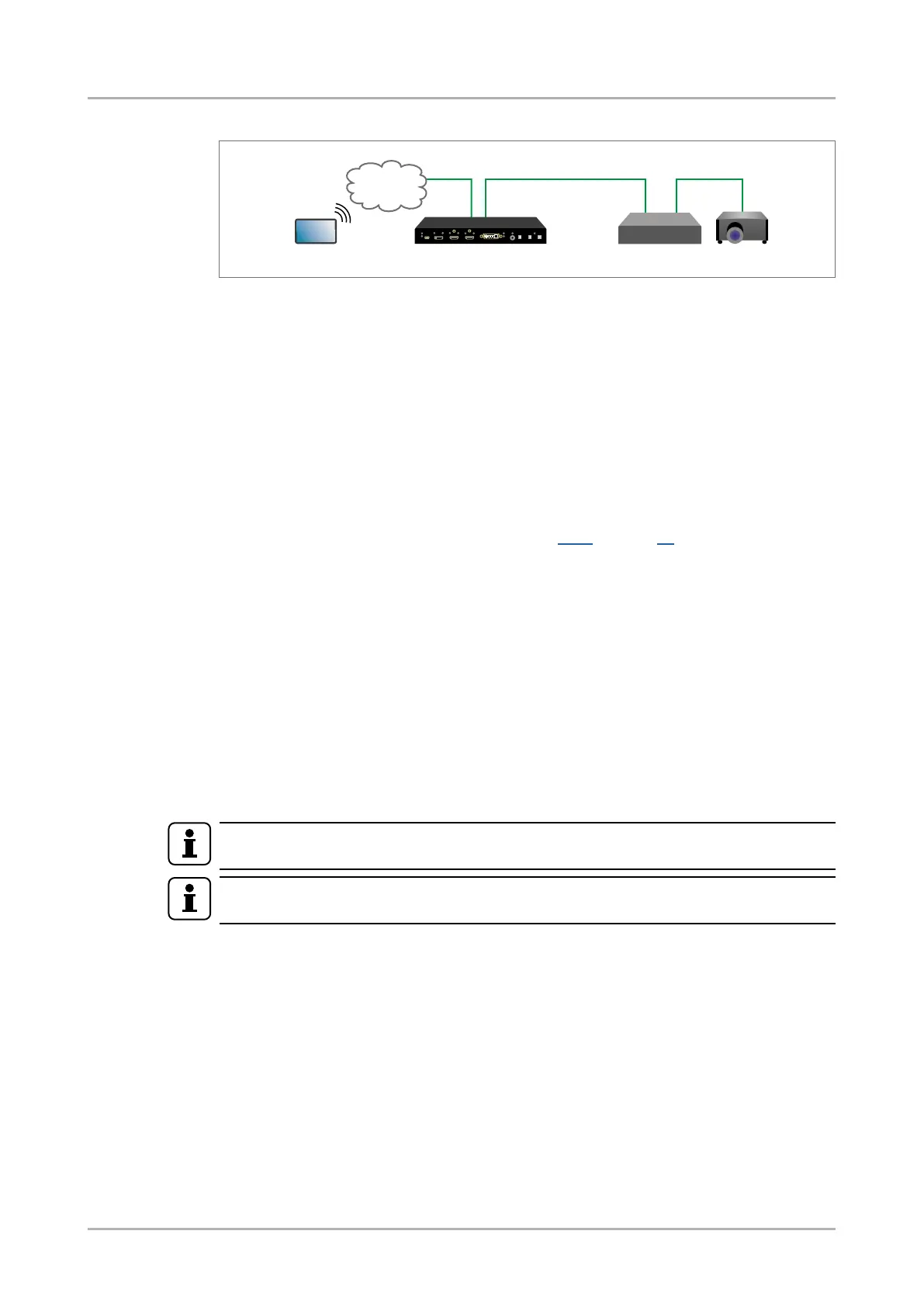
RS-232 signal transmission - example
RS-232 signal transmission
The concept
The Touch controller can send commands (input/output switching, control functions, etc.) to
the transmitter and is able to remote control the projector via RS-232.
Settings
▪ Touch controller: wireless IP connection to the same Ethernet as the transmitter is
connected to. Use a dedicated software tool (e.g. a terminal) which is suitable for
sending commands via TCP/IP to a certain IP:port address.
▪ Transmitter: the RS-232 interface of the OPT OUTPUT (O1) is in Pass-through
mode. Set the further parameters (Baud rate, Data bits, etc.) in accordance with the
specications of the projector. See section 6.6.1 on page 39.
▪ Receiver: the receiver will transmit the RS-232 data between the optical input port and
the RS-232 port.
▪ Projector: note the RS-232 port setting that is specied by the Manufacturer. Connect
a suitable serial cable with the proper wiring.
Command sending
▪ You can send LW3 protocol commands to the 192.168.0.100:6107 port to control the
transmitter.
▪ You can send LW2 protocol commands to the 192.168.0.100:10001 port to control the
transmitter.
▪ You can send commands to the 192.168.0.100:8001 port to control the projector. This
port number means the RS-232 interface of the optical output port (O1).
INFO
Above values are examples and based on factory default settings.
INFO
Only SW4-OPT-TX240RAK model has Ethernet LAN port.
4.3.2. USB Control interface
The device can be controlled over front panel USB mini B-type connector. This interface only
supports LW3 protocol. The interface can be used to establish a connection to Lightware
Device Controller software.
Touch controller
LAN OPT OUT RS-232
OPT receiver Projector
Ethernet
SW4-OPT-TX240RAK
HDMI-3D-OPT-TX200 series
User’s manual
Optical extender concept Page 25 / 106









 To Next Page