Legend:
<size>: <number of inputs>x<number of outputs>
<layer>:
See the details in section 7.3.1 on page 51.
Explanation: The device reports that it has a video crosspoint with 4 inputs and 2 outputs,
and an audio crosspoint with 6 inputs and 2 outputs.
7.3.8. Change video autoselect mode
Description: The autoselect mode of the video outputs can be changed.
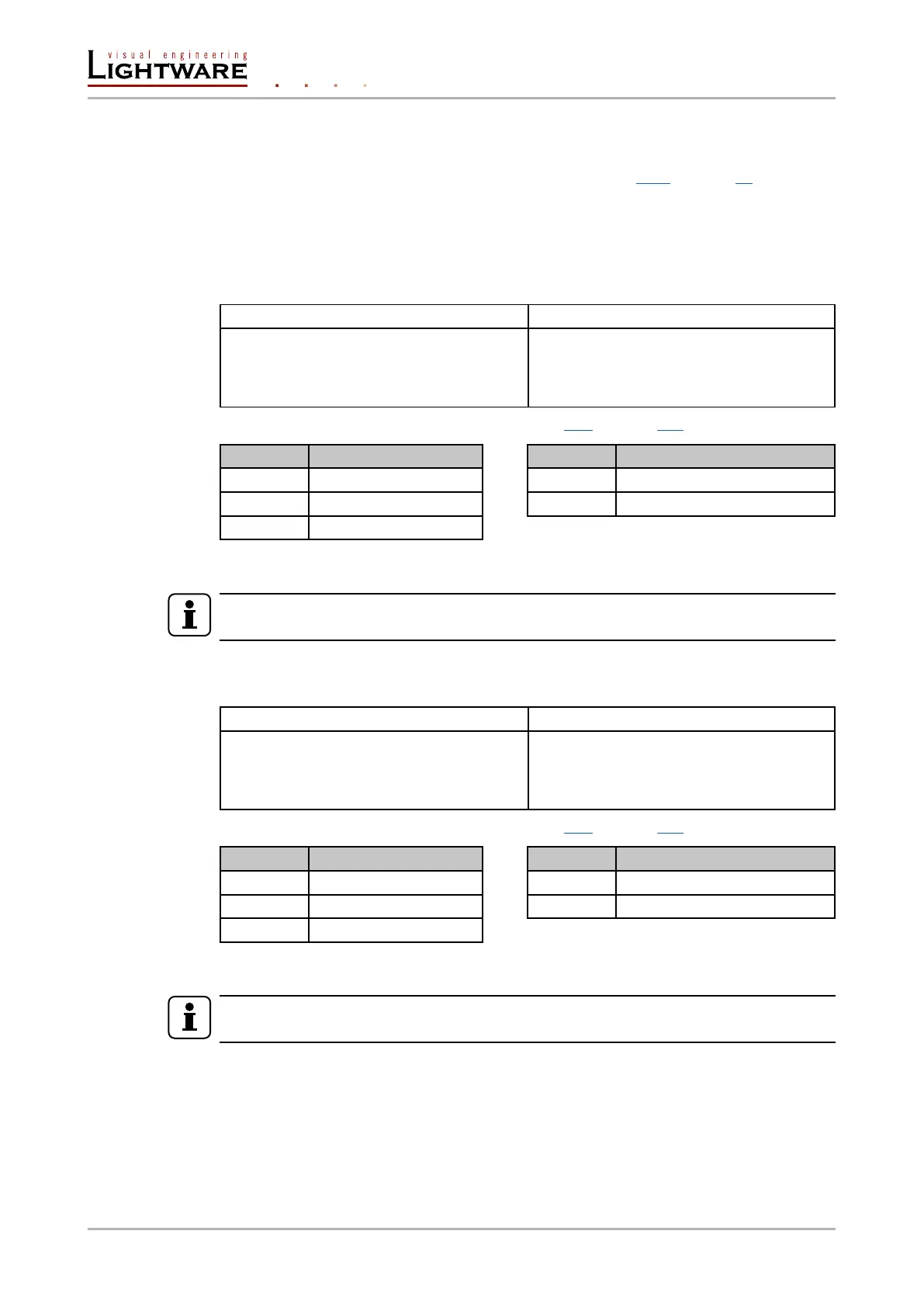
Format Example
Command {AS_V<out>=<state>;<mode>}}
Response (AS_V<out>=<state>;<mode>)
CrLf
{as_v1=E;P}
(AS_V1=E;P)CrLf
Legend: The output numbers are listed in section 11.2 on page 101.
Letter <state> Letter <mode>
F First detect mode E Autoselect mode is enabled
P Priority detect mode D Autoselect mode is disabled
L Last detect mode
Explanation: The Autoselect mode of video output1 (and output 2) is enabled and set to
Priority mode.
INFO
The Autoselect mode can be queried by typing the “as_v<out>=?” command.
7.3.9. Change audio autoselect mode
Description: The autoselect mode of the audio outputs can be changed.
Format Example
Command {AS_A<out>=<state>;<mode>}}
Response (AS_A<out>=<state>;<mode>)
CrLf
{as_a1=E;P}
(AS_A1=E;P)CrLf
Legend: The output numbers are listed in section 11.2 on page 101.
Letter <state> Letter <mode>
F First detect mode E Autoselect mode is enabled
P Priority detect mode D Autoselect mode is disabled
L Last detect mode
Explanation: The Autoselect mode of audio output1 (and output 2) is enabled and set to
Priority mode.
INFO
The Autoselect mode can be queried by typing the “as_v<out>=?” command.
Page 54 / 106 LW2 programmers' reference









 To Next Page