Alarm Operation
Setting the Alar
m Timer:
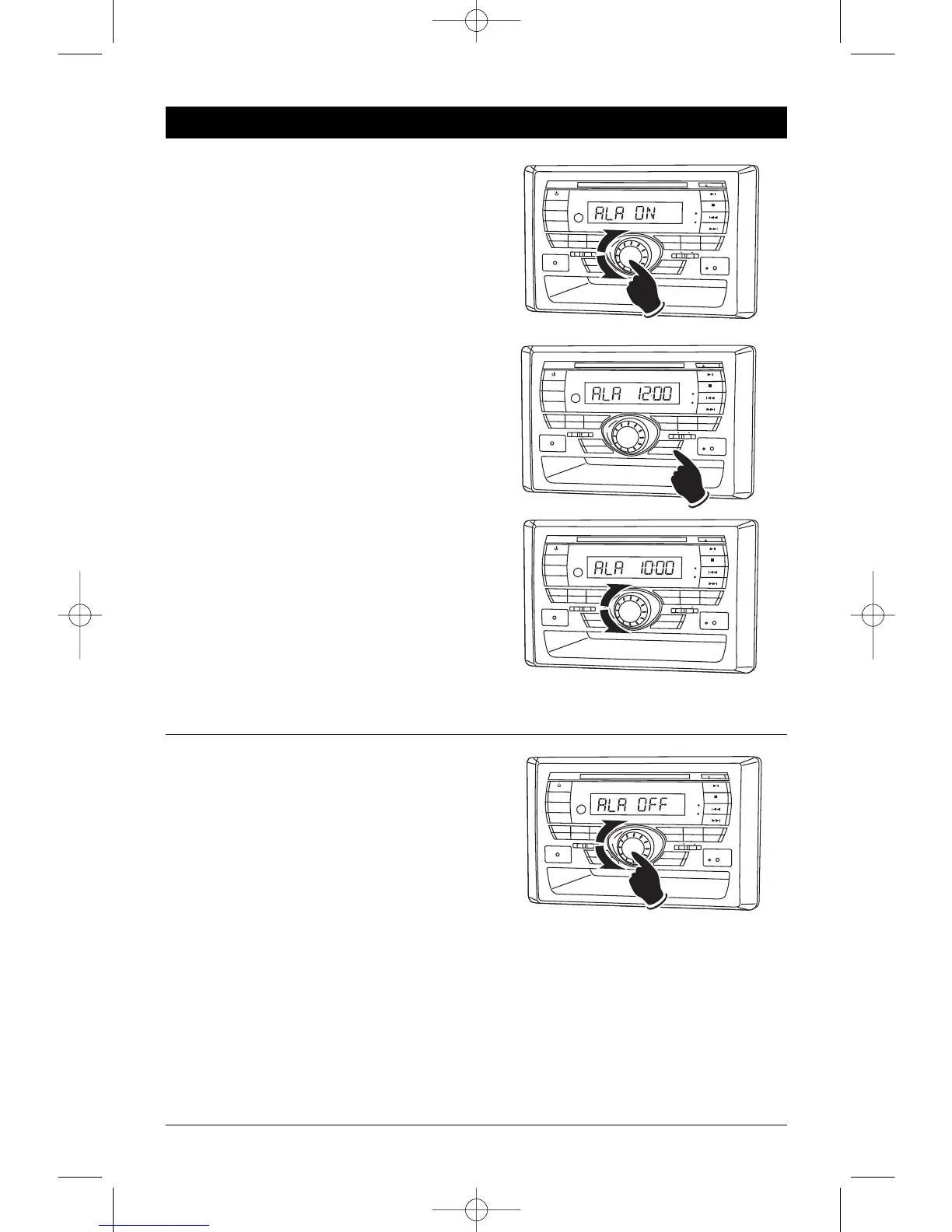
1. Press and hold the Volume knob until
“PCLK OFF” appears in the display. Press the
Volume knob 3 more times and “ALA OFF”
appears in the display.
2. Rotate the Volume knob until “ALA ON”
appears in the display. The alarm indication
LED will now be lit.
3. Press and release the ALARM button and the
hour indicators will start flashing.
4. Rotate the Volume knob until the correct Hour
appears in the display.
Note: When setting the alarm clock make sure
to select the correct AM or PM indicator.
5. Press the Volume knob and the Minute indica-
tors will start flashing.
6.
Rotate the Volume knob until the correct
Minutes appears in the display
.
7. Press the ALARM button and the display will
return to normal operation.
8. Press the POWER button to turn the unit off.
The unit will automatically turn on when the
set alarm time is reached.
Cancelling the Alarm Timer:
1. Press and hold the Volume knob until
“PCLK OFF” appears in the display. Press the
Volume knob 3 more times and “ALA ON”
appears in the display.
2. Rotate the Volume knob until “ALA OFF”
appears in the display
. The alarm indication
LED will not be lit.


 To Next Page
 Loading...