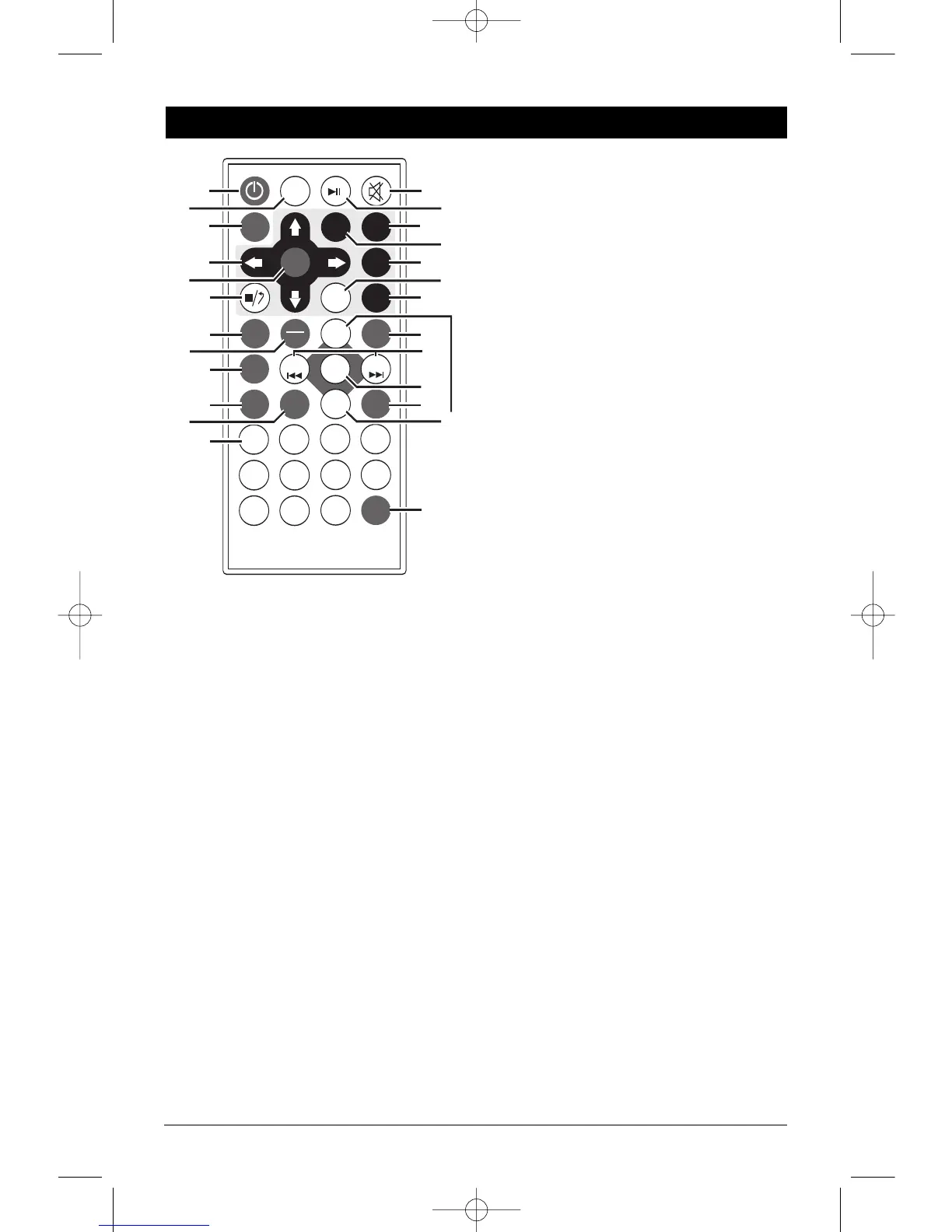
1. Power On/Off Button: Press to turn the unit on
or off.
2. MODE Button: Press to choose between
Audio/Video In, Front (AV IN F), Audio/Video In,
Rear (AV IN R), AM/FM Radio (RADIO),
Music/Movie Disc (DISC) and IPOD Input (IPOD)
3. AM/FM Band Selector Button (BND): Press to
select the desired radio band: 1 FM, 2 FM, 3 FM,
1 AM or 2 AM.
4. Navigation Buttons: In the movie disc menu
mode, these buttons serve as cursor buttons to
select item left/right, up/down.
5. ENTER Button: Executes the selected item.
6.
m
Stop Button: Press to stop play of picture or
audio.
7. AMS/RPT Button:
Radio Mode: Automatic radio station memory
storing (See “AM/FM Operation” for mor
e
details).
Disc Mode: Press to repeat a music track, press
again to repeat the music disc. In the movie
mode press to repeat a movie title or chapter.
Press again to cancel.
8. ST/PROG Button:
Radio Mode:
Press to select FM stereo or mono
reception.
Disc Mode: Program disc play.
9. LOC/RDM Button:
Radio Mode: Press to select Local or Distant
reception.
Disc Mode: Press to play all the tracks on the
music disc in random order. Press again to
cancel.
10. MENU Button: Press to display the root menu
that is stored on the movie disc.
11. OSD Button (On Screen Display): Press to
display movie disc information: chapter, elapse
time, etc.
12. Numeric Buttons
13. Mute Button:
Press to mute the volume, press
again to restore the volume.
14.
©
ll Play/Pause Button: Press to pause disc
play, press again to resume play.
15. Subtitle Button (Sub-T): Press to access
movie disc’s subtitle languages.
16. Title Button: Press to display the root menu
that is stored on the movie disc.
17. Setup Button: Displays the onscreen SETUP
menu.
18. Angle Button: Changes the view angle on
multi-angle movie disc.
19. Slow Button: Press to play the movie in slow
motion.
20. ZOOM Button: Press to enlarge or reduce the
movie’s onscreen image.
21. SEEK- l
§§
and SEEK
+ ©©
l Button:
Radio Mode:
Press to tune the radio to a
lower or higher frequency.
Disc Mode: Press this button to search for the
beginning of the previous track or next track or
chapter.
IPOD Mode: Press this button to search for
the beginning or next track.
22.
SEL Button:
Pr
ess to select the sound con
-
trols: Bass, Treble and Balance.
23. Audio Button: Press to access movie’s audio
setting.
24.
Volume Buttons (VOL
+
and VOL
-
): Pr
ess to
increase or decrease the volume level.
25. GO TO Button: Goes to bookmark function
during movie playback.
LS5050-UM Rev. B 4/16/10 4:14 PM Page 5


 To Next Page