14
Music Disc Operation
General Operations:
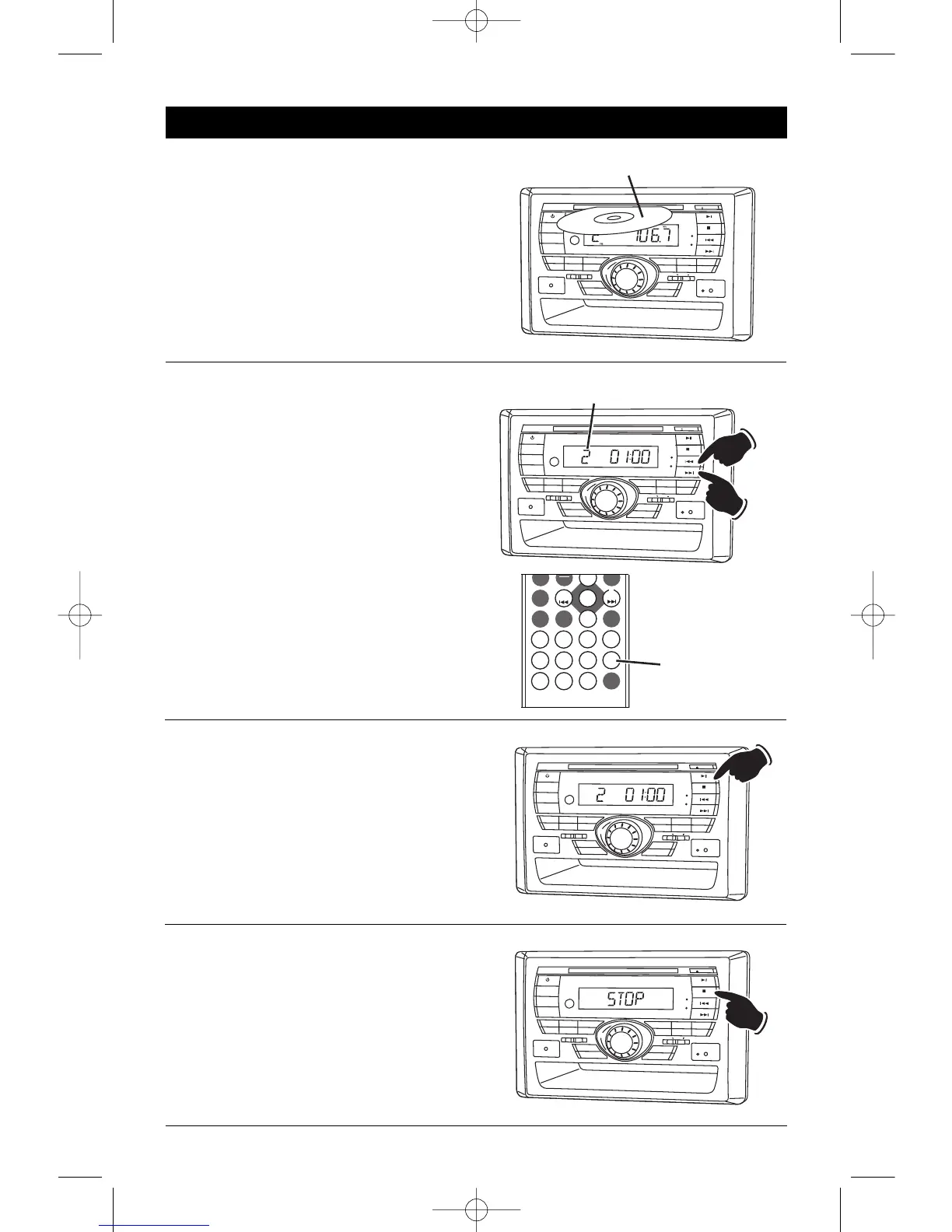
1. Press the POWER button to turn the unit
On.
2. Gently insert the disc into the slot with
the label side up. The unit will automati-
cally load the disc.
Note: If a disc does not auto-load DO NOT
FORCE
into the slot, as you may already
have a disc loaded.
Pausing the Disc:
Press the
©
ll button to pause the disc, press it
again to resume play.
Stopping the Disc:
Pr
ess the
m
button to stop the disc. T
o r
esume
play
, pr
ess the
©
ll button.
Pressing the
m
button 2 times, then pressing
the
©
ll button will play the disc from the begin-
ning.
Music Track Selection:
Press the l
§§
button to select a lower track.
Press the
©©
l button to select a higher track.
The track number will appear in the display.
Tracks can also be selected by using the remote
control. Press the track selection number button
that corresponds to the track you want to play.
For example: If you want to play track 8, press
button
8. Track 8 will start playing and “8” will
appear in the display.
If you want to play track 12, press button 1, fol-
lowed immediately by button
2. Track 12 will start
playing and “12” will appear in the display.


 To Next Page
 Loading...