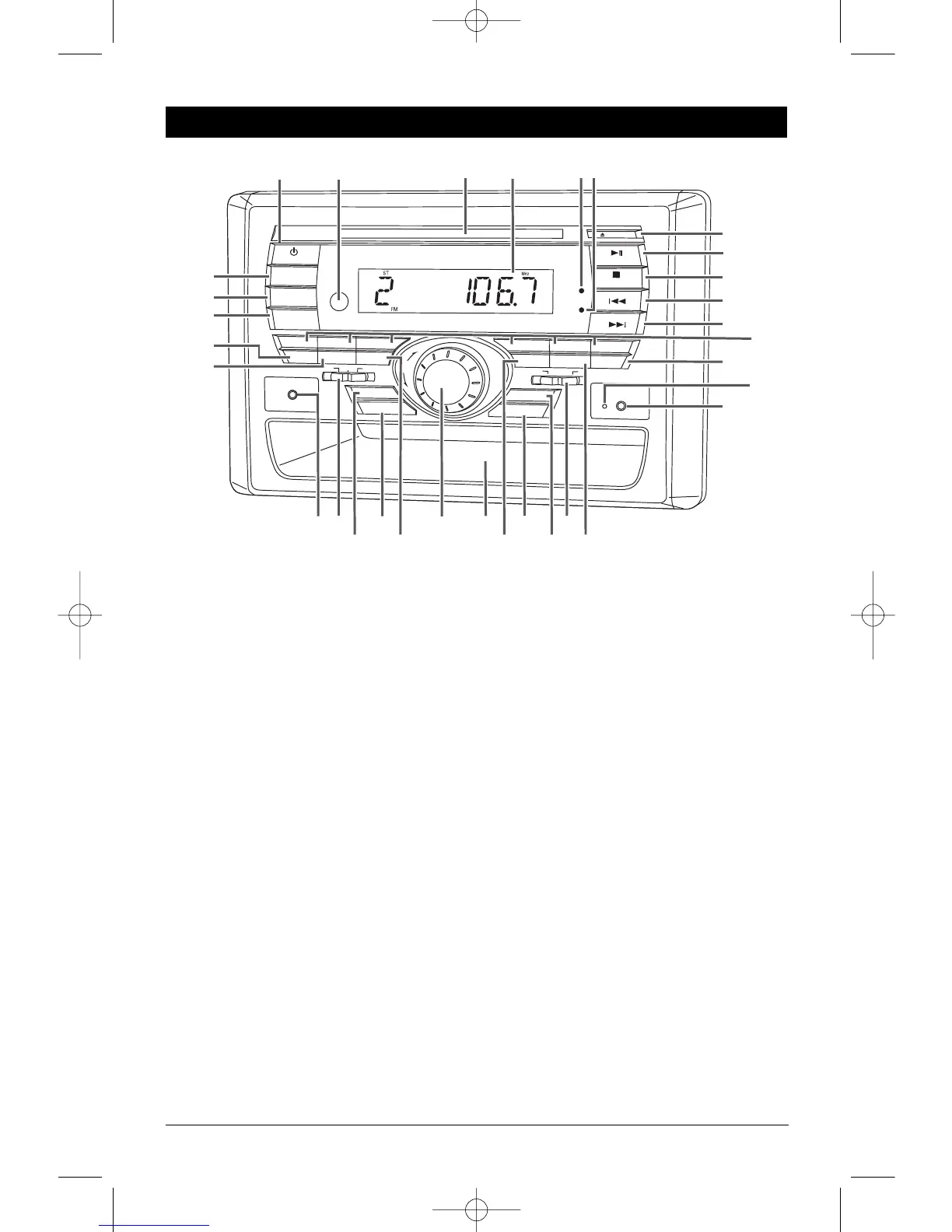
Button Locations and Functions
3
1. Power On/Off: Press to turn the unit on or off.
2. Infrared Eye: Receives the signals from the remote control.
3. Disc Slot: To play a disc, insert the disc into slot with label facing up.
4.
Display Area: This area displays all function information for the radio, clock, disc player and IPOD.
5. FM Stereo Indication LED: FM stereo reception is indicated when the LED is on.
6. Alarm Timer LED: The alarm timer has been activated when the LED is on.
7. Eject Button: Press to eject the disc.
8. Play/Pause (
©
ll) and Mute Button:
Radio and Multi-Media Input Modes:
Press to mute volume level. Press again to restore.
Disc Mode: Press to pause disc play, press again to resume play.
IPOD Mode: Press to pause play, press again to resume play.
9. Stop Button
Disc Mode: Press to stop play of movie or audio.
IPOD Mode: Press to access IPOD menu. (See IPOD Operations section for more details).
10. Seek
-
l
§§
Button:
Radio Mode:
Press to tune the radio to a lower frequency.
Disc Mode: Pr
ess this button to sear
ch for the beginning of the pr
evious track or chapter.
IPOD Mode: Press this button to search for the beginning of the previous track.
11. Seek
+ ©©
l Button:
Radio Mode:
Press to tune the radio to a higher frequency.
Disc Mode: Pr
ess this button to sear
ch for the beginning of the next track or chapter
.
IPOD Mode: Press this button to search for the beginning of the next track.
12. Radio Station Recall Buttons (1-6): Pr
ess and r
elease when recalling preset radio stations. Press
and hold until the preset number appears to memorize a radio station.
13. Random Button:
Disc Mode:
Press to play all the tracks on the music disc in random order. Press again to cancel.


 To Next Page