18
Home Share
Home Share
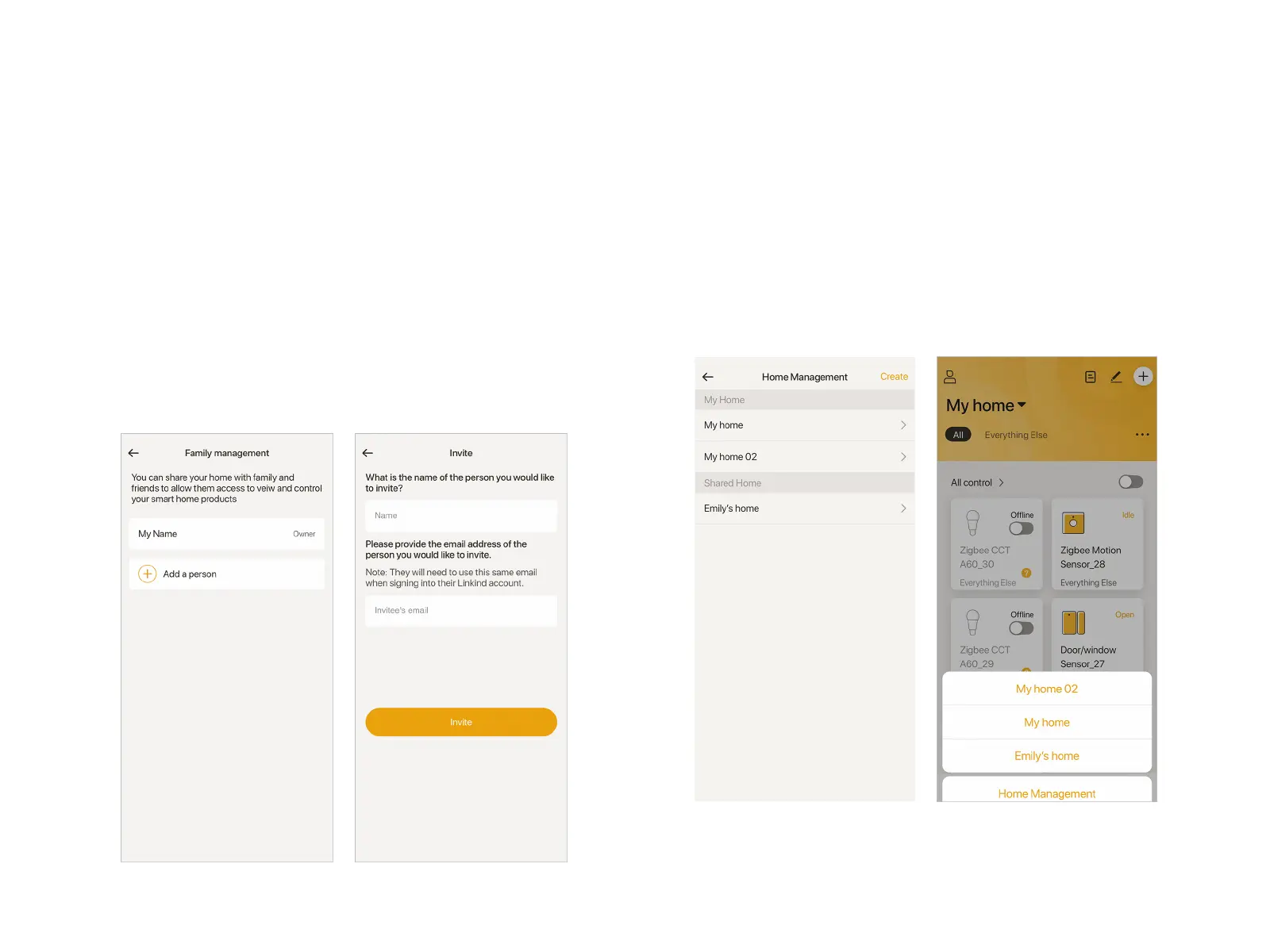
"Home share" option allows you to share the control over the
smart devices to others.
Tap the "Home" you created to go to detailed settings. Tap
"Home share", then "Add a person" in "Family management"
page. In "Invite" page, fill in the name and E-mail of the Invitee
you want to add. The "Name" here works as a note, not
necessarily to be the same as that used in the APP. Lastly, tap
"Invite". An invitation letter will be sent to the Invitee's Email box.
Note: The Invitee's email could be both a registered Linkind
account or unregistered one.
Accept Invitation
Invitee needs to open the letter subjected with "Home Share
Invitation". Click "Accept invitation" to confirm the acceptance.
Then the invitee is able to log in his Linkind account to control
the shared Home.
Note: If the Invitee didn't register Linkind account, he or she will
be guided by the Invitation letter to done the registration.


 To Next Page