REMOTE CONTROL | 13
Using the Remote Control
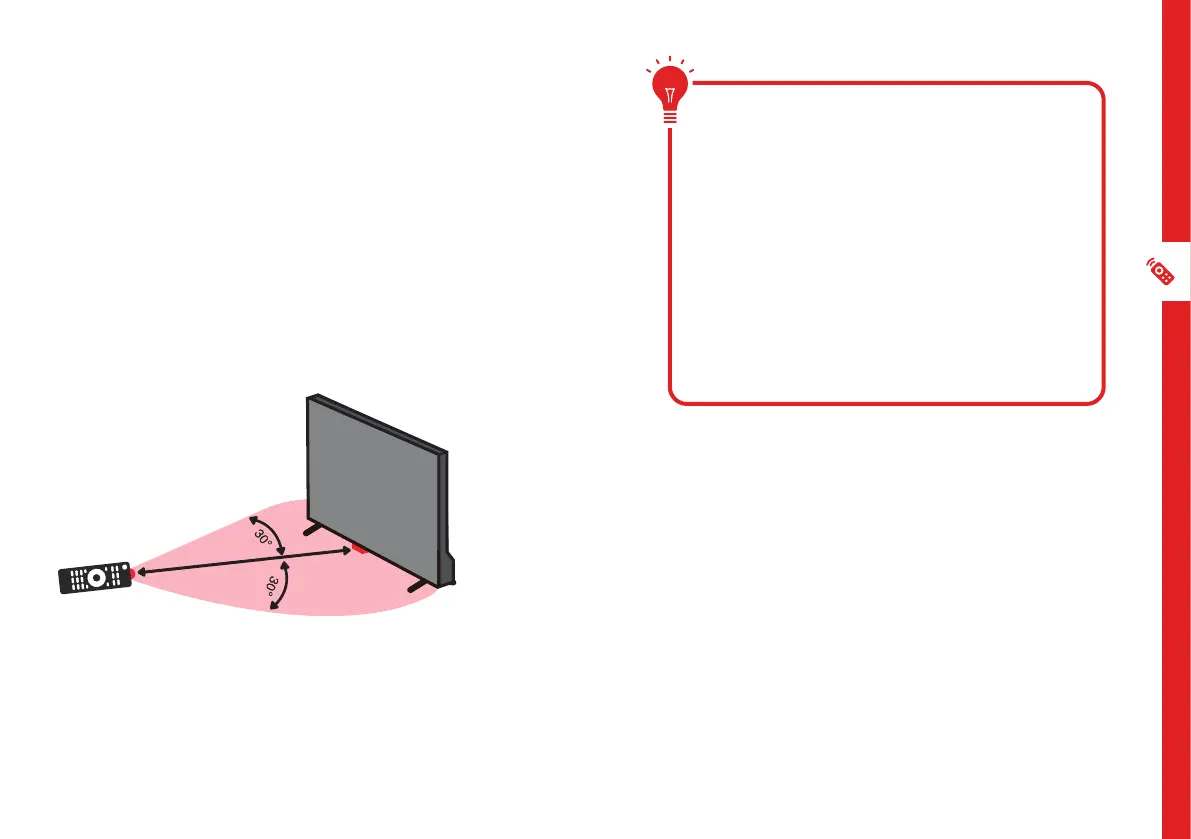
To use the remote, point it towards the remote sensor
at the front of the TV. The remote will not operate if its
path is blocked.
The remote has a range of up to about 5 metres from
the TV at an angle of up to 30 degrees to either side of
the sensor, as illustrated below.
Image is an example only.
Remote sensor location on TV may vary.
5m
Remote Hints and Tips
• Do not drop, step on or otherwise
impact the remote control. This
may damage the parts or lead to
malfunction.
• Do not place objects between the
remote control and the remote sensor.
• Do not use this remote control while
simultaneously operating a remote
control for other devices.
Remote Pairing
This remote control uses both Bluetooth
®
and
IR (infrared) to send its commands to the TV.
• You can use this remote control via IR for
most operations.
• To use advanced operations like voice
search, you need to pair the TV with the
remote control. See page 15 for more
information on pairing your remote.



 To Next Page