SMART TV | 21
Home Screen
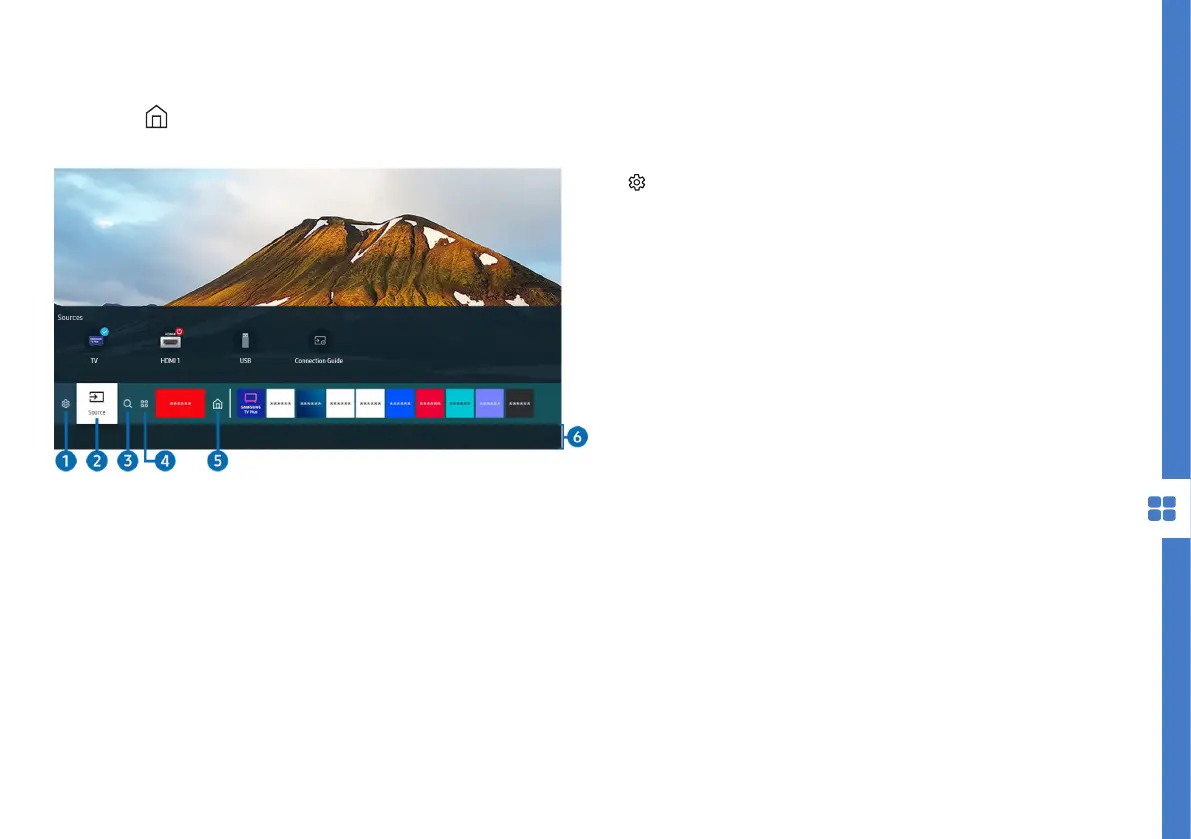
Press the button to display the Home Screen, where you can open previously or
frequently used apps. You can also move or delete the apps from the screen.
Image is for reference only. The image may differ.
1. Settings : a list of quick setting icons will appear
above the top of the menu. You can set frequently
used functions by selecting the icons.
• e-Manual : read the built-in TV manual. Please
refer to page 25 for more detailed information.
• Picture mode: select picture mode that
provides best viewing experience.
• Sound mode: select a sound mode that best
optimises your sound experience.
• Sound output: select which speakers the
TV uses for audio output. Select Bluetooth
Speaker List to connect to a Bluetooth speaker.
• Subtitle: turn subtitles on/off.
• Audio Language: change the audio language.
• Sleep Timer: set TV standby sleep timer.
• Network: View current network and internet
status.
• Device Care: run to diagnose and optimise
your TV + TV storage.
• All Settings: display settings menu.



 To Next Page