EasyManua.ls Logo

LION SG4000 - User Manual

LION SG4000
24 pages
Print Icon
To Next Page IconTo Next Page
Loading...
SG4000
SMOKE
GENERATOR
[
USER’S MANUAL
Original User Manual
Rev 101 06/21
Question and Answer IconNeed help?

Do you have a question about the LION SG4000 and is the answer not in the manual?

Summary

Introduction

For Your Safety

Specifications

General Specifications

General capabilities and technical information for LION Smoke Generators.

Continuous Generator Operation

Details on how LION Smoke Generators provide continuous smoke production.

Special Features

Key features of the LION SG4000 Smoke Generator.

Technical Specifications Table

Detailed technical specifications including voltage, power, dimensions, and more.

Overview of the Smoke Generator

Smoke on Demand Operation

Manual smoke production by pressing the SMOKE button.

Continuous Mode Operation

Continuous smoke production until the STOP button is pressed.

Run Button Functionality

Initiates preset programs for automated smoke generation.

Stop Button Functionality

Ceases all smoke production and maintains heater core temperature.

Up and Down Buttons

Adjusts smoke density and navigates menus.

Menu Button Functionality

Accesses the Smoke Generator's menu for programming and settings.

Enter Button Functionality

Confirms settings and changes menus.

Fluid Level Sensor Display

Indicates the remaining Smoke Liquid in the tank.

Heater Core Temperature Display

Shows heater core temperature as a percentage of 660°F (350°C).

Current Operating Mode Display

Displays the generator's current activity status like Ready or Heating.

Smoke Output Density

Displays smoke output percentage, adjustable via UP/DOWN buttons.

Volume of Smoke Produced

Shows the current volume of smoke being produced in cubic feet.

Supply Power Indicator

Indicates received power percentage of 120V; drops with poor power source.

Remote Control Setting Display

Indicates which section of the wireless remote controls the generator.

Using Your Smoke Generator

Programming the Smoke Generator

Step-by-step guide to programming the smoke generator for AUTO or TIMER modes.

Programming Display (AUTO Mode)

Details of the AUTO mode programming display, including Room Size.

Programming Display (TIMER Mode)

Details of the TIMER mode programming display, including Smoke, Pause, Repeat.

Programmable Operation Options

Setting 'Smoke' duration, 'Pause' intervals, and 'Repeat' function for programs.

Other Smoke Generator Settings

Setup Display and Options

Accessing Setup to change Power, Language, or Restore Defaults.

DMX Display and Configuration

Configuring DMX channel for external control.

Remote Control Display and Layout

Understanding the remote control display and physical button layout.

DMX Channel Configuration

Changing the DMX channel for compatible dimmer packs and multiple generators.

Remote Control Pairing

Linking remote controls to the Smoke Generator and designating button functions.

Learning Remote Control

Pairing a remote control with the Smoke Generator by pressing buttons.

Erasing Paired Remotes

Removing all previously paired remote controls from the generator.

Remote Connection Icon

Icon indicating remote activation on the standard display screen.

Error Codes and Definitions

Error Code E1: Setting Read Failure

Device unable to read setting values; requires factory calibration.

Error Code E3: Heating Element 1 Feedback Issue

Heating element 1 switched on but no feedback; requires factory repair.

Error Code E4: Heating Element 2 Feedback Issue

Heating element 2 switched on but no feedback; requires factory repair.

Error Code E5: Low Fluid Level

Fluid level is too low; requires adding fluid and restarting.

Error Code E6: Casing Overheating

Heating element casing temperature above maximum; wait for cooling or repair.

Error Code E7: Element Overheating

Heating element temperature above maximum; wait for cooling or repair.

Error Code E8: Element Temperature Too Low

Heating element temperature below minimum; requires factory repair if persists.

Error Code E9: Heating Element 1 Off

Heating element 1 switched off but functional; requires factory repair.

Error Code E10: Heating Element 2 Off

Heating element 2 switched off but functional; requires factory repair.

Service and Maintenance

Annual Maintenance Procedures

Flushing the generator with LION Cleaning Solution annually.

Water Exposure Precautions

Generator is water-resistant, not watertight; avoid getting wet.

Main Power Cord Service

Contact LION for main power cord replacement.

Opening and Repairing Guidelines

Only qualified staff should open and repair the Smoke Generator.

Important Points and Precautions

Warranty Information

Warranty Conditions and Limitations

Details on warranty coverage, transferability, and exclusions for manufacturing defects.

Contact Information

Summary

Introduction

For Your Safety

Specifications

General Specifications

General capabilities and technical information for LION Smoke Generators.

Continuous Generator Operation

Details on how LION Smoke Generators provide continuous smoke production.

Special Features

Key features of the LION SG4000 Smoke Generator.

Technical Specifications Table

Detailed technical specifications including voltage, power, dimensions, and more.

Overview of the Smoke Generator

Smoke on Demand Operation

Manual smoke production by pressing the SMOKE button.

Continuous Mode Operation

Continuous smoke production until the STOP button is pressed.

Run Button Functionality

Initiates preset programs for automated smoke generation.

Stop Button Functionality

Ceases all smoke production and maintains heater core temperature.

Up and Down Buttons

Adjusts smoke density and navigates menus.

Menu Button Functionality

Accesses the Smoke Generator's menu for programming and settings.

Enter Button Functionality

Confirms settings and changes menus.

Fluid Level Sensor Display

Indicates the remaining Smoke Liquid in the tank.

Heater Core Temperature Display

Shows heater core temperature as a percentage of 660°F (350°C).

Current Operating Mode Display

Displays the generator's current activity status like Ready or Heating.

Smoke Output Density

Displays smoke output percentage, adjustable via UP/DOWN buttons.

Volume of Smoke Produced

Shows the current volume of smoke being produced in cubic feet.

Supply Power Indicator

Indicates received power percentage of 120V; drops with poor power source.

Remote Control Setting Display

Indicates which section of the wireless remote controls the generator.

Using Your Smoke Generator

Programming the Smoke Generator

Step-by-step guide to programming the smoke generator for AUTO or TIMER modes.

Programming Display (AUTO Mode)

Details of the AUTO mode programming display, including Room Size.

Programming Display (TIMER Mode)

Details of the TIMER mode programming display, including Smoke, Pause, Repeat.

Programmable Operation Options

Setting 'Smoke' duration, 'Pause' intervals, and 'Repeat' function for programs.

Other Smoke Generator Settings

Setup Display and Options

Accessing Setup to change Power, Language, or Restore Defaults.

DMX Display and Configuration

Configuring DMX channel for external control.

Remote Control Display and Layout

Understanding the remote control display and physical button layout.

DMX Channel Configuration

Changing the DMX channel for compatible dimmer packs and multiple generators.

Remote Control Pairing

Linking remote controls to the Smoke Generator and designating button functions.

Learning Remote Control

Pairing a remote control with the Smoke Generator by pressing buttons.

Erasing Paired Remotes

Removing all previously paired remote controls from the generator.

Remote Connection Icon

Icon indicating remote activation on the standard display screen.

Error Codes and Definitions

Error Code E1: Setting Read Failure

Device unable to read setting values; requires factory calibration.

Error Code E3: Heating Element 1 Feedback Issue

Heating element 1 switched on but no feedback; requires factory repair.

Error Code E4: Heating Element 2 Feedback Issue

Heating element 2 switched on but no feedback; requires factory repair.

Error Code E5: Low Fluid Level

Fluid level is too low; requires adding fluid and restarting.

Error Code E6: Casing Overheating

Heating element casing temperature above maximum; wait for cooling or repair.

Error Code E7: Element Overheating

Heating element temperature above maximum; wait for cooling or repair.

Error Code E8: Element Temperature Too Low

Heating element temperature below minimum; requires factory repair if persists.

Error Code E9: Heating Element 1 Off

Heating element 1 switched off but functional; requires factory repair.

Error Code E10: Heating Element 2 Off

Heating element 2 switched off but functional; requires factory repair.

Service and Maintenance

Annual Maintenance Procedures

Flushing the generator with LION Cleaning Solution annually.

Water Exposure Precautions

Generator is water-resistant, not watertight; avoid getting wet.

Main Power Cord Service

Contact LION for main power cord replacement.

Opening and Repairing Guidelines

Only qualified staff should open and repair the Smoke Generator.

Important Points and Precautions

Warranty Information

Warranty Conditions and Limitations

Details on warranty coverage, transferability, and exclusions for manufacturing defects.

Contact Information

Overview

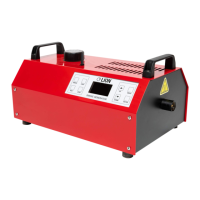
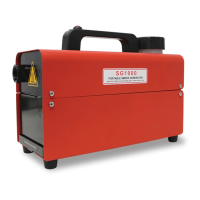
The LION SG4000™ Smoke Generator is an industrial-grade, high-volume smoke machine designed primarily for firefighter and emergency personnel training. It is driven by a microprocessor control system that carefully regulates temperature, smoke volume, and density, allowing for continuous smoke production ideal for realistic and intense training exercises. The generator is designed for long-term use, with electronically set values and the ability to download new software developments at the LION factory.

Important Technical Specifications:

  • Supply Voltage: 115V Version: 115VAC 50-60Hz; 230V Version: 230VAC 50-60Hz
  • Power Consumption: 115V Version: Max 1800W; 230V Version: Max 2000W
  • Dimensions: 12.5" x 19.25" x 7.5" (32 x 49 x 19 cm)
  • Weight: 45 lbs. (20.4 kg)
  • Power Cord: 10 ft. (3.0 m)
  • Tank Capacity: 5 litres/1.25 gallons
  • Consumption of Smoke Liquid at Max. Power: 3 litres/hr.
  • Operating Temperature: 30°F to 90°F (-1°C to 32°C)
  • Max. Pressure: 85 PSI (5.9 bar)
  • Smoke Production: 4000 ft³ (1219.2 m³) /min of smoke to zero visibility at 3 ft. (0.9 m)

Usage Features:

The SG4000™ features a user panel with an LCD display and eight interface buttons: SMOKE, CONT., RUN, STOP, UP, DOWN, MENU, and ENTER.

  • SMOKE (Smoke On Demand): Produces smoke manually while depressed. If the heater is at operating temperature, "BOOST" will display, and smoke output will temporarily increase to 140% density for up to 20 seconds before returning to normal. If a program is running, this button temporarily interrupts pre-set functions, reverting to the original program upon release.
  • CONT. (Continuous Mode): Produces smoke continuously until the STOP button is pressed.
  • RUN: Begins preset programs.
  • STOP: Ceases all smoke production and/or running programs, maintaining the heater core at optimum temperature.
  • UP and DOWN: Adjust smoke output density and navigate menus.
  • MENU: Accesses the Smoke Generator's menu for programming options and settings.
  • ENTER: Confirms settings and changes menus.

The LCD display provides crucial information:

  • Fluid Level Sensor: A bar indicating remaining Smoke Liquid.
  • Heater Core Temperature: A percentage (100% = 660°F/350°C). Normal operation ranges from 96% to 103%.
  • Current Operating Mode: Displays status (e.g., "Ready," "Heating").
  • Density of Smoke Output: Displays smoke output as a percentage of maximum, adjustable with UP/DOWN buttons.
  • Volume of Smoke Produced: Displays current smoke volume in cubic feet.
  • Supply Power Indicator: Displays power received as a percentage of 120V.
  • Remote Control Setting: Indicates which section (A or B) of a wireless remote controls the generator.

Programming the Smoke Generator:

The device offers two programming modes: AUTO and TIMER.

  • Initial Delay: Set the time before smoke generation begins (hours and minutes).
  • AUTO Mode (Room Size): Select small, medium, or large room size, and the generator will produce smoke until an automatic shut-off level is reached.
  • TIMER Mode: Allows setting specific "Smoke" duration, "Pause" duration between smoke operations, and "Repeat" (On/Off) to continuously run the program until STOP is pressed.

Other Settings:

The MENU also provides access to "Setup" and "DMX" options.

  • Setup: Adjust "Power" (max 1800 watts, lower settings reduce power consumption and smoke output), "Language," and "Restore Defaults."
  • DMX: Change the DMX channel, useful when operating with a dimmer pack and multiple generators.
  • Remote Control (RC): Link wireless remote controls. A remote can operate two independent generators (A or B). Each set of four buttons on the remote functions identically to the control panel buttons, with AUTO acting as RUN. Remotes are paired one at a time, and "Erase All" removes all paired remotes.

Error Codes:

The Smoke Generator displays error codes to indicate operational issues. If multiple errors occur, they are shown sequentially.

  • E1 (Settings Invalid): Device unable to read settings. Requires factory calibration.
  • E3 (Heating Element 1 Problem): No feedback from heating element 1. Requires factory repair.
  • E4 (Heating Element 2 Problem): No feedback from heating element 2. Requires factory repair.
  • E5 (Low Fluid Level): More fluid needed. Restart generator after refilling.
  • E6 (Overheating Casing): Heating element casing temperature too high. Wait for cooling. Regular occurrence may require calibration or repair.
  • E7 (Overheating Element): Heating element temperature too high. Wait for cooling. Regular occurrence may require calibration or repair.
  • E8 (Under-temperature Element): Heating element temperature too low. If it doesn't reach the required level quickly, heating element correction or factory repair is needed.
  • E9 (Heating Element 1 Drive Error): Error in drive of heating element 1. Switch off immediately to prevent overheating. Requires factory repair.
  • E10 (Heating Element 2 Drive Error): Error in drive of heating element 2. Switch off immediately to prevent overheating. Requires factory repair.

Maintenance Features:

  • Annual Maintenance: Flush with LION Cleaning Solution (deionized water) once per year. Remove existing fluid, then flush approximately 3 quarts of Cleaning Solution by running the generator on Continuous setting until the tank is empty. Remove any remaining solution.
  • Water: The generator is water-resistant, not watertight. Avoid direct water exposure during training. Do not cover with a tarpaulin, as this can lead to heat buildup. Damage from water exposure voids the warranty.
  • Main Power Cord: Contact LION for assistance if the power cord needs replacement.
  • Opening and Repairing: Only qualified staff may open and repair the Smoke Generator.

Important Points:

  • Use only LION's specially formulated, water-based Smoke Liquid to ensure premium smoke and unit longevity. Using other liquids, especially oil-based, may clog fluid lines, create hazardous smoke, and void the warranty.
  • Use respiratory protection in prolonged contact with smoke or dense concentrations. People with respiratory conditions or asthma should avoid exposure.
  • The outlet nozzle and face become hot during operation; do not touch until completely cooled (at least 15 minutes). Do not move or store until cooled.
  • Always use on a hard, level, non-combustible surface.
  • Do not alter the appliance.
  • Inspect thoroughly after dropping or banging.
  • Position horizontally when in use.
  • Avoid extreme temperatures and direct sunlight.
  • Connect to a grounded power connection with sufficient current.
  • If an extension cord is necessary, use a grounded 12-gauge wire minimum.
  • For high concentrations in intense fire department training, an A1/P2 filter mask is recommended.

LION SG4000 Specifications

General IconGeneral
BrandLION
ModelSG4000
CategoryFog Machine
LanguageEnglish

Related product manuals