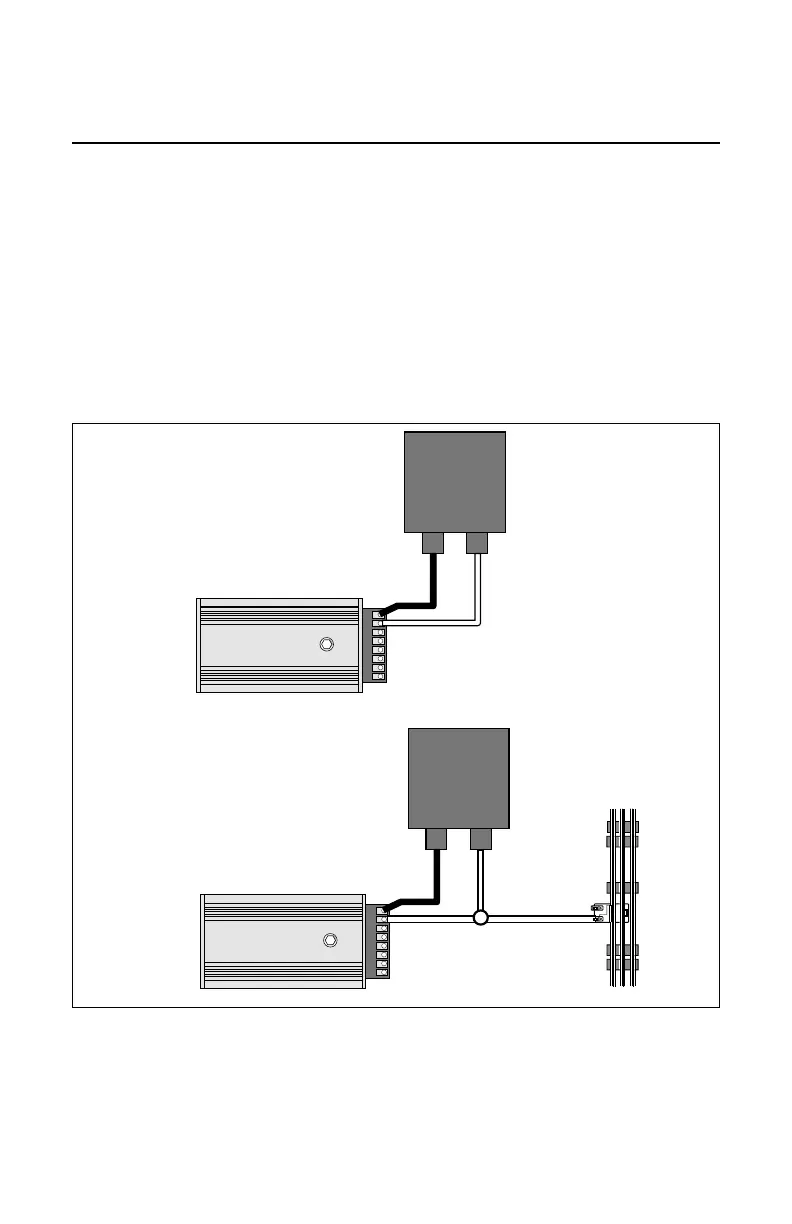
Figure 1. Powering your AVC with a transformer
3
Wiring your Accessory Voltage Controller
Powering the Accessory Voltage Controller
P
ower your AVC using one of the options illustrated in Figure 1. A separate power supply is
used in Option 1; the AVC is connected to the outside rail or common layout ground in
Option 2.
1. Attach one wire to the Power/A terminal of your transformer and connect it to the HOT
terminal on the AVC unit.
2. Option 1: Attach another wire to the Common/Ground/U terminal of your transformer and
connect it to the NEUT terminal on the AVC unit.
Option 2: Attach another wire to the outside rail and connect it to the NEUT terminal on
the transformer.
Refer to page 5
for accessory
connections.


 To Next Page