7
Wiring your Accessory Voltage Controller
Assigning an ID# to the AVC unit
F
ollow these steps to assign an ID# to your AVC unit so you can adjust the accessory voltages
with your CAB-1 Remote Controller.
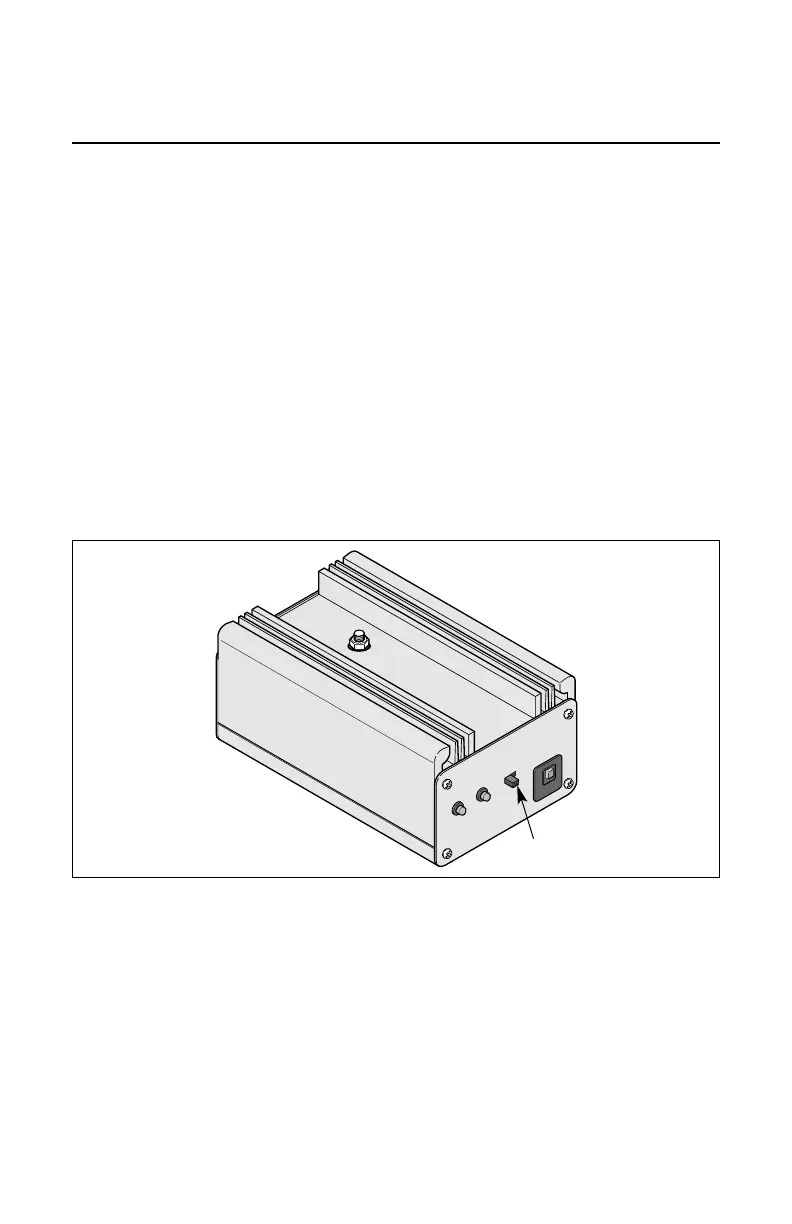
1. Slide the RUN/PRG switch to PRG.
This switch is located on the front of the AVC unit. Refer to Figure 4.
2. Press either TR or ENG (your choice) on your CAB-1 Remote Controller.
3. Select an ID# (0-9 for TR ID#s, 0-99 for ENG ID#s) and enter with the numeric keys on
your CAB-1 Remote Controller.
4. Press SET on your CAB-1 Remote Controller.
5. Slide the RUN/PRG switch back to RUN.
The ID# of the AVC unit has been assigned.


 To Next Page