EasyManua.ls Logo

Lionel TMCC - Connecting Your Accessories to the AVC Unit

Lionel TMCC
12 pages
Print Icon
To Next Page IconTo Next Page
To Previous Page IconTo Previous Page
Loading...
Wiring your Accessory Voltage Controller
6
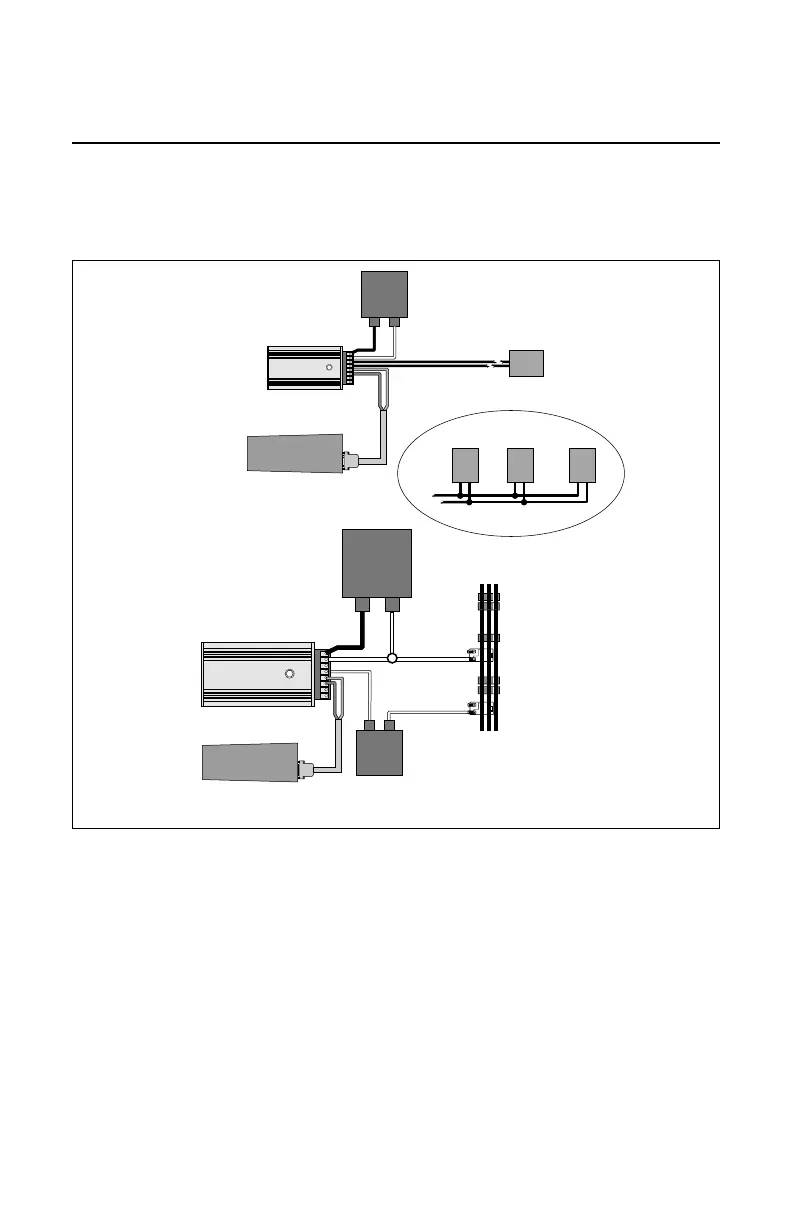
Connecting your accessories to the AVC unit
C
onnect your accessories to the TRACK OUT terminals on the AVC unit as illustrated in
Figure 3. In Options 1 and 2, the AVC and accessory are powered by a separate power
supply. In Option 2, the neutral is shared by the outside rail, the AVC, and the accessory.

POWER
SUPPLY
TRACK OUT/U
ACCESSORY 1 ACCESSORY 2 ACCESSORY 3
TRACK OUT/U
TRACK OUT/A
TRACK OUT/A
TRACK OUT/A
AVC
WIRING MULTIPLE ACCESSORIES
RED
(DAT)
GREEN
(COM)
COMMAND
BASE
RED
(DAT)
GREEN
(COM)
COMMAND
BASE
COMMON/GROUND/U
POWER/A
ACCESSORY
ACCESSORY
COMMON/
GROUND/U
POWER
SUPPLY
POWER/A
AVC
Option 2
Option 1
Figure 3. Connecting your accessories

Related product manuals