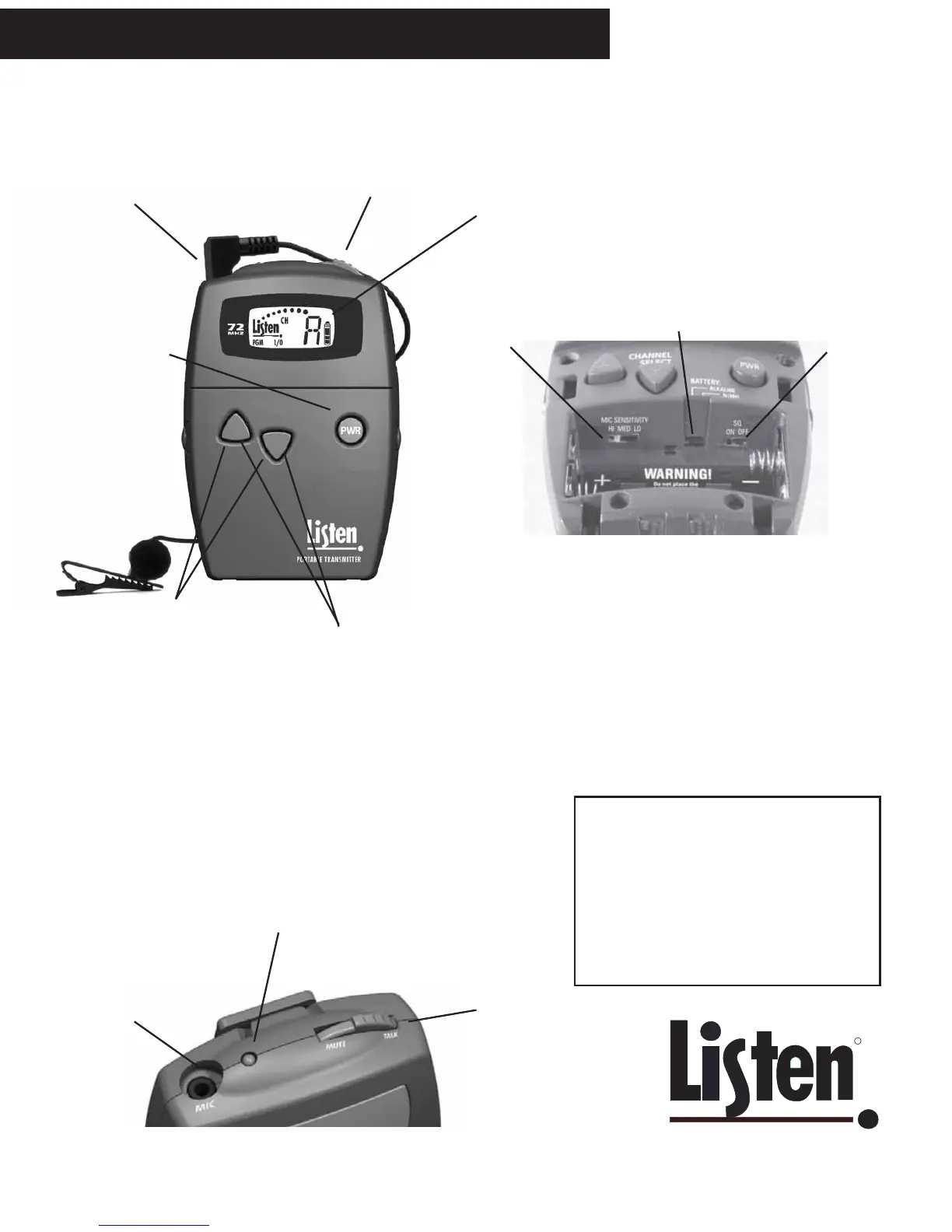
LT-700 Portable Transmitter Quick Reference
A Listen microphone or line
level cable connects here.
MUTE / TALK switch (more
information below)
Look & Listen Display
TM
shows level,
channel, battery status, PROGRAM
mode, whether a channel is locked, and
whether a channel is locked out from
selection (PROGRAM mode). See
close-up on page 17.
Use UP and DOWN buttons to
select a channel. Press and hold
either button for 3 seconds to lock
the channel. Press and hold a
button again to unlock.
Press PWR switch to turn
unit on or off. When in
PROGRAM mode, this
switch is used to toggle the
L/O mode for a channel.
Mic Sensitivity Switch - it arrives set at MID, which will work for
most microphones. If your mic level is too low, change the switch to
HI; if the level is too loud, switch to LO.
Battery Select Switch - place in NiMH position ONLY if you are
using Nickel Metal Hydride batteries, otherwise, leave it in the
Alkaline position.
SQ Switch: shipped in the ON position, use a screwdriver or pen to
slide to the OFF position if needed. You should turn SQ off if any of
your receivers do not have SQ.
Top of Unit
A microphone or
line level cable
connects here.
LED indicators:
Steady Red: Normal operation
Slow Flashing: Battery is low
Slow Flashing while charging: Unit is charging
Fast Flashing: Mute
MUTE / TALK switch -
this mutes the mic only
and not the line input.
LT-700 Portable Transmitter Quick Reference
Inside Access Door
Press and hold both buttons
for about 5 seconds to
enter PROGRAM mode.
The PGM icon will appear
in the display. To exit
PROGRAM, let unit sit idle
for 4+ seconds.
A Note on Charging NiMH Batteries
If you are using NiMH batteries in any
listen product, you should allow adequate
time for the charger (drop-in case or
LA-202) to complete a full charge cycle on
the batteries. This takes about 13 hours.
Mic Sensitivity
Switch
Battery Select
Switch
SQ
Switch



 To Next Page