LISTEN TECHNOLOGIES CORPORATION +1.801.233.8992 1.800.330.0891 Fax: +1.801.233.8995
Internet: www.ListenTech.com All specifications subject to change without notice.
26
LR-400 and LR-500 Display Receivers: Look & Listen
TM
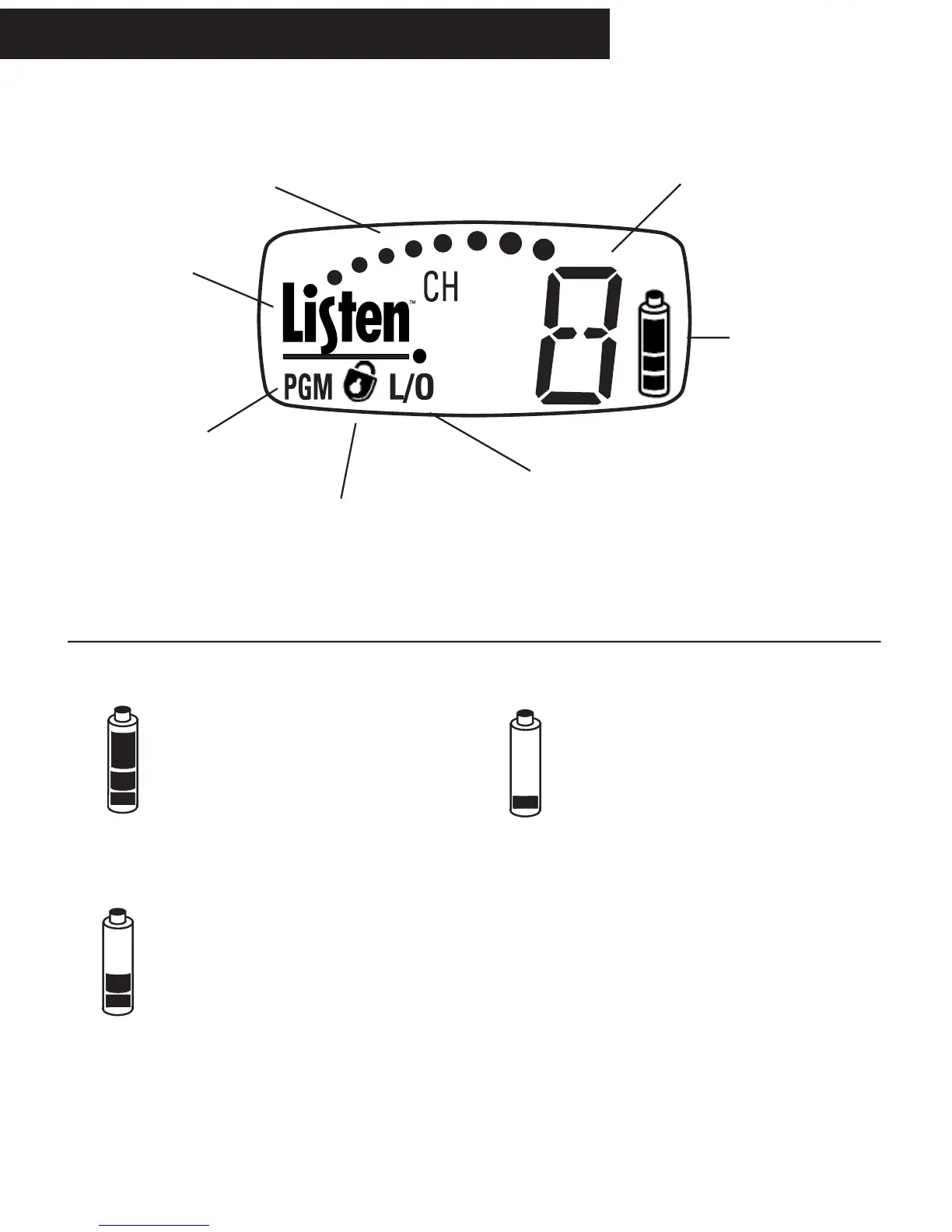
Display Descriptions
Dots indicate the relative RF signal
strength. When there is no signal
the unit is squelched.
Indicates the currently
tuned channel
Battery life indicator.
See below for more
details.
PGM: when showing, the unit
is in Program mode to lock
out unwanted channels from
user access.
L/O: while in Program mode, this symbol indicates
that a channel is locked out and will not be available
to the user. Press SEEK to toggle channels between
Locked Out and non-Locked Out modes.
Listen - We Hear You!
Battery Level Indicator
When all three segments are
showing, the battery is at a greater
than 50% charge. The top segment
will remain visible until a little more
than half of the battery’s life has
been consumed.
When two segments are showing,
you have less than half of the
battery life remaining.
When one segment is showing, the
battery level is low. This segment will
start flashing when shutdown is
imminent. The red LED on top of the unit
will also flash slowly. For LR-300 users,
the flashing LED is the only indication of
low battery.
Display Receivers - Look & Listen
TM
Display
When the padlock is visible, the
channel is locked. Press and hold
SEEK for 5 seconds to unlock or
lock.



 To Next Page