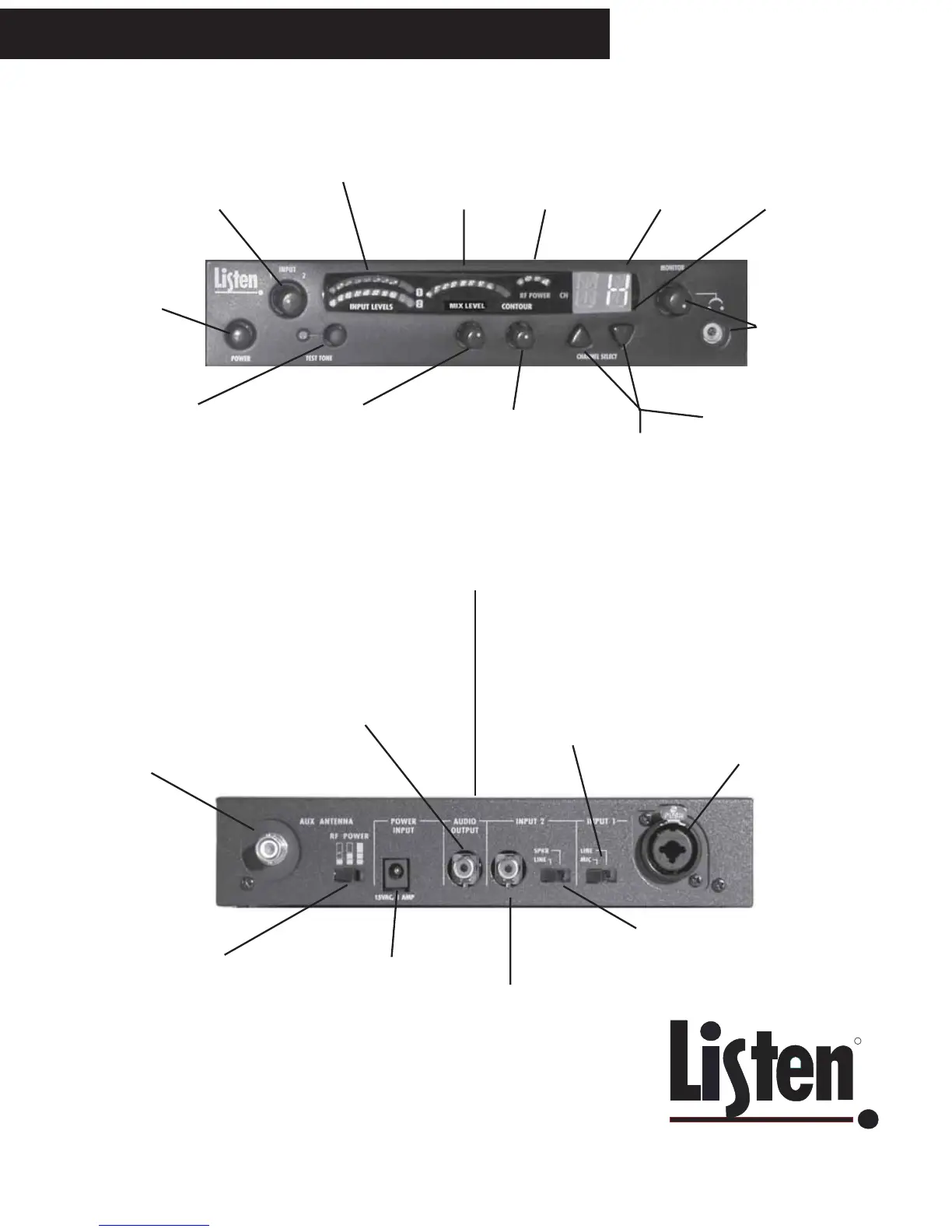
LT-800 Front Panel: Controls & Displays
LT-800 Rear Panel: Connections and Settings
Adjust audio input levels
of INPUT 1 and INPUT 2
here. See page 9 for
more information.
Indicates audio input
level of INPUT 1 and
INPUT 2
Shows MIX
Audio level
Indicates RF
output power (full,
1/2 or 1/4) - select
on rear panel (see
below)
Shows which
channel is
selected
If decimal is lit,
channel is
locked
Plug in a headset
and adjust its
volume
SELECT
CHANNEL
TO LOCK CHANNEL: press
UP and DOWN buttons
simultaneously and hold for
approx. 3 seconds. Press
both and hold again to unlock.
CONTOUR: Equalization
adjustment. Turn counter-
clockwise for voice and
clockwise for music.
MIX LEVEL: Adjust so
the VU meter
occasionally lights the
RED LED.
TEST TONE:
Activates a tone to
aid setting up a
system
Power ON / OFF
REMOTE ANTENNA
CONNECTION: See the
Listen website for details on
antennas that can be
attached here. You can
only use one antenna at a
time.
LT-800 Stationary Transmitter Quick Reference
Set RF Power level here (1/4, 1/2 and
Full). See page 7 for guidelines on
setting power levels.
The Listen LA-201
power supply
connects here.
AUDIO OUTPUT: This
connector contains a mix of
INPUT 1 and INPUT 2. This is
an unbalanced phono
connector; the output level is
-10dBu.
INPUT 2: This
unbalanced phono
connector is used to
connect an unbalanced
high impedance line or
speaker input.
Set switch to match your INPUT 2 source.
The level in the LINE position is -10dBu and in
the SPEAKER position, it is +10dBu.
INPUT 1: Used for balanced
connection of a microphone or
line level input. This
combination connector
accepts either XLR or 1/4”
phone plugs.
Select MIC or LINE input
here for INPUT 1. Mic input
level is -55dBu with 50 ohm
impedance; in the LINE
position, the input level is
+4dBu with an impedance
of 600 ohms.
Top antenna connection: Remove rubber plug and screw antenna in
place. You can only use one antenna at a time.



 To Next Page