LR-100 Stationary Receiver / Power Amplifier
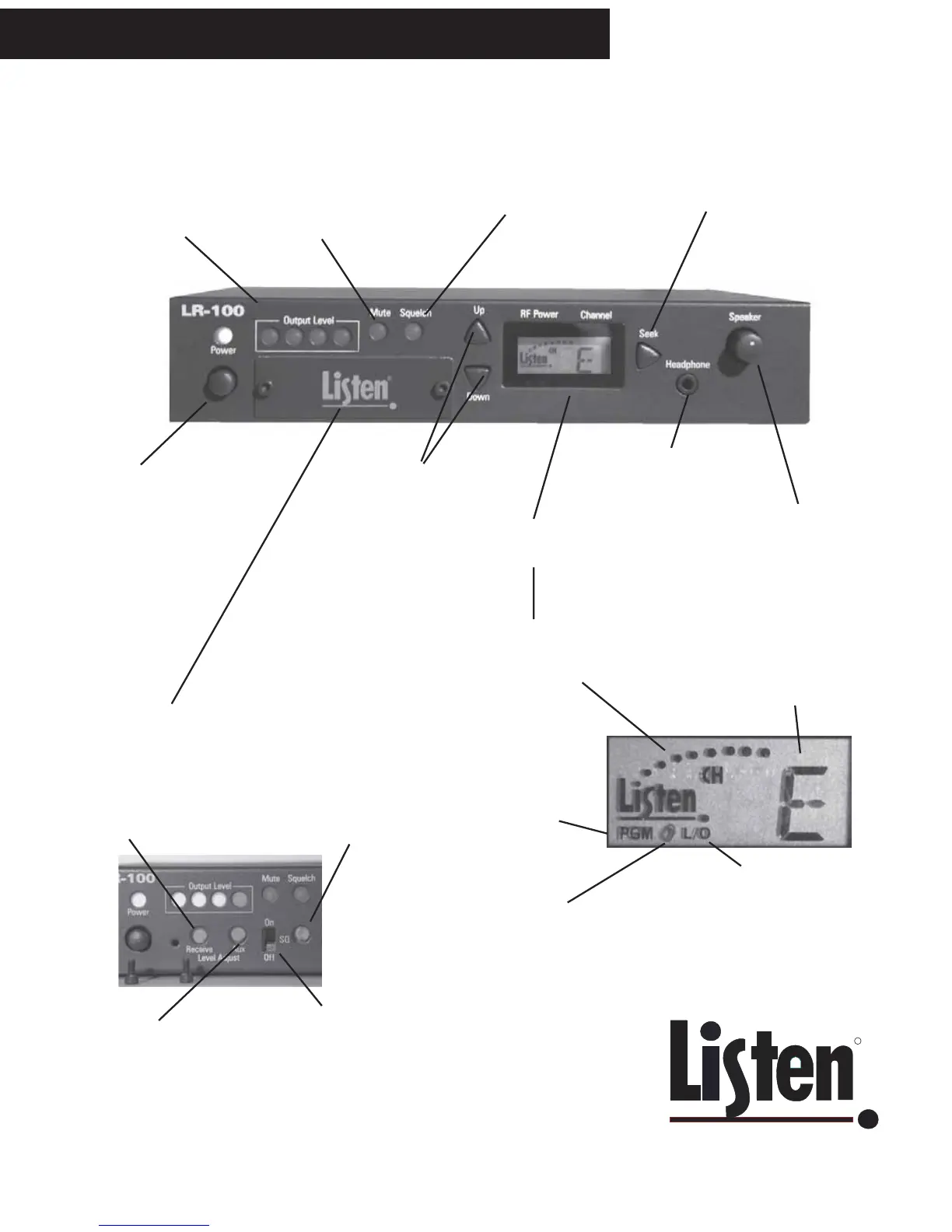
LR-100 Quick Reference - Front Panel
VU METER: Set
Receive and Auxiliary
levels so that the red
LED (at right) does not
illuminate
MUTE: when lit, the OUTPUT
audio is muted. MUTE is
activated and deactivated by a
momentary closure to ground on
the rear detachable terminal
block (see next page).
SQUELCH: when
adjusted properly,
this LED is lit when
the transmit audio is
not being received.
UP and DOWN
channel tuning
buttons
SEEK: press to find the next strong
signal. Also used to lock and unlock
channel selection; press and hold for
5 seconds. A padlock will appear on
the display when locked. Press and
hold again to unlock.
SPEAKER control:
adjusts the volume of
your loudspeaker
connected to the LR-100,
and/or the headphone.
Connect a mono or stereo
headphone here - 3.5 mm
plug (mini).
Look & Listen
TM
Display -
see details below
POWER switch: if
operated on battery,
switch is inoperative
Behind Access Panel
RECEIVE audio
level adjustment
AUXILIARY audio
level adjustment
SQ: to activate, move
switch to ON position. This
switch should be turned OFF
if any of your equipment
does not have SQ capability.
See “What is SQ?” on Page
5 for more information.
SQUELCH adjustment: adjust so that
when your transmit audio is off, the
Squelch LED is illuminated. When
squelched, audio is muted (this keeps
you from hearing hiss in your receivers)
Look & Listen
TM
Panel Details
RF signal
strength
Indicates the
currently tuned
channel
PGM: when
showing, the unit is
in Program mode to
lock out unwanted
channels from user
access.
When the padlock is visible,
the channel is locked. Press
and hold SEEK for 5 seconds to
unlock or lock.
L/O: while in Program mode,
this symbol indicates that a
channel is locked out and will
not be available to the user.
Press SEEK to toggle channels
between Locked Out and
non-Locked Out modes.



 To Next Page