Place Batteries in Unit.
Place two AA batteries in the compartment, making
note of the battery polarity shown in the battery
compartment, and again verifying that the BATTERY
SELECT switch is in the correct position for the
batteries you are using.
Connect the Microphone.
The microphone jack is located on top of the unit.
The LT-700 uses the microphone cable as an antenna
for transmitting.
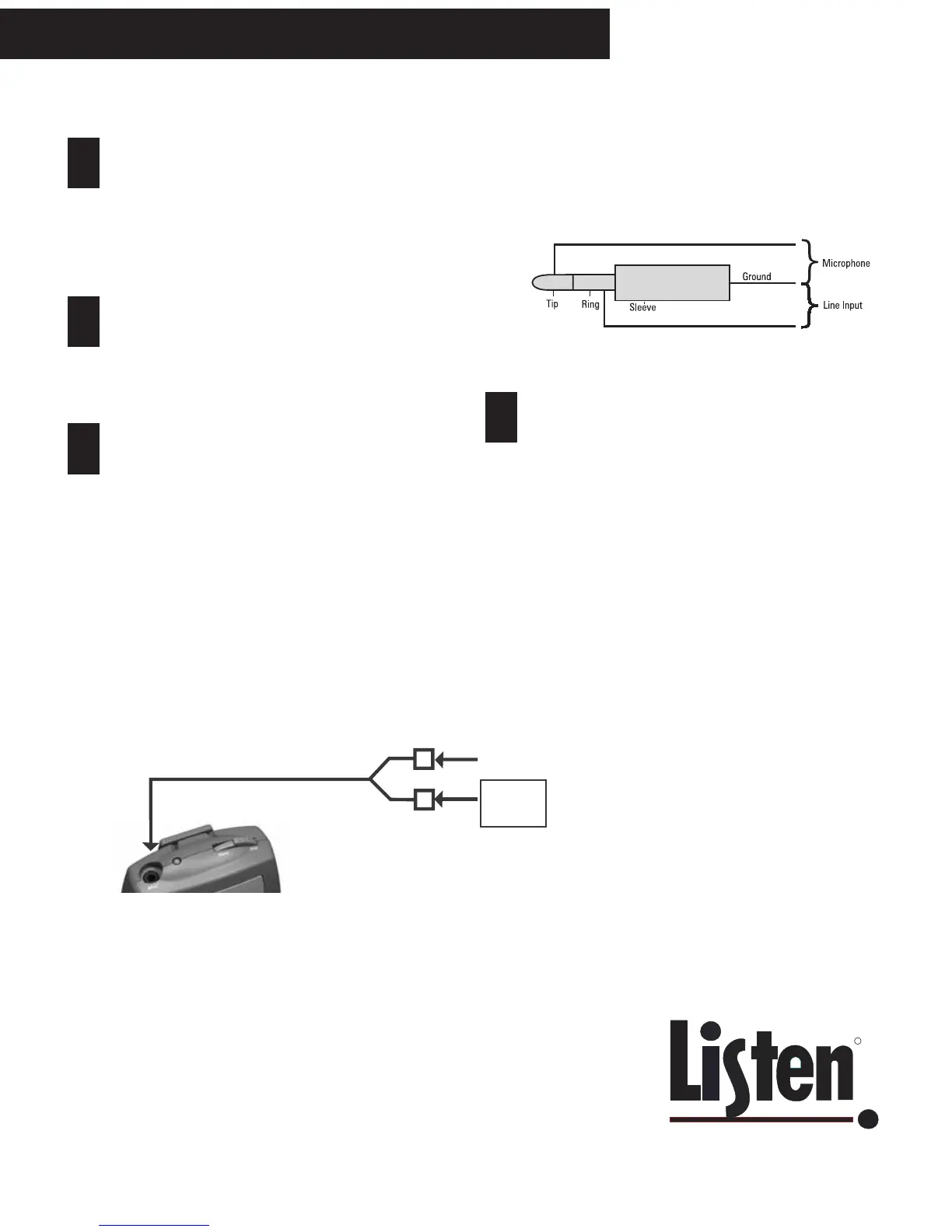
Optional - Connect the Line Input Cable.
This cable allows you to connect a TV, CD player or
other equipment to the LT-700. To do this, you must
order the Listen LA-263 Line Input Cable (it is not
included with your unit). This cable allows you to
connect both a microphone and line input to the jack
on top of the LT-700. See the diagram below for
connection information. You can use the microphone
and the line input at the same time. Please note that
the MUTE switch mutes only the microphone; your
line source will continue transmitting when MUTE is
pressed.
LT-700 Portable Transmitter
7
8
9
If you prefer to make your own cable for connection of
mic and line inputs, connect as follows:
10
MICROPHONE
TV, CD
PLAYER
LINE INPUT CABLE
LA-263
Turn the Unit On.
If it does not turn on by pressing the power button,
check to make sure you have installed charged
batteries and that the batteries have been installed
correctly.



 To Next Page