17
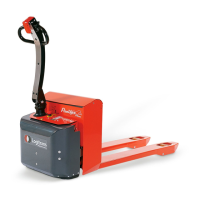
At the Stops menu, press on the rst stop in the requested direction, and the
following is shown.
1. Use ➕/➖ to choose the size of the
angle or use “TEACH” to choose actual
position.
2. Use ✔/✖ to accept/cancel choice
and return to Stops menu.
3. At the Stops menu choose the next
stop position/angle and repeat the
procedure.
3.6.5 Deleting stop positions
At the Stops menu, press “CLEAR ALL” to delete all set stop positions/angles.
3.6.4 Setting of stop position
From the factory, the forks are set to rotate continuously. When the forks have
rotated 360°, the machine stops rotating. If you want rotation to continue, it is
necessary to release/press the rotation switch on the remote control again.
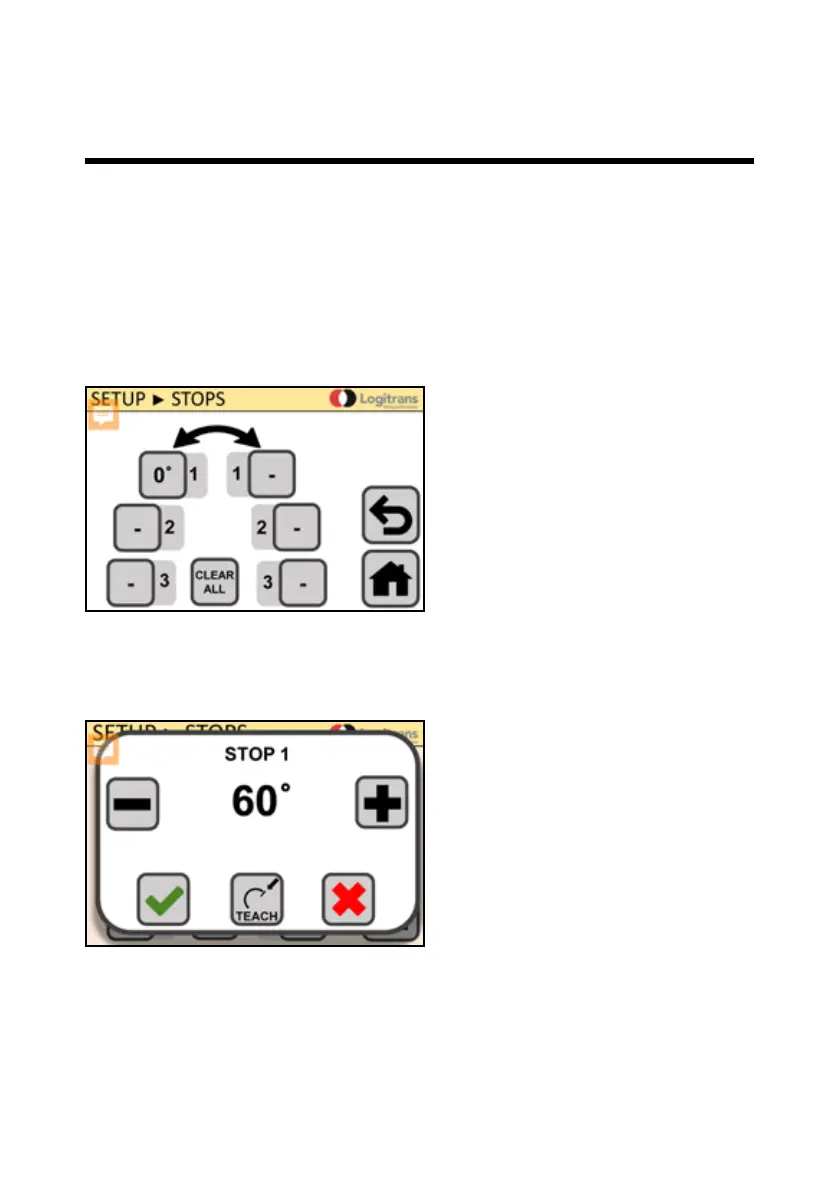
It is possible to set up to three stop positions/angles for rotation in both directions.
If the machine is set with one or more stop positions/angles, the machine cannot
rotate further than the last set stop position/angle.
At home screen (HOME) press settings
(SETUP), and afterwards STOPS, and
the following is shown.
3.0 How to operate the Rotator


 To Next Page