Page 14
User Guide MeeBox NAS
Connecting and turning on your MeeBox
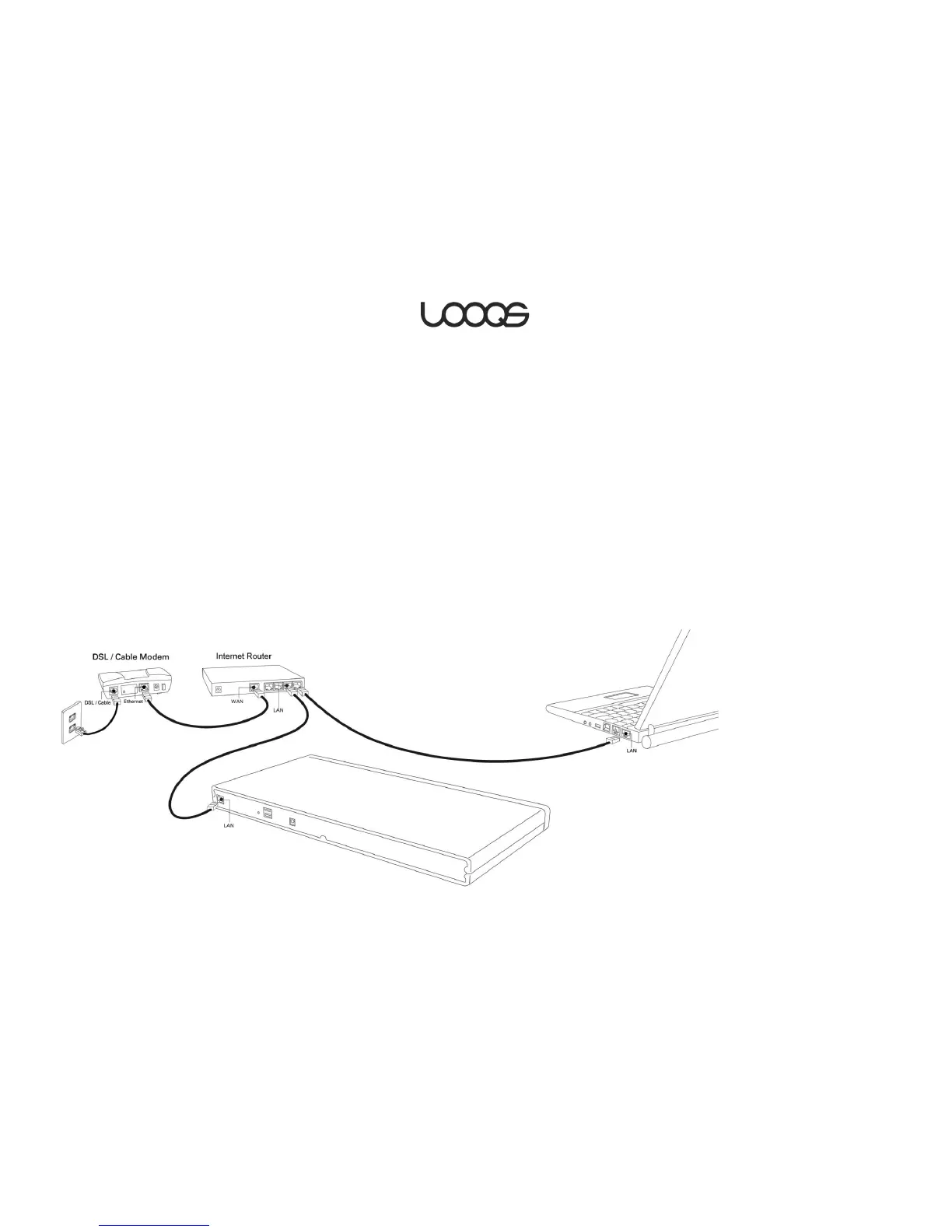
In order for the computers on your network to access your MeeBox, the MeeBox must be
connected by Ethernet cable to your network router. The router can be a wireless router,
but your MeeBox must connect to it through an Ethernet cable.
Using the supplied Ethernet cable (or another that is rated at least Category 5), plug one
end of the cable into the network port on your MeeBox and the other end into an
available LAN port on your router.
Note
Some home networks do not have a separate router but instead have a router built into
the DSL/cable modem. In this case, you can connect your MeeBox to an available LAN
port on the modem.
Plug the MeeBox’s AC adapter into the power port on the back of your MeeBox, and then
plug the adapter into a power outlet using the supplied power cord.
Turn on your MeeBox by briefly pressing the power button in the center of the front façade.


 To Next Page