18
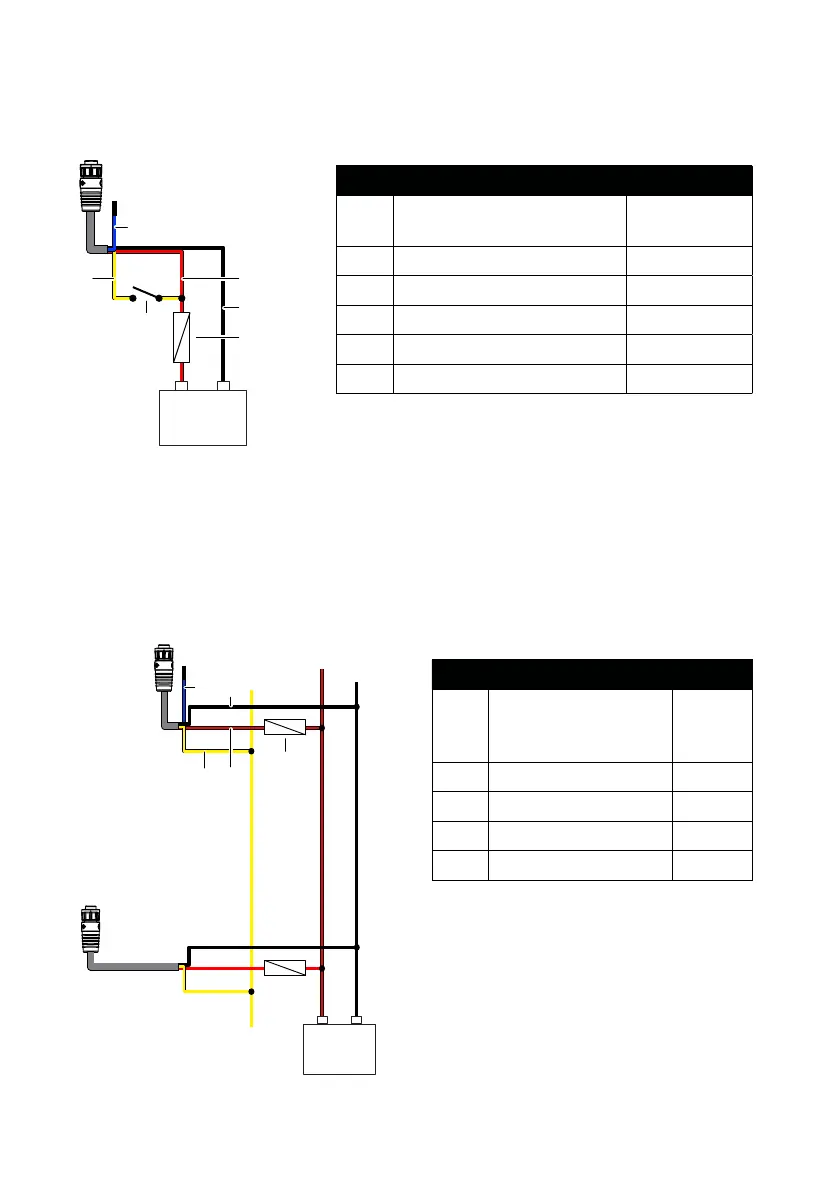
Power controlled by external switch
To turn the sonar module ON/OFF when power is applied/removed by an external switch,
connect the yellow wire to the red wire via a switch after the fuse.
+
_
12/24 V DC
B
E
F
C
D
A
Power controlled by MFD/power bus
To turn the sonar module ON/OFF when power is applied/removed to your multi-function
display (MFD), connect the yellow wire to the display unit’s yellow wire.
¼ Note: This ON/OFF functionality is supported in HDS Pro, HDS Live and HDS Carbon
multi-function displays.
Key Description Color
A Synchronization wire (used
only in dual view systems)
Blue
B Accessory wake up Yellow
C + 12/24 V DC Red
D DC negative Black
E Fuse
F Switch
Key Description Color
A Synchronization wire
(used only in dual
view systems)
Blue
B Accessory wake up Yellow
C + 12 V DC Red
D DC negative Black
E Fuse


 To Next Page