16
WIRING
⚠ WARNING: Before starting the wiring, turn the electrical power off. If power is left
on or turned on while wiring, re, electrical shock or other serious injury may occur.
Make sure the power supply voltage is compatible with the unit.
Do not:
• Make sharp bends in the cables.
• Run cables in a way that water flows into the connectors.
• Run the data cables adjacent to radar, transmitter, or large/high current carrying
cables or high frequency signal cables.
• Run cables so they interfere with mechanical systems.
• Run cables over sharp edges or burrs.
• Extend or shorten the supplied transducer or Ethernet cables. If you need extra length,
you must buy a longer Ethernet cable or a transducer extension cable.
Do:
• Make drip and service loops.
• Solder/crimp and insulate connections if extending or shortening the power cable.
• Leave room around the connectors to ease the plugging and unplugging of cables.
• Use cable ties on all cables to keep them secure.
¼ Note: Take care not to overtighten the cable ties to avoid damaging the cables.
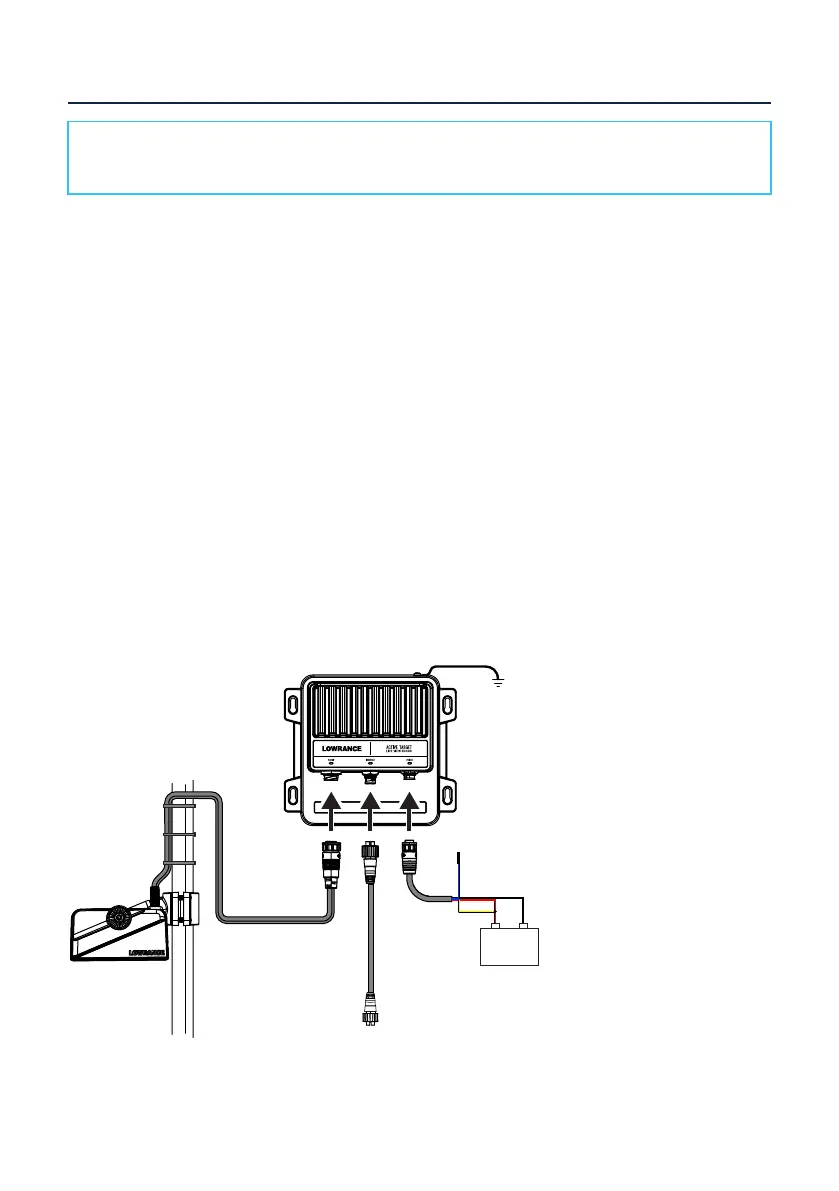
Wiring diagram for a single-view system:
Ethernet
Grounding
+
_
¼ Note: For alternative ways to connect the yellow wire, refer to page 18.


 To Next Page