8
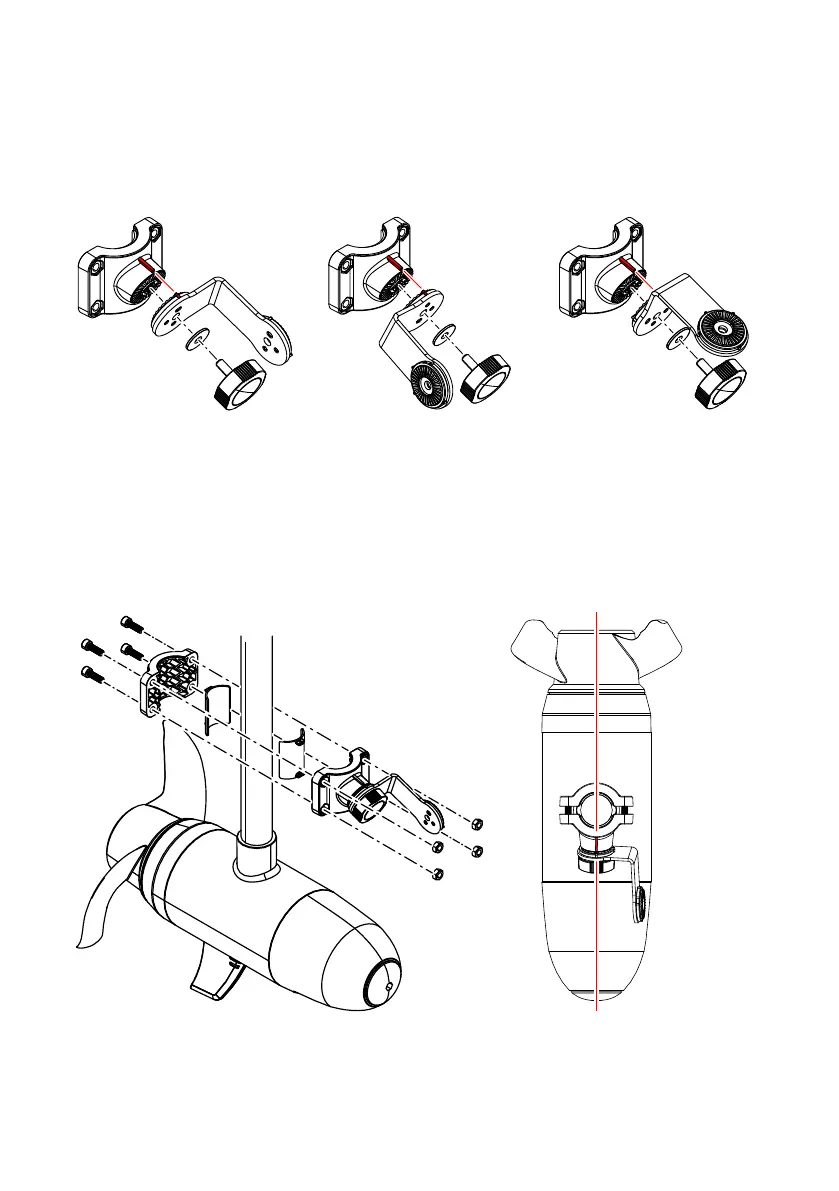
Down, forward or scout view
Use one knob and washer to attach the short side of the bracket arm to the shaft front
collar. Align the lines on the arm with the lines on the collar to achieve the desired view.
¼ Note: If you have a pre-assembled shaft mount clamp in scout view, you can readjust
it to the down/forward position by loosening the knob and rotating the arm.
Down/forward (port) Down/forward (starboard) Scout (port & starboard)
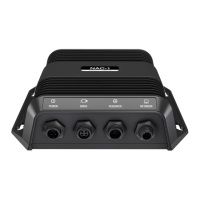
To create the clamp, align the front and back collars and rubber inserts with the centerline
of the trolling motor. Ensure the shaft front collar is angled in the downward position
(arrows on both sides of the collar indicate the top).
¼ Note: If you have a pre-assembled clamp, you’ll need to unscrew the front and back
collars and reassemble the clamp as shown.
Secure the clamp to the trolling motor shaft with the cap screws and nuts. Use the arm to
nely adjust the alignment before securing the clamp.


 To Next Page