16
17
Pages | HOOK series
Pages | HOOK series
Combo pages
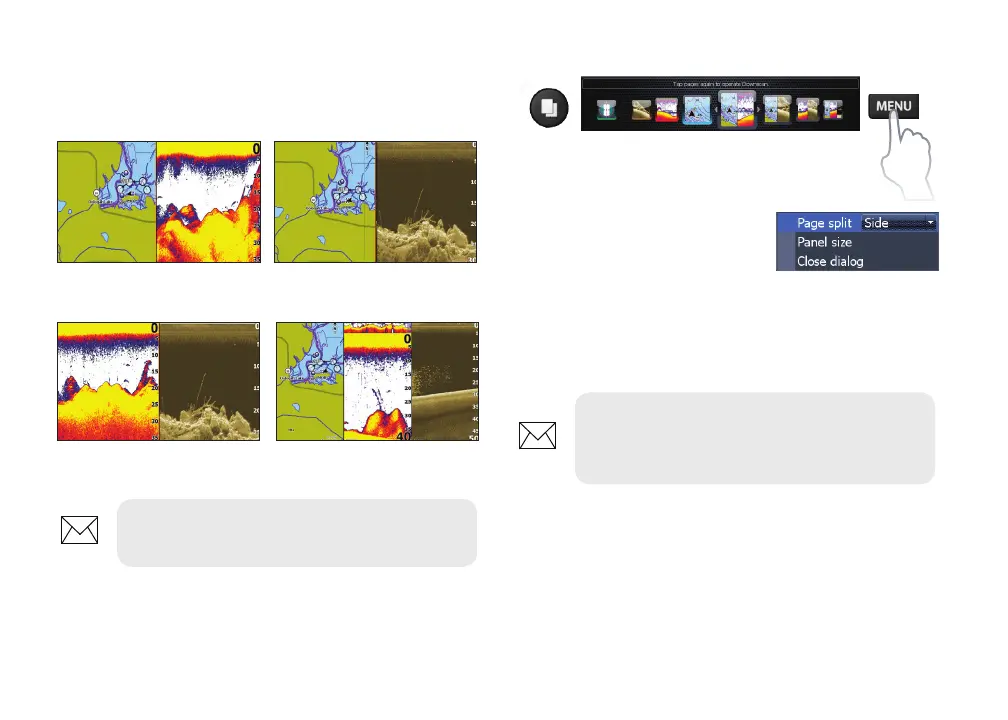
This unit has four pre-congured combo pages.
Chart/Sonar Chart/Downscan
Sonar/Downscan Chart/Sonar/Downscan
NOTE: Press the PAGES key twice to
switch active panels.
Customizing combo pages
You can adjust the panel size
of combo pages and control
how the pages will be
arranged on the screen:
vertically (side) or horizontally (over).
To make adjustments to combo page panels,
select a combo page from the Pages carousel and
press MENU.
NOTE: To adjust panel size, access the
customize menu after selecting a combo
page for display and select Panel size.










 To Next Page