28
29
DownScan Operation | HOOK series
DownScan Operation | HOOK series
Features described in this section are for Down-
Scan sonar. Refer to the Sonar operation section
for information on conventional and CHIRP sonar.
Trackback
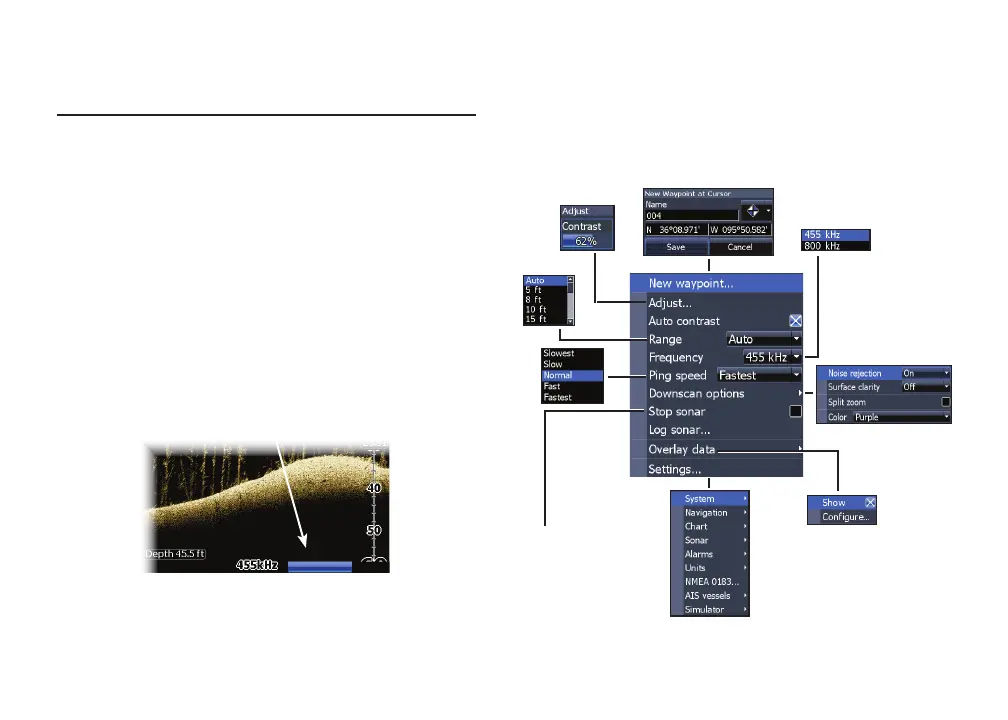
You can review your sonar history by pressing the
keypad to the left until the screen starts to move
in reverse and the sonar history bar appears at the
bottom of the screen.
Move the sonar history bar all the way to the right
to resume normal sonar scrolling, or press MENU
and select Exit cursor mode.
DownScan menu
Press MENU from the DownScan page to view the
DownScan menu.
DownScan operation
Stops sonar
transmission;
pauses sonar
scroll
DownScan history bar










 To Next Page